连接全球集群
全球集群开始运行后,您可以使用 Endpoint 和身份验证 Token 连接集群。本文介绍两种 Endpoint 类型、各自的适用场景,以及在优雅切换和强切期间的路由行为。
如需使用该功能请提交工单。
选择 Endpoint 类型
全球集群提供两种连接方式:
-
通过全球 Endpoint 连接,支持全自动的切换
-
通过全球集群的子集群 Endpoint 连接,支持 Private Endpoint 和 Public Endpoint,不支持切换
下表对比了两种连接 Endpoint。
| 全球 Endpoint | 子集群的Endpoint | |
|---|---|---|
| 写入路由 | 自动路由到主集群 | 仅主集群的公共 Endpoint 接受写入 |
| 读取路由 | 路由到主集群 (即将支持按延迟智能路由) | 读取请求由您连接的特定集群处理 |
| 优雅切换 / 强切 | 自动重新路由,无需修改代码 | 需要手动更新连接,指向新的主集群 |
| Private Link | 不支持(需要公网访问) | 支持 |
| 最佳适用场景 | 需要自动故障切换和基于延迟路由的生产应用 | 直接访问特定集群(例如环境复制、测试、调试) |
建议在生产环境中使用全球 Endpoint。它无需在优雅切换或强切期间在应用代码中处理 Endpoint 变更。
获取 Endpoint 和 Token
导航到全球集群或目标集群:
-
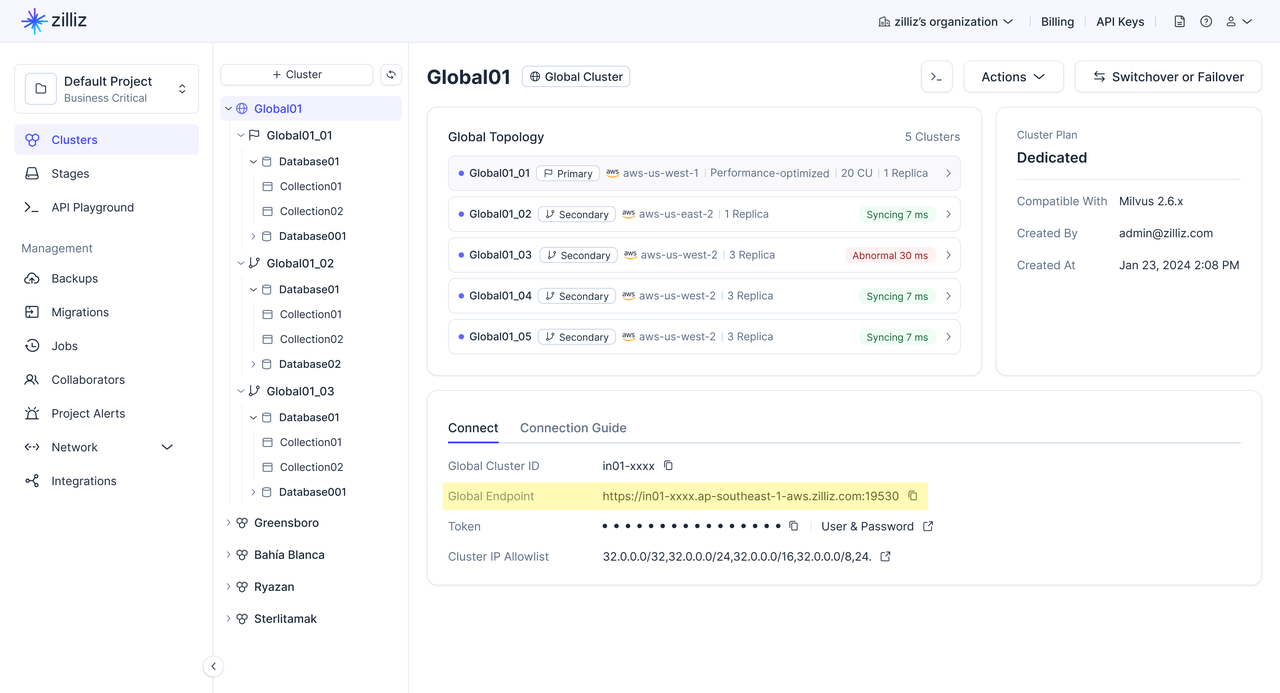
全球 Endpoint:前往全球集群页面。
-
公共 Endpoint:前往特定主集群或从集群的集群详情页面。
在连接卡片中,复制全球 Endpoint 或公共 Endpoint。
检查 SDK 版本
请确保已安装 SDK。连接全球集群前,请确认 SDK 满足以下最低版本要求。
| SDK | 最低版本 |
|---|---|
| Python | 2.6.9 |
| Node.js | 2.6.10 |
| Java | 2.6.14 |
| Go | 2.6.2 |
通过全球 Endpoint 连接
全球 Endpoint 是一个统一的 URL,会始终将请求路由到全球集群中当前的主集群。您可以将其作为 SDK 客户端中的 uri 使用。
如果执行了优雅切换(Switchover) 或强切(Failover)操作,Zilliz Cloud 会自动将 全球 Endpoint 指向新的主集群。这样,您的应用可以继续使用同一个 Endpoint,而无需手动更改集群 URI。
Zilliz Cloud 支持通过 SDK 和 RESTful API 连接到全球 Endpoint。对于生产环境中的应用,推荐使用 SDK 客户端。
为什么推荐使用 SDK 连接,而不是 RESTful API 连接?
SDK 客户端可以获取 Global Cluster topology,包括 endpoint 列表、主集群和备集群角色,以及集群健康状态。基于这些信息,当主集群发生变化时,SDK 客户端可以更快做出响应。SDK 客户端未来还将支持读写分离,即将写请求路由到主集群,并根据 Global Cluster topology 路由符合条件的读请求。
相比之下,RESTful API 连接不会在客户端维护 Global Cluster topology 信息。因此,在发生 switchover 或 failover 后,RESTful API 连接切换到新主集群可能需要更长时间。出于同样原因,RESTful API 连接无法支持读写分离。
下表对比了 SDK 连接和 RESTful API 连接。
| 维度 | SDK 连接 | RESTful API 连接 |
|---|---|---|
| 适用场景 | 需要在角色切换期间更快恢复,并希望未来使用读写分离能力的生产应用。 | 轻量脚本、简单 REST 集成,以及一次性管理操作。 |
| Topology 感知 | 可以获取全球集群的 Topology 拓扑图,包括 Endpoint 列表、主集群和备集群角色,以及集群健康状态。 | 不会维护全球集群的 Topology 拓扑图信息。 |
| 主集群变更处理 | 当 Switchover 或 Failover 后主集群发生变化时,通常可以在数秒内更快做出响应。 | 由于客户端不维护 Topology 拓扑图信息,切换到新主集群可能需要更长时间,通常为分钟级。 |
| 读写分离 | 即将支持 | 不支持 |
- Python
- Java
- Go
- Rust
- C++
- NodeJS
- cURL
from pymilvus import MilvusClient

# Use the global endpoint for automatic routing
client = MilvusClient(
    uri="YOUR_GLOBAL_ENDPOINT",  # Global endpoint from the console
    token="YOUR_CLUSTER_TOKEN"   # API key or username:password
)
import io.milvus.v2.client.MilvusClientV2;
import io.milvus.v2.client.ConnectConfig;

// Use the global endpoint for automatic routing
ConnectConfig connectConfig = ConnectConfig.builder()
    .uri("YOUR_GLOBAL_ENDPOINT")  // Global endpoint from the console
    .token("YOUR_CLUSTER_TOKEN")  // API key or username:password
    .build();

MilvusClientV2 client = new MilvusClientV2(connectConfig);
import (
    "context"
    "log"

    "github.com/milvus-io/milvus/client/v3/milvusclient"
)

// Use the global endpoint for automatic routing
client, err := milvusclient.New(context.Background(), &milvusclient.ClientConfig{
    Address: "YOUR_GLOBAL_ENDPOINT", // Global endpoint from the console
    APIKey:  "YOUR_CLUSTER_TOKEN",   // API key or username:password
})
if err != nil {
    log.Fatal(err)
}
use milvus::v2::error::Result;
use milvus::v2::prelude::*;

#[tokio::main]
async fn main() -> Result<()> {
    // Use the global endpoint for automatic routing
    let config = ConnectConfig::new().uri("YOUR_GLOBAL_ENDPOINT").token("YOUR_CLUSTER_TOKEN");
    let client = ClientV2::new(&config).await?;
    Ok(())
}
#include "milvus/MilvusClientV2.h"

#include <iostream>

// Use the global endpoint for automatic routing
auto client = milvus::MilvusClientV2::Create();
auto status = client->Connect(milvus::ConnectParam("YOUR_GLOBAL_ENDPOINT").WithToken("YOUR_CLUSTER_TOKEN"));
if (!status.IsOk()) {
    std::cout << status.Message() << std::endl;
}
const { MilvusClient } = require("@zilliz/milvus2-sdk-node");

// Use the global endpoint for automatic routing
const client = new MilvusClient({
    address: "YOUR_GLOBAL_ENDPOINT",  // Global endpoint from the console
    token: "YOUR_CLUSTER_TOKEN"  // API key or username:password
});
curl --request POST \
  --url "${CLUSTER_ENDPOINT}/v2/vectordb/collections/list" \
  --header "Authorization: Bearer ${TOKEN}" \
  --header "Content-Type: application/json" \
  -d '{}'
通过公共 Endpoint 连接
全球集群中的每个集群都有自己的公共 Endpoint。当您需要直接访问特定集群时,可以使用此方式。
- Python
- Java
- Go
- Rust
- C++
- NodeJS
- cURL
from pymilvus import MilvusClient

# Connect directly to a specific cluster
client = MilvusClient(
    uri="YOUR_CLUSTER_PUBLIC_ENDPOINT",  # Public endpoint of a specific cluster
    token="YOUR_CLUSTER_TOKEN" # API key or username:password
)
import io.milvus.v2.client.MilvusClientV2;
import io.milvus.v2.client.ConnectConfig;

// Connect directly to a specific cluster
ConnectConfig connectConfig = ConnectConfig.builder()
    .uri("YOUR_CLUSTER_PUBLIC_ENDPOINT")  // Public endpoint of a specific cluster
    .token("YOUR_CLUSTER_TOKEN")  // API key or username:password
    .build();

MilvusClientV2 client = new MilvusClientV2(connectConfig);
import (
    "context"
    "log"

    "github.com/milvus-io/milvus/client/v3/milvusclient"
)

// Connect directly to a specific cluster
client, err := milvusclient.New(context.Background(), &milvusclient.ClientConfig{
    Address: "YOUR_CLUSTER_PUBLIC_ENDPOINT", // Public endpoint of a specific cluster
    APIKey:  "YOUR_CLUSTER_TOKEN",           // API key or username:password
})
if err != nil {
    log.Fatal(err)
}
use milvus::v2::error::Result;
use milvus::v2::prelude::*;

#[tokio::main]
async fn main() -> Result<()> {
    // Connect directly to a specific cluster
    let config = ConnectConfig::new().uri("YOUR_CLUSTER_PUBLIC_ENDPOINT").token("YOUR_CLUSTER_TOKEN");
    let client = ClientV2::new(&config).await?;
    Ok(())
}
#include "milvus/MilvusClientV2.h"

#include <iostream>

// Connect directly to a specific cluster
auto client = milvus::MilvusClientV2::Create();
auto status = client->Connect(milvus::ConnectParam("YOUR_CLUSTER_PUBLIC_ENDPOINT").WithToken("YOUR_CLUSTER_TOKEN"));
if (!status.IsOk()) {
    std::cout << status.Message() << std::endl;
}
const { MilvusClient } = require("@zilliz/milvus2-sdk-node")

// Connect directly to a specific cluster
const client = new MilvusClient({
    address: "YOUR_CLUSTER_PUBLIC_ENDPOINT",  // Public endpoint of a specific cluster
    token: "YOUR_CLUSTER_TOKEN"  // API key or username:password
})
curl --request POST \
  --url "${CLUSTER_ENDPOINT}/v2/vectordb/collections/list" \
  --header "Authorization: Bearer ${TOKEN}" \
  --header "Content-Type: application/json" \
  -d '{}'
使用公共 Endpoint 时,仅主集群的公共 Endpoint 接受写入操作。向从集群的公共 Endpoint 写入将会失败。
路由行为
正常运行期间
| 请求类型 | 全球 Endpoint | 公共 Endpoint |
|---|---|---|
| 写入(insert、upsert、delete) | 路由到主集群 | 仅主集群的 Endpoint 接受 |
| 读取(search、query) | 路由到主集群。(即将支持按延迟智能路由。) | 由您连接的特定集群处理 |
优雅切换 / 强切期间及之后
| 场景 | 全球 Endpoint | 公共 Endpoint |
|---|---|---|
| 优雅切换进行中 | 写入短暂暂停,随后在新主集群上恢复。读取不受影响。 | Endpoint 无变化。原主集群变为从集群。 |
| 强切进行中 | 写入不可用,直到新主集群提升完成。从集群上的读取不受影响。 | 原主集群的 Endpoint 变为不可达。 |
| 完成后 | 自动路由到新主集群,无需修改代码。 | 需要更新代码,使用新主集群的公共 Endpoint 进行写入。 |
SDK 自动重连
使用全球 Endpoint 时,Zilliz Cloud SDK 会在优雅切换和强切期间自动处理 Endpoint 重新路由。您的应用无需为路由变更实现重试逻辑。但在切换瞬间正在执行的写入操作可能会收到短暂错误——应用中的标准重试逻辑即可处理这些情况。