管理 On-Demand 集群
公测版本指南介绍如何管理 On-demand 集群。
查看全部 On-demand 集群
-
通过 RESTful API
您可以按如下方式列出所有 On-demand 集群:
bashexport BASE_URL="https://api.cloud.zilliz.com.cn"export TOKEN="YOUR_API_KEY"curl --request GET \--url "{BASE_URL}/v2/clusters/onDemandClusters?projectId={PROJECT_ID}®ionId=aws-us-west-2" \--header "Authorization: Bearer ${TOKEN}" \--header "Accept: application/json"以下是输出示例。
bash{"code": 0,"data": {"count": 2,"onDemandClusters": [{"clusterId": "in07-7d6ac8697204a6a","clusterName": "xxx","regionId": "ali-cn-beijing","cuSize": 8,"status": "SUSPENDED","endpoint": "https://proj-09ee1f4b1151d5dd1edbc5.aws-us-west-2.vectordb-uat3.zillizcloud.com","privateLink": "","createdBy": "admin@zilliz.com","createTime": 1745396115000}]}} -
通过 Web 控制台
 1
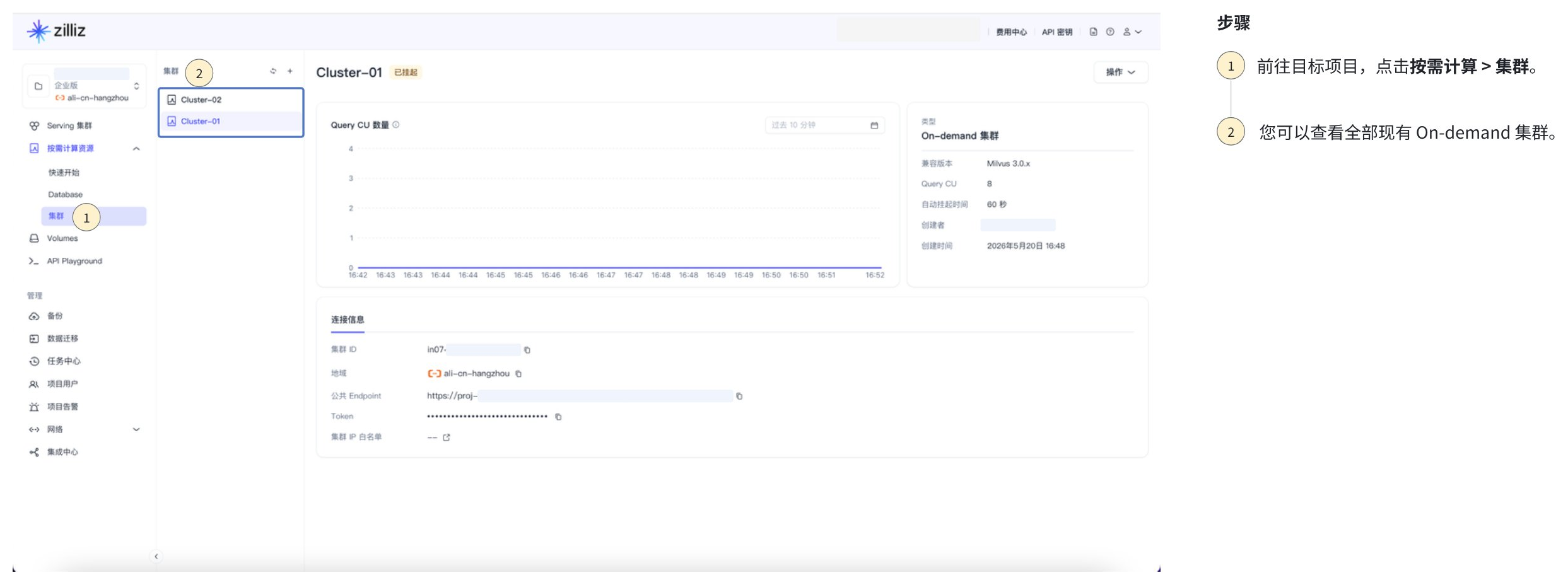
1前往目标项目,点击按需计算 > 集群。
2您可以查看全部现有 On-demand 集群。
查看 On-demand 集群详情
-
通过 RESTful API
您可以按如下方式查看 On-demand 集群 详情:
bashexport BASE_URL="https://api.cloud.zilliz.com.cn"export TOKEN="YOUR_API_KEY"curl --request GET \--url "${BASE_URL}/v2/clusters/onDemandClusters/in07-7d6ac8697204a6a" \--header "Authorization: Bearer ${TOKEN}" \--header "Accept: application/json"以下是输出示例。
bash{"code": 0,"data": {"clusterId": "in07-7d6ac8697204a6a","clusterName": "xxx","regionId": "ali-cn-beijing","cuSize": 8,"status": "RUNNING","endpoint": "https://proj-09ee1f4b1151d5dd1edbc5.aws-us-west-2.vectordb-uat3.zillizcloud.com","privateLink": "","createdBy": "admin@zilliz.com","createTime": 1745396115000}} -
通过 Web 控制台
 1
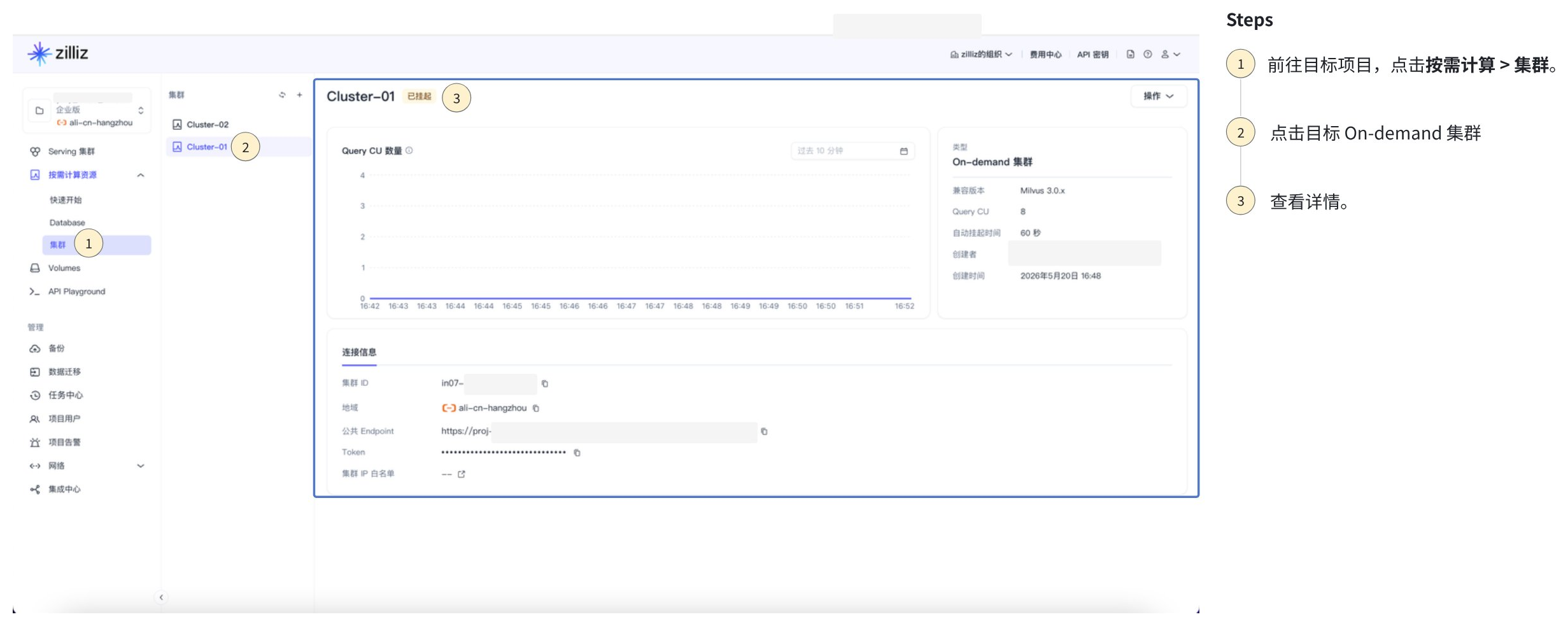
1前往目标项目,点击按需计算 > 集群。
2点击目标 On-demand 集群
3查看详情。
修改 On-demand 集群设置
您可以修改已创建的 On-demand 集群的设置。
-
通过 RESTful API
您可以按照如下方式修改 On-demand 集群的自动挂起时间。
bashexport TOKEN="YOUR_API_KEY"export CLUSTER_ID="inxx-xxxxxxxxxxxxxxx"curl --request PATCH \--url "https://${BASE_URL}/v2/clusters/onDemandClusters/in07-7d6ac8697204a6a" \--header "Authorization: Bearer ${API_KEY}" \--header "Accept: application/json" \--header "Content-Type: application/json" \--data-raw '{"autoSuspend": "5m","clusterName": "my-on-demand-updated","description": "Updated on-demand cluster description","cuSize": 32}'以下是输出示例。
bash{"code": 0,"data": {"clusterId": "inxx-xxxxxxxxxxxxxxx","prompt": "Successfully submitted."}} -
通过 Web 控制台
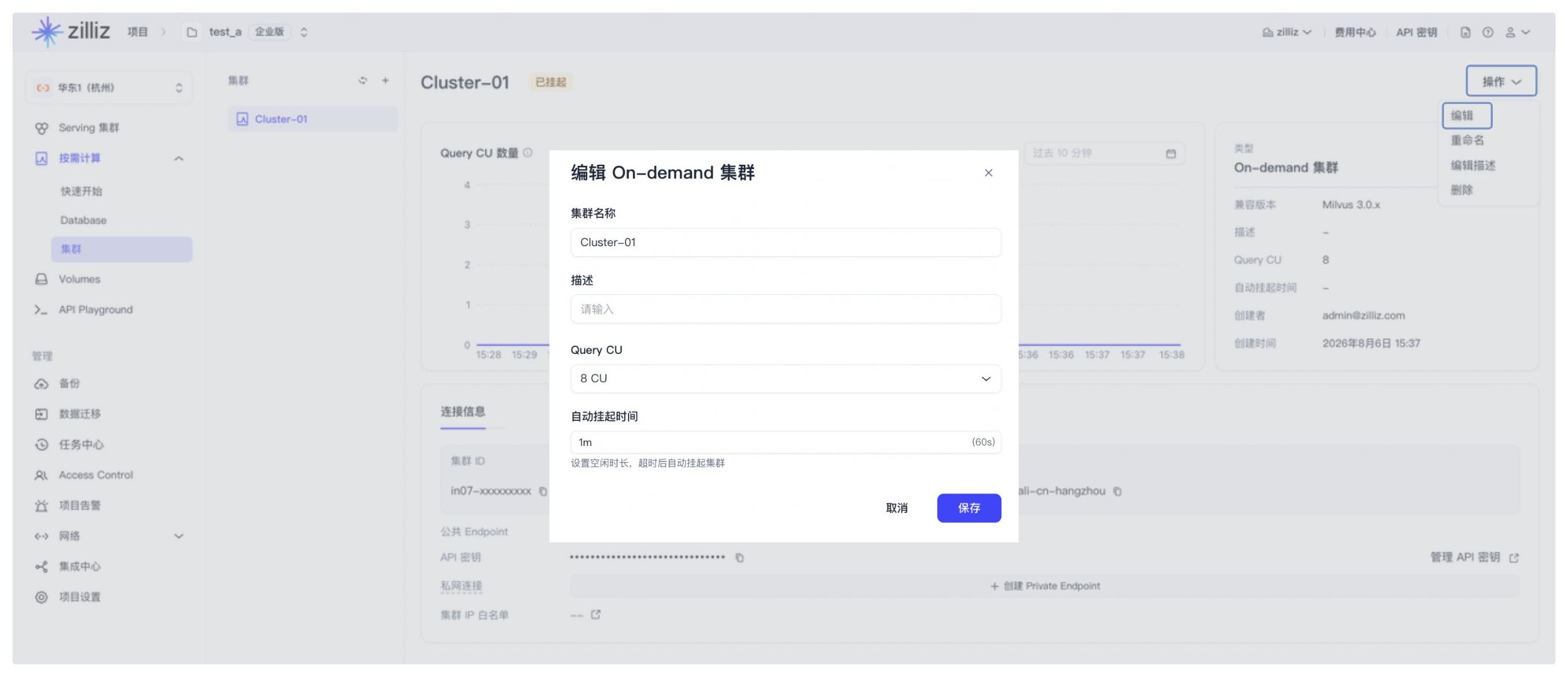
您可以通过 Web 控制台修改按需集群的名称、描述、Query CU 数量和自动挂起时间。
配置 keep-warm 策略
Keep-warm schedule 可让按需集群在每周重复的时间窗口内保持运行。keep-warm 时间窗口开始时,如果按需集群处于已挂起状态,Zilliz Cloud 会恢复该按需集群。在该时间窗口内,自动挂起会被抑制。时间窗口结束后,按需集群会重新遵循现有的自动挂起策略。
Keep-warm schedule 不会永久关闭自动挂起,也不会在 keep-warm 时间窗口结束时主动挂起按需集群。
如需在 keep-warm 时间窗口内挂起按需集群,请先禁用或删除 keep-warm schedule。
每个按需集群只能配置一个 keep-warm schedule。一个 schedule 可以包含 1 到 10 条规则。每条规则使用组织的系统时区,并包含生效星期、开始时间和结束时间。
通过 RESTful API
使用现有的按需集群 API 配置 keep-warm schedule。keep-warm 配置通过创建、查看和更新 API 中的 keepWarm 对象传递。
创建 keep-warm schedule
如需在创建按需集群时配置 keep-warm schedule,请在创建请求中包含 keepWarm。
以下示例创建一个按需集群,并为工作日 09:00 到 18:00 配置 keep-warm schedule。
curl --request POST \
  --url "${BASE_URL}/v2/clusters/createOnDemandCluster" \
  --header "Authorization: Bearer ${TOKEN}" \
  --header "OrgId: org-xxxxxxxxxxxxxxxxxxx" \
  --header "Content-Type: application/json" \
  -d '{
    "projectId": "proj-xxxxxxxxxxxxxxxxxxx",
    "regionId": "aws-us-west-2",
    "cuSize": 8,
    "clusterName": "my-on-demand-cluster",
    "autoSuspend": "5m",
    "keepWarm": {
      "enabled": true,
      "schedules": [
        {
          "daysOfWeek": [1, 2, 3, 4, 5],
          "startTime": "09:00",
          "endTime": "18:00"
        }
      ]
    }
  }'
响应示例:
{
  "code": 0,
  "data": {
    "clusterId": "inxx-xxxxxxxxxxxxxxx",
    "prompt": "successfully submitted. Cluster is being created."
  }
}
查看 keep-warm schedule
以下示例查看某个按需集群的 keep-warm schedule。
curl --request GET \
  --url "${BASE_URL}/v2/clusters/onDemandClusters/${CLUSTER_ID}" \
  --header "Authorization: Bearer ${TOKEN}" \
  --header "OrgId: org-xxxxxxxxxxxxxxxxxxx" \
  --header "Accept: application/json"
响应示例:
{
  "code": 0,
  "data": {
    "clusterId": "inxx-xxxxxxxxxxxxxxx",
    "clusterName": "my-on-demand-cluster",
    "status": "RUNNING",
    "autoSuspend": 300,
    "keepWarmActive": true,
    "keepWarm": {
      "enabled": true,
      "systemTimezone": "Asia/Shanghai",
      "schedules": [
        {
          "daysOfWeek": [1, 2, 3, 4, 5],
          "startTime": "09:00",
          "endTime": "18:00"
        }
      ],
      "nextTransitionAt": "2026-09-15T10:00:00Z",
      "nextTransitionType": "END"
    }
  }
}
如果未配置 schedule,keepWarm 为 null,keepWarmActive 为 false。
更新 keep-warm schedule
如需更新 keep-warm schedule,请发送包含完整 keepWarm 对象的 PATCH 请求。Zilliz Cloud 会用提交的 schedules 替换现有 schedule。
以下示例更新现有按需集群的 keep-warm schedule。
curl --request PATCH \
  --url "${BASE_URL}/v2/clusters/onDemandClusters/${CLUSTER_ID}" \
  --header "Authorization: Bearer ${TOKEN}" \
  --header "OrgId: org-xxxxxxxxxxxxxxxxxxx" \
  --header "Content-Type: application/json" \
  -d '{
    "keepWarm": {
      "enabled": true,
      "schedules": [
        {
          "daysOfWeek": [1, 2, 3, 4, 5],
          "startTime": "09:00",
          "endTime": "18:00"
        }
      ]
    }
  }'
响应示例:
{
  "code": 0,
  "data": {
    "clusterId": "inxx-xxxxxxxxxxxxxxx"
  }
}
禁用 keep-warm schedule
如需禁用 keep-warm schedule,请发送包含完整 keepWarm 对象的 PATCH 请求,并将 enabled 设置为 false。
禁用 schedule 会保留所有已配置的规则。如果按需集群当前处于 keep-warm 时间窗口内,Zilliz Cloud 会立即退出 keep-warm 模式。该 schedule 不会挂起按需集群。
以下示例禁用现有的 keep-warm schedule。
curl --request PATCH \
  --url "${BASE_URL}/v2/clusters/onDemandClusters/${CLUSTER_ID}" \
  --header "Authorization: Bearer ${TOKEN}" \
  --header "OrgId: org-xxxxxxxxxxxxxxxxxxx" \
  --header "Content-Type: application/json" \
  -d '{
    "keepWarm": {
      "enabled": false,
      "schedules": [
        {
          "daysOfWeek": [1, 2, 3, 4, 5],
          "startTime": "09:00",
          "endTime": "18:00"
        }
      ]
    }
  }'
响应示例:
{
  "code": 0,
  "data": {
    "clusterId": "inxx-xxxxxxxxxxxxxxx"
  }
}
删除 keep-warm schedule
删除 keep-warm schedule 会移除该 schedule 及其所有规则,但不会删除按需集群、数据、事件或审计记录。
如需删除 keep-warm schedule,请发送 PATCH 请求,并传入空的 schedules 列表。
curl --request PATCH \
  --url "${BASE_URL}/v2/clusters/onDemandClusters/${CLUSTER_ID}" \
  --header "Authorization: Bearer ${TOKEN}" \
  --header "OrgId: org-xxxxxxxxxxxxxxxxxxx" \
  --header "Content-Type: application/json" \
  -d '{
    "keepWarm": {
      "enabled": false,
      "schedules": []
    }
  }'
响应示例:
{
  "code": 0,
  "data": {
    "clusterId": "inxx-xxxxxxxxxxxxxxx"
  }
}
通过 Web 控制台

前往目标按需集群。
打开操作菜单,然后点击管理 Keep-warm。
打开 Keep-warm Schedule。
在规则中,添加一条或多条规则。
为每条规则配置重复日期、开始时间和结束时间。
查看下一次状态切换时间。
点击保存。
集群详情页会显示 keep-warm schedule 的状态。如果已配置 schedule,还会显示下一次状态切换时间。
如果按需集群当前处于 keep-warm 时间窗口内,页面会在主集群状态旁显示一个次级 Keep-warm 标签。

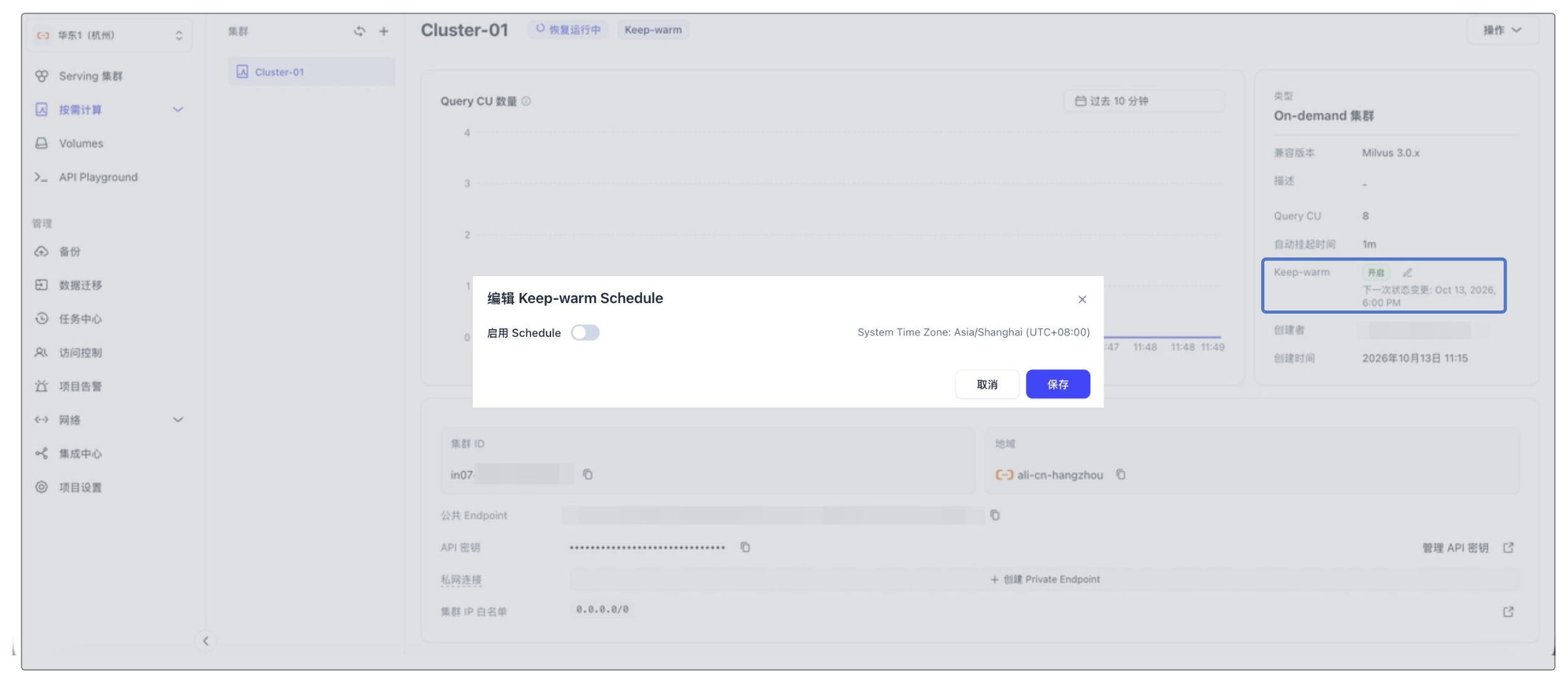
禁用 schedule 会保留所有已配置的规则。如果按需集群当前处于 keep-warm 时间窗口内,Zilliz Cloud 会立即退出 keep-warm 模式。该 schedule 不会挂起按需集群。如需禁用 keep-warm schedule,请关闭 Keep-warm Schedule,然后点击保存,如下所示。
删除 On-demand 集群
删除集群后,系统会立即将其移除,且无法恢复。此操作不可撤销。
-
通过 RESTful API
您可以按如下方式删除 On-demand 集群:
bashexport BASE_URL="https://api.cloud.zilliz.com.cn"export TOKEN="YOUR_API_KEY"curl --request DELETE \--url "${BASE_URL}/v2/clusters/onDemandClusters/in07-7d6ac8697204a6a" \--header "Authorization: Bearer ${TOKEN}" \--header "Accept: application/json"以下是输出示例。
bash{"code": 0,"data": {"clusterId": "in07-7d6ac8697204a6a","status": "DELETING"}} -
通过 Web 控制台
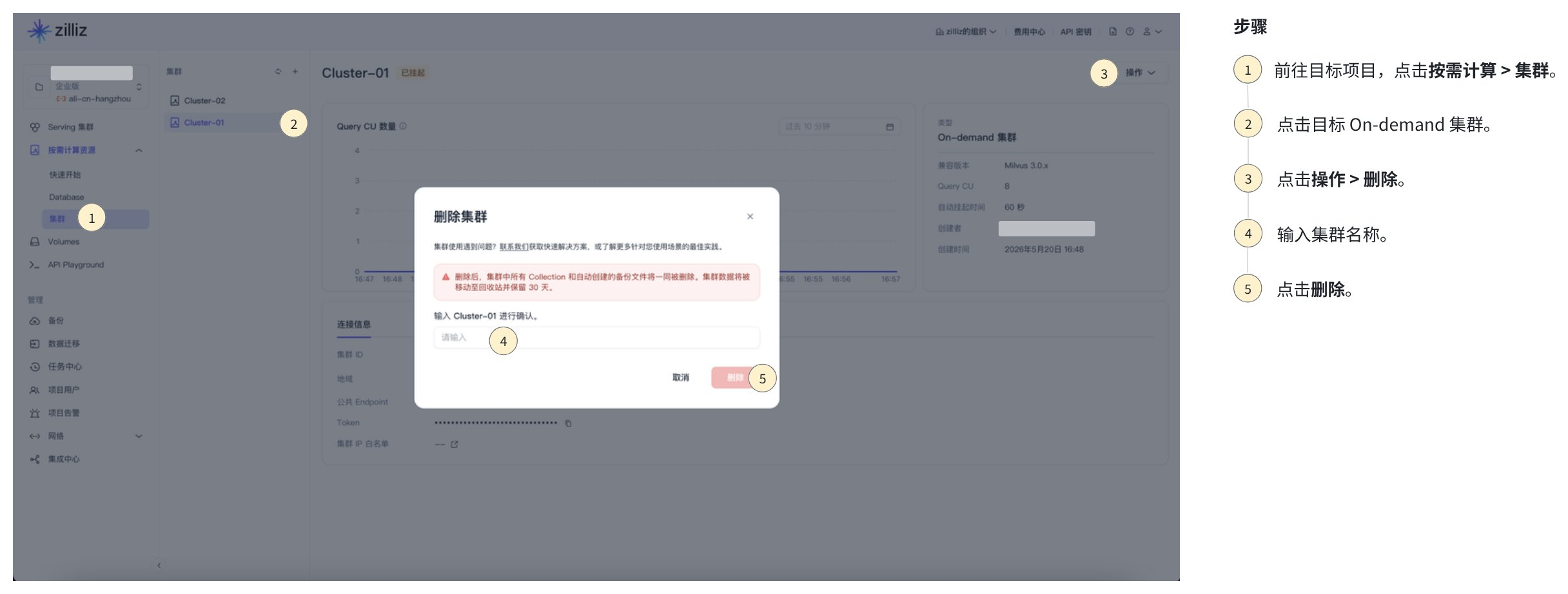 1
1前往目标项目,点击按需计算 > 集群。
2点击目标 On-demand 集群。
3点击操作 > 删除。
4输入集群名称。
5点击删除。