NGRAM
在 Zilliz Cloud 中,NGRAM 索引 用于加速对 VARCHAR 字段 或 JSON 字段中指定路径的 LIKE 查询。在建立索引之前,Zilliz Cloud 会将文本拆分为固定长度 n 的 重叠子串(n-gram)。例如,当 n = 3 时,单词 "Milvus" 会被拆分为以下 3-gram:"Mil", "ilv", "lvu", "vus"。这些 n-gram 随后会存储在倒排索引中,每个 gram 都映射到包含它的文档 ID。在查询时,该索引使 Zilliz Cloud 能快速缩小候选范围,从而显著加速查询执行。
当你需要快速进行 前缀、后缀、中缀或通配符过滤 时,使用 NGRAM 索引:
-
name LIKE "data%" -
title LIKE "%vector%" -
path LIKE "%json" -
message =~ "error.*timeout" -
url =~ "/api/v[0-9]+/users"
有关更多 LIKE 关键字或过滤表达式的信息,请参考 模式匹配。
工作原理
展开查看 NGRAM 工作原理
Zilliz Cloud 以两阶段流程实现 NGRAM 索引:
-
建立索引:在数据写入时,为每个文档生成 n-gram,并构建倒排索引
-
加速查询:在查询时,使用索引筛选出小规模候选集合,再进行精确匹配
阶段 1:建立索引
在数据写入时,Zilliz Cloud 通过以下两步构建 NGRAM 索引:
-
分解文本为 n-gram
Zilliz Cloud 在目标字段的每个字符串上滑动一个长度为 n 的窗口,提取重叠子串。 子串长度由配置范围
[min_gram, max_gram]控制。-
min_gram:生成的最短 n-gram,也定义了查询时能受益的最短子串长度 -
max_gram:生成的最长 n-gram,在查询时也作为拆分长查询字符串的最大窗口大小
示例:当
min_gram=2, max_gram=3,字符串"AI database"被分解为: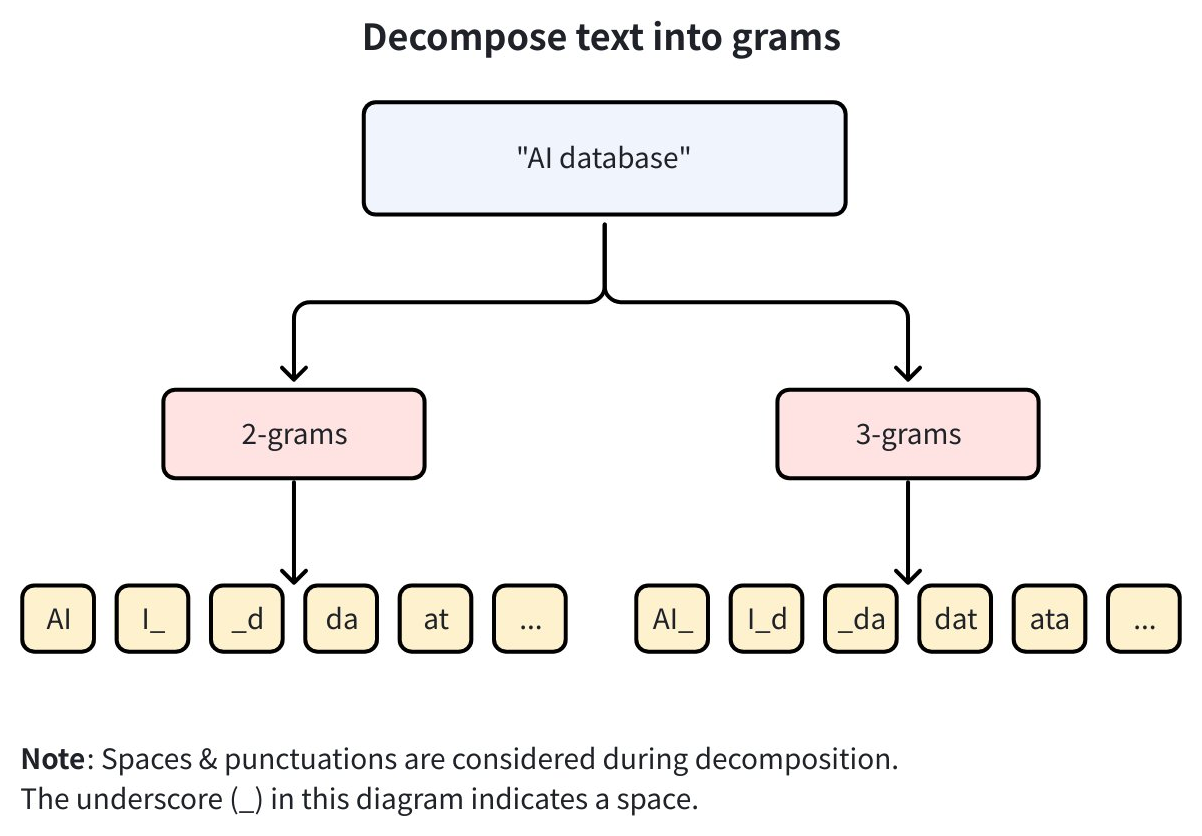
-
2-gram:
AI,I_,_d,da,at, … -
3-gram:
AI_,I_d,_da,dat,ata, …
说明-
在
[min_gram, max_gram]范围内,Zilliz Cloud 会生成所有长度的 n-gram。例如[2,4]+"text"→-
2-gram:
te,ex,xt -
3-gram:
tex,ext -
4-gram:
text
-
-
n-gram 分解基于字符,不依赖语言。例如中文
"向量数据库"+min_gram=2→"向量","量数","数据","据库" -
空格与标点视为字符参与分解
-
保留大小写,区分大小写(如
"Database"与"database"生成不同 n-gram)
-
-
建立倒排索引:构建倒排索引,将每个 n-gram 映射到包含它的文档 ID 列表。
例如,若 2-gram
"AI"出现在文档 1, 5, 6, 8, 9,则索引记录为:{"AI": [1,5,6,8,9]}。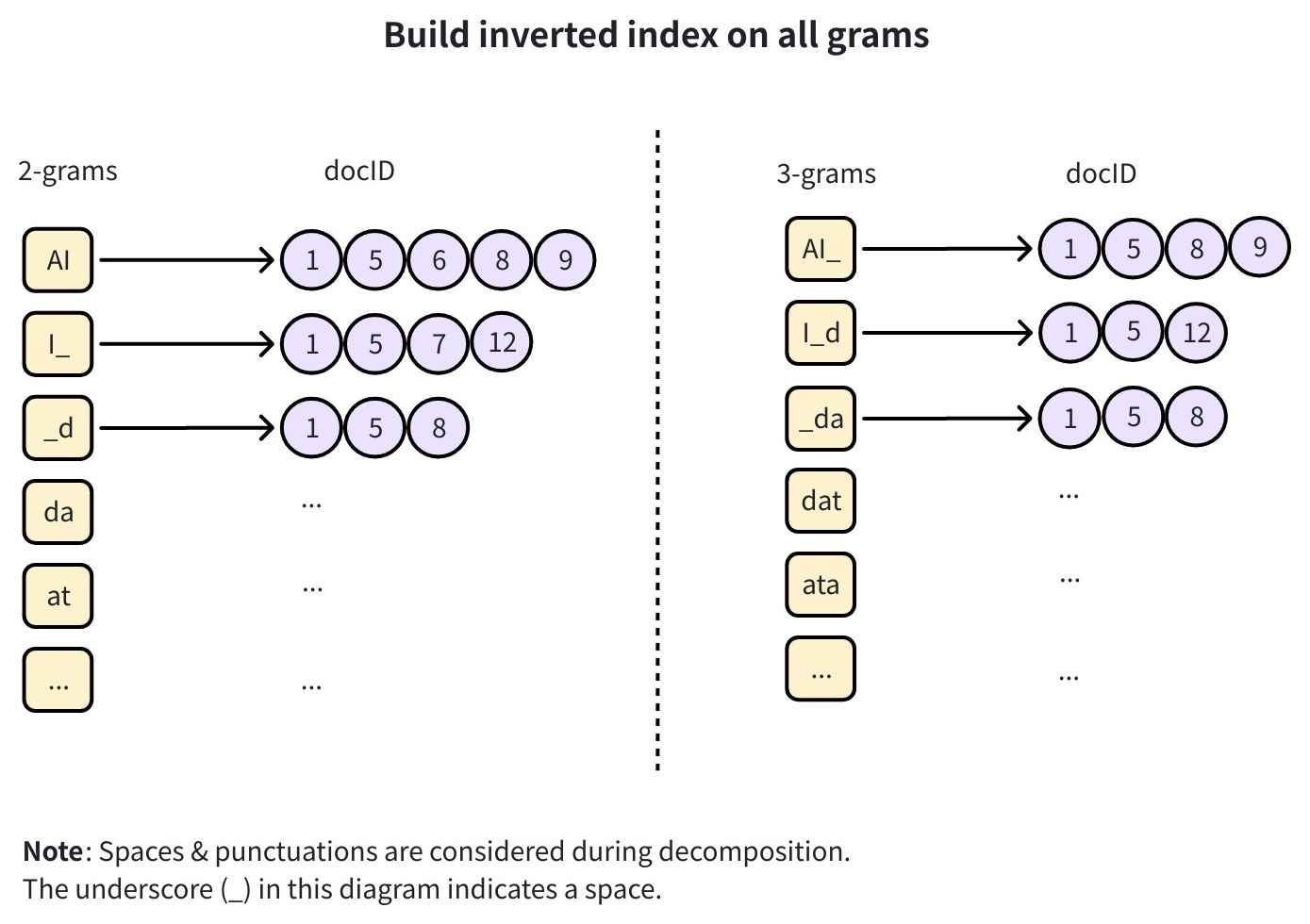
阶段 2:加速查询
执行 LIKE 查询时,Zilliz Cloud 使用 NGRAM 索引按以下步骤加速:

-
提取查询词:从 LIKE 表达式提取不带通配符的连续子串(如
"%database%"→"database") -
分解查询词:根据查询词长度 L 与 [min_gram, max_gram] 拆分:
-
L < min_gram → 索引不可用,回退全表扫描
-
min_gram ≤ L ≤ max_gram → 查询词整体视为一个 n-gram
-
L > max_gram → 按 max_gram 窗口切分为多个 n-gram
示例:max_gram=3,查询"database"→ 拆分为"dat","ata","tab", …
-
-
查找并取交集:在倒排索引中查找每个查询 gram,并对文档 ID 列表求交集 → 得到候选集
-
验证与返回:对候选集应用原始 LIKE 过滤,得到最终精确结果
创建 NGRAM 索引
可以在 VARCHAR 字段或 JSON 路径上创建 NGRAM 索引。
示例 1:在 VARCHAR 字段上
对于 VARCHAR 字段,只需指定 field_name,并配置 min_gram 和 max_gram。
- Python
- Java
- Go
- Rust
- C++
- NodeJS
- cURL
from pymilvus import MilvusClient

client = MilvusClient(uri="YOUR_CLUSTER_ENDPOINT") # Replace with your server address

# Assume you have defined a VARCHAR field named "text" in your collection schema

# Prepare index parameters
index_params = client.prepare_index_params()

# Add NGRAM index on the "text" field
index_params.add_index(
    field_name="text",   # Target VARCHAR field
    index_type="NGRAM",           # Index type is NGRAM
    index_name="ngram_index",     # Custom name for the index
    min_gram=2,                   # Minimum substring length (e.g., 2-gram: "st")
    max_gram=3                    # Maximum substring length (e.g., 3-gram: "sta")
)

# Create the index on the collection
client.create_index(
    collection_name="Documents",
    index_params=index_params
)
import io.milvus.v2.client.ConnectConfig;
import io.milvus.v2.client.MilvusClientV2;
import io.milvus.v2.common.IndexParam;
import io.milvus.v2.service.index.request.CreateIndexReq;
import java.util.Arrays;
import java.util.HashMap;
import java.util.Map;

ConnectConfig connectConfig = ConnectConfig.builder()
        .uri("YOUR_CLUSTER_ENDPOINT")
        .token("YOUR_CLUSTER_TOKEN")
        .build();
MilvusClientV2 client = new MilvusClientV2(connectConfig);

Map<String, Object> params = new HashMap<>();
params.put("min_gram", "2");
params.put("max_gram", "3");

client.createIndex(CreateIndexReq.builder()
        .collectionName("Documents")
        .indexParams(Arrays.asList(
                IndexParam.builder().fieldName("text").indexType(IndexParam.IndexType.NGRAM)
                        .indexName("ngram_index")
                        .extraParams(params)
                        .build()))
        .build());
import (
    "context"
    "fmt"

    "github.com/milvus-io/milvus/client/v3/index"
    "github.com/milvus-io/milvus/client/v3/milvusclient"
)

ctx := context.Background()

cli, err := milvusclient.New(ctx, &milvusclient.ClientConfig{
    Address: "YOUR_CLUSTER_ENDPOINT",
    APIKey:  "YOUR_CLUSTER_TOKEN",
})
if err != nil {
    fmt.Println(err)
}

_, err = cli.CreateIndex(ctx, milvusclient.NewCreateIndexOption("Documents", "text", index.NewNgramIndex(2, 3)).WithIndexName("ngram_index"))
if err != nil {
    fmt.Println(err)
}
use milvus::v2::prelude::*;
use std::collections::HashMap;

let config = ConnectConfig::new().uri("YOUR_CLUSTER_ENDPOINT").token("YOUR_CLUSTER_TOKEN");
let client = ClientV2::new(&config).await?;

let request = CreateIndexRequest::builder()
    .collection_name("Documents")
    .index_params(vec![IndexParam::new()
        .field_name("text")
        .index_name("ngram_index")
        .index_type(IndexType::Ngram)
        .extra_params(HashMap::from([
            ("min_gram".to_string(), "2".to_string()),
            ("max_gram".to_string(), "3".to_string()),
        ]))])
    .build()?;
client.create_index(request).await?;
#include "milvus/MilvusClientV2.h"
#include <iostream>

auto client = milvus::MilvusClientV2::Create();
auto status = client->Connect(milvus::ConnectParam("YOUR_CLUSTER_ENDPOINT").WithToken("YOUR_CLUSTER_TOKEN"));
if (!status.IsOk()) {
    std::cout << status.Message() << std::endl;
}

milvus::IndexDesc ngram_index("text", "ngram_index", milvus::IndexType::NGRAM);
ngram_index.AddExtraParam("min_gram", "2");
ngram_index.AddExtraParam("max_gram", "3");

milvus::CreateIndexRequest create_request;
create_request.WithCollectionName("Documents");
create_request.WithIndexes({ngram_index});
create_request.WithSync(true);

status = client->CreateIndex(create_request);
if (!status.IsOk()) {
    std::cout << status.Message() << std::endl;
}
import { MilvusClient } from "@zilliz/milvus2-sdk-node";

const client = new MilvusClient({ address: "YOUR_CLUSTER_ENDPOINT", token: "YOUR_CLUSTER_TOKEN" });

await client.createIndex({
    collection_name: "Documents",
    field_name: "text",
    index_name: "ngram_index",
    index_type: "NGRAM",
    params: { min_gram: 2, max_gram: 3 },
});
export CLUSTER_ENDPOINT="YOUR_CLUSTER_ENDPOINT"
export TOKEN="YOUR_CLUSTER_TOKEN"

curl --request POST \
--url "${CLUSTER_ENDPOINT}/v2/vectordb/indexes/create" \
--header "Authorization: Bearer ${TOKEN}" \
--header "Content-Type: application/json" \
-d '{
    "collectionName": "Documents",
    "indexParams": [
        {
            "fieldName": "text",
            "indexName": "ngram_index",
            "params": {
                "index_type": "NGRAM",
                "min_gram": 2,
                "max_gram": 3
            }
        }
    ]
}'
此配置会为 text 字段中的每个字符串生成 2-gram 和 3-gram,并存储到倒排索引中。
示例 2:在 JSON 路径上
对于 JSON 字段,除了配置 gram 参数外,还必须指定:
-
params.json_path:指向要建立索引的值的 JSON 路径。 -
params.json_cast_type:必须为"varchar"(不区分大小写),因为 NGRAM 索引针对字符串进行操作。
- Python
- Java
- Go
- Rust
- C++
- NodeJS
- cURL
# Assume you have defined a JSON field named "json_field" in your collection schema, with a JSON path named "body"

# Prepare index parameters
index_params = client.prepare_index_params()

# Add NGRAM index on a JSON field
index_params.add_index(
    field_name="json_field",              # Target JSON field
    index_type="NGRAM",                   # Index type is NGRAM
    index_name="json_ngram_index",        # Custom index name
    min_gram=2,                           # Minimum n-gram length
    max_gram=4,                           # Maximum n-gram length
    params={
        "json_path": "json_field[\"body\"]",  # Path to the value inside the JSON field
        "json_cast_type": "varchar"                  # Required: cast the value to varchar
    }
)

# Create the index on the collection
client.create_index(
    collection_name="Documents",
    index_params=index_params
)
import io.milvus.v2.common.IndexParam;
import io.milvus.v2.service.index.request.CreateIndexReq;
import java.util.Arrays;
import java.util.HashMap;
import java.util.Map;

Map<String, Object> params = new HashMap<>();
params.put("min_gram", "2");
params.put("max_gram", "4");
params.put("json_path", "json_field[\"body\"]");
params.put("json_cast_type", "varchar");

client.createIndex(CreateIndexReq.builder()
        .collectionName("Documents")
        .indexParams(Arrays.asList(
                IndexParam.builder().fieldName("json_field").indexType(IndexParam.IndexType.NGRAM)
                        .indexName("json_ngram_index")
                        .extraParams(params)
                        .build()))
        .build());
import (
    "context"
    "fmt"

    "github.com/milvus-io/milvus/client/v3/index"
    "github.com/milvus-io/milvus/client/v3/milvusclient"
)

opt := milvusclient.NewCreateIndexOption("Documents", "json_field", index.NewNgramIndex(2, 4)).
    WithIndexName("json_ngram_index")
opt.WithExtraParam("json_path", `json_field["body"]`)
opt.WithExtraParam("json_cast_type", "varchar")

_, err = cli.CreateIndex(ctx, opt)
if err != nil {
    fmt.Println(err)
}
use milvus::v2::prelude::*;
use std::collections::HashMap;

    let request = CreateIndexRequest::builder()
        .collection_name("Documents")
        .index_params(vec![IndexParam::new()
            .field_name("json_field")
            .index_name("json_ngram_index")
            .index_type(IndexType::Ngram)
            .extra_params(HashMap::from([
                ("min_gram".to_string(), "2".to_string()),
                ("max_gram".to_string(), "4".to_string()),
                ("json_path".to_string(), "json_field[\"body\"]".to_string()),
                ("json_cast_type".to_string(), "varchar".to_string()),
            ]))])
        .build()?;
    client.create_index(request).await?;
milvus::IndexDesc json_ngram_index("json_field", "json_ngram_index", milvus::IndexType::NGRAM);
json_ngram_index.AddExtraParam("min_gram", "2");
json_ngram_index.AddExtraParam("max_gram", "4");
json_ngram_index.AddExtraParam("json_path", "json_field[\"body\"]");
json_ngram_index.AddExtraParam("json_cast_type", "varchar");

milvus::CreateIndexRequest create_request;
create_request.WithCollectionName("Documents");
create_request.WithIndexes({json_ngram_index});
create_request.WithSync(true);

status = client->CreateIndex(create_request);
if (!status.IsOk()) {
    std::cout << status.Message() << std::endl;
}
await client.createIndex({
    collection_name: "Documents",
    field_name: "json_field",
    index_name: "json_ngram_index",
    index_type: "NGRAM",
    params: { min_gram: 2, max_gram: 4, json_path: 'json_field["body"]', json_cast_type: "varchar" },
});
curl --request POST \
--url "${CLUSTER_ENDPOINT}/v2/vectordb/indexes/create" \
--header "Authorization: Bearer ${TOKEN}" \
--header "Content-Type: application/json" \
-d '{
    "collectionName": "Documents",
    "indexParams": [
        {
            "fieldName": "json_field",
            "indexName": "json_ngram_index",
            "params": {
                "index_type": "NGRAM",
                "min_gram": 2,
                "max_gram": 4,
                "json_path": "json_field[\"body\"]",
                "json_cast_type": "varchar"
            }
        }
    ]
}'
在该示例中:
-
仅
json_field["body"]的值会被索引 -
值在分词前会被强制转换为 VARCHAR
-
Zilliz Cloud 生成 2–4 长度的子串并存储
更多 JSON 字段索引方法请参考 JSON 索引。
NGRAM 加速的查询
NGRAM 索引会被应用于:
-
查询目标为已建立 NGRAM 索引的 VARCHAR 字段或 JSON 路径
-
LIKE 模式中的字面部分长度 ≥ min_gram
(例如,如果预计最短的查询词为 2 个字符,则在创建索引时设置
min_gram=2。)
支持的查询类型:
-
前缀匹配
python# Match any string that starts with the substring "database"filter = 'text LIKE "database%"' -
后缀匹配
python# Match any string that ends with the substring "database"filter = 'text LIKE "%database"' -
中缀匹配
python# Match any string that contains the substring "database" anywherefilter = 'text LIKE "%database%"' -
通配符匹配
python# Match any string where "st" appears first, and "um" appears later in the textfilter = 'text LIKE "%st%um%"' -
JSON 路径查询
python# Match any string where "st" appears first, and "um" appears later in the textfilter = 'text LIKE "%st%um%"' -
正则表达式匹配
python# Match log messages that contain "error" followed later by "timeout"filter = 'text =~ "error.*timeout"' -
针对 JSON 路径的正则表达式匹配
pythonfilter = 'json_field["body"] =~ "error.*timeout"'
有关更多信息,请参考模式匹配。
删除索引
您也可以使用 drop_index() 从 Collection 中删除指定字段上的索引。
如果您的集群与 Milvus v2.6.x 兼容,您可以删除标量字段上的索引,无须对 Collection 执行 Release 操作。
- Python
- Java
- Go
- Rust
- C++
- NodeJS
- cURL
client.drop_index(
    collection_name="Documents",   # Name of the collection
    index_name="ngram_index" # Name of the index to drop
)
import io.milvus.v2.service.index.request.DropIndexReq;

client.dropIndex(DropIndexReq.builder()
        .collectionName("Documents")
        .indexName("ngram_index")
        .build());
import (
    "fmt"

    "github.com/milvus-io/milvus/client/v3/milvusclient"
)

err = cli.DropIndex(ctx, milvusclient.NewDropIndexOption("Documents", "ngram_index"))
if err != nil {
    fmt.Println(err)
}
use milvus::v2::prelude::*;

    let request = DropIndexRequest::builder()
        .collection_name("Documents")
        .index_name("ngram_index")
        .build()?;
    client.drop_index(request).await?;
status = client->DropIndex(milvus::DropIndexRequest()
                               .WithCollectionName("Documents")
                               .WithIndexName("ngram_index"));
if (!status.IsOk()) {
    std::cout << status.Message() << std::endl;
}
await client.dropIndex({ collection_name: "Documents", index_name: "ngram_index" });
curl --request POST \
--url "${CLUSTER_ENDPOINT}/v2/vectordb/indexes/drop" \
--header "Authorization: Bearer ${TOKEN}" \
--header "Content-Type: application/json" \
-d '{
    "collectionName": "Documents",
    "indexName": "ngram_index"
}'
使用须知
-
字段类型:支持
VARCHAR和JSON字段。对于 JSON 字段,需同时提供params.json_path和params.json_cast_type="varchar"。 -
正则表达式加速:仅当 Zilliz Cloud 能从正则表达式中提取固定的字面子串时,
NGRAM才能加速正则表达式过滤。像[a-z]+这样的表达式不包含固定的字面子串,因此可能回退到扫描。 -
不区分大小写的正则表达式:支持包含
(?i)的正则表达式,但由于索引保留原始大小写,这类表达式可能无法使用NGRAM优化。 -
验证步骤:对于正则表达式过滤,
NGRAM会生成候选结果,随后由 Zilliz Cloud 使用完整的 RE2 正则表达式进行验证,因此索引加速不会改变匹配结果。 -
Unicode:NGRAM 按字符进行拆分,与语言无关,空白字符和标点符号也会参与拆分。
-
空间与时间的权衡:gram 范围
[min_gram, max_gram]越宽,生成的 gram 越多,索引也越大。如果内存紧张,可考虑对大型倒排列表使用mmap模式。有关更多信息,请参阅使用 mmap。 -
不可变性:
min_gram和max_gram无法直接修改;如需调整,必须重建索引。
最佳实践
-
选择合适的 min_gram 和 max_gram
-
推荐起点:min_gram=2, max_gram=3
-
min_gram 设置为用户可能输入的最短字面量长度
-
max_gram 设置为常见有效子串的典型长度(越大 → 过滤更精确,但索引更大)
-
-
避免低选择性 grams
如
"aaaaaa"这类模式,过滤效果差 -
保持一致的归一化处理
如果需要(如小写化、去除空格),请在写入与查询时保持一致