快速开始:按需搜索
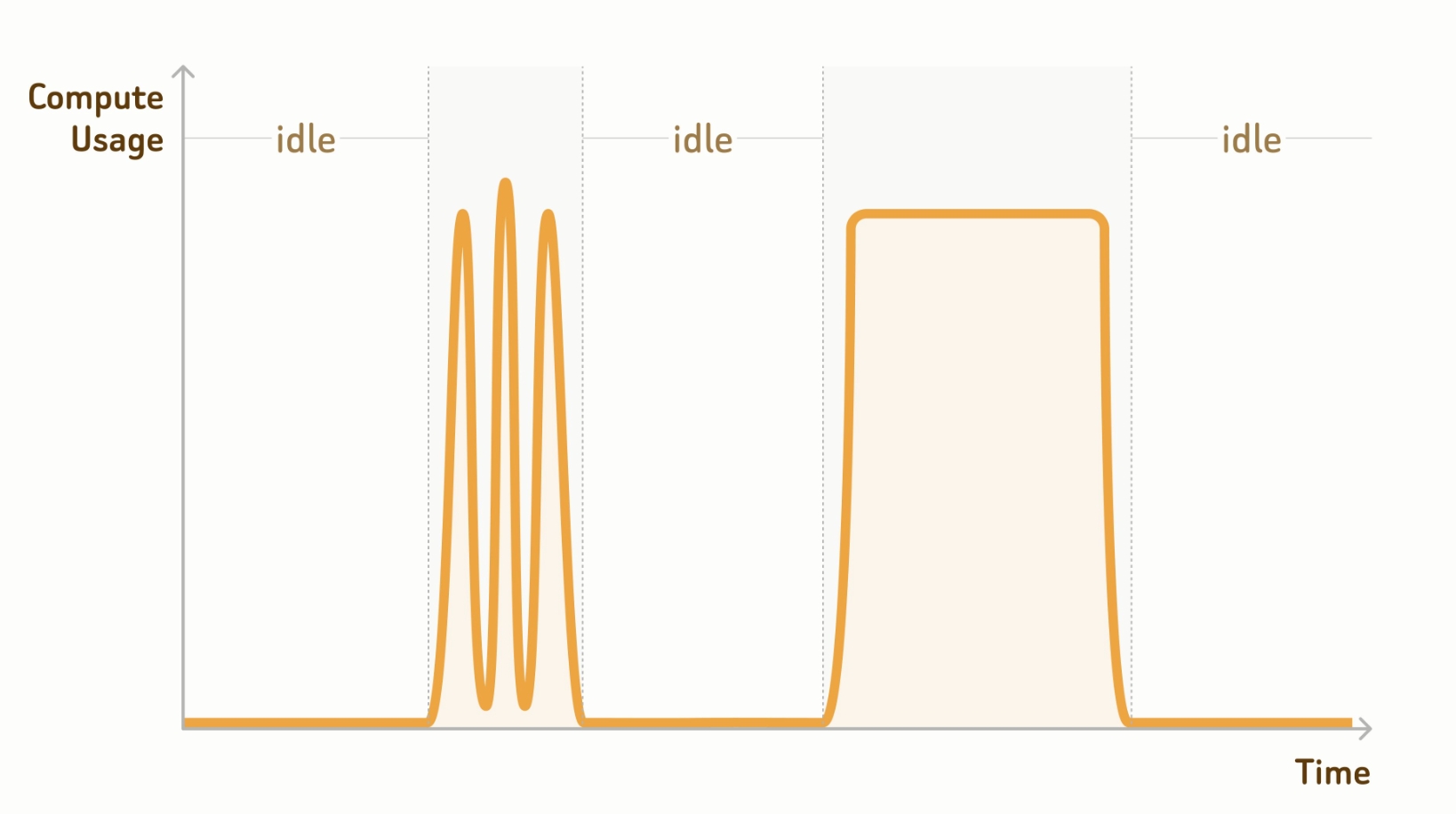
公测版Zilliz Cloud 提供了按需计算资源,允许您按需运行相似性搜索和查询任务。如下图所示,按需计算资源在没有请求需要处理时会自动挂起,挂起的计算资源不产生任何费用。
步骤 1:连接项目 Endpoint
在操作 Database 之前,请先连接到项目 Endpoint。启用 Zilliz Cloud Console 中的按需计算后,您可以在快速开始页面获取项目 Endpoint。
-
Managed Collection 操作需要使用 API 密钥进行身份验证。此流程不支持
username:password身份验证。 -
用于按需计算的 Database 中创建的 Managed Collection 无需执行 Load 操作即可查询。
- Python
- cURL
# connect to database
client = MilvusClient(
    # a project-specific on-demand compute endpoint
    uri="https://{project-id}.{region}.api.zillizcloud.com.cn",
    token="YOUR_API_KEY"
)
export PROJECT_ENDPOINT="https://{project-id}.{region}.api.zillizcloud.com.cn"
步骤 2:(可选)创建 Database
Zilliz Cloud 会默认提供一个 Default Database。如果您使用 Default Database,可以跳过此步骤。您也可以按如下方式创建 Database。
- Python
- cURL
client.create_database(
    db_name="my_database"
)
curl --request POST \
--url "${PROJECT_ENDPOINT}/v2/vectordb/databases/create" \
--header "Authorization: Bearer ${TOKEN}" \
--header "Content-Type: application/json" \
-d '{
    "dbName": "my_database"
}'
步骤 3:创建 Collection
Database 准备就绪后,您可以在其中创建 Managed Collection。与将 Collection 列映射到外部数据文件的 External Collection 不同,Managed Collection 需要您导入数据。
以下示例演示了如何定义 Collection Schema 并创建 Collection。
- Python
- cURL
from pymilvus import MilvusClient, DataType

schema = MilvusClient.create_schema()

schema.add_field(
    field_name="product_id",
    datatype=DataType.INT64,
    is_primary=True
)

schema.add_field(
    field_name="product_name",
    datatype=DataType.VARCHAR,
    max_length=512
)

schema.add_field(
    field_name="embedding",
    datatype=DataType.FLOAT_VECTOR,
    dim=768
)
export schema='{
    "fields": [
        {
            "fieldName": "product_id",
            "dataType": "Int64",
            "isPrimary": true
        },
        {
            "fieldName": "embedding",
            "dataType": "FloatVector",
            "elementTypeParams": {
                "dim": "768"
            }
        },
        {
            "fieldName": "product_name",
            "dataType": "VarChar",
            "elementTypeParams": {
                "max_length": 512
            }
        }
    ]
}'
然后,您可以使用上述 Schema 创建一个 Collection。如果您决定使用 Default Database,可以直接省略 db_name 参数。
- Python
- cURL
client.use_database(
    db_name="my_database"
)

# create the collection
client.create_collection(
    collection_name="prod_collection",
    schema=schema
)
curl --request POST \
--url "${PROJECT_ENDPOINT}/v2/vectordb/collections/create" \
--header "Authorization: Bearer ${TOKEN}" \
--header "Content-Type: application/json" \
-d "{
    \"dbName\": \"my_database\",
    \"collectionName\": \"prod_collection\",
    \"schema\": $schema
}"
步骤 4:创建 Index
您需要为所有向量字段创建索引,并可按需为特定标量字段创建索引。
- Python
- cURL
index_params = client.prepare_index_params()

# Add indexes
index_params.add_index(
    field_name="embedding",
    index_type="AUTOINDEX",
    metric_type="COSINE"
)

index_params.add_index(
    field_name="product_name",
    index_type="AUTOINDEX"
)

client.create_index(
    db_name="my_database",
    collection_name="prod_collection",
    index_params=index_params
)
export indexParams='[
    {
        "fieldName": "embedding",
        "metricType": "COSINE",
        "indexName": "embedding",
        "indexType": "AUTOINDEX"
    },
    {
        "fieldName": "product_name",
        "indexName": "product_name",
        "indexType": "AUTOINDEX"
    }
]'

curl --request POST \
--url "${PROJECT_ENDPOINT}/v2/vectordb/indexes/create" \
--header "Authorization: Bearer ${TOKEN}" \
--header "Content-Type: application/json" \
-d "{
    \"dbName\": \"my_database\",
    \"collectionName\": \"prod_collection\",
    \"indexParams\": $indexParams
}"
步骤 5:导入数据
完成上述设置后,您可以导入已处理的数据。以下示例假设您已将处理后的数据存储在外部存储桶中。
有关存储桶或存储集成中支持的数据格式,请参见支持的数据格式。
- Python
- cURL
from pymilvus.bulk_writer import bulk_import

# The path should be relative to the root
# of a zilliz cloud volume or an external storage
OBJECT_URLS = [[
    "https://{bucket}.oss.cn-hangzhou.aliyuncs.com/path/in/external/storage.json"
]]
ACCESS_KEY = "YOUR_STORAGE_ACCESS_KEY"
SECRET_KEY = "YOUR_STORAGE_SECRET_KEY"

res = bulk_import(
    api_key="YOUR_ZILLIZ_API_KEY",
    url="https://api.cloud.zilliz.com.cn",
    project_id="proj-xxxxxxxxxxxxxxxxxxx",
    region_id="ali-cn-hangzhou",
    collection_name="prod_collection",
    object_url=OBJECT_URLS,
    access_key=ACCESS_KEY,
    secret_key=SECRET_KEY
)

# job-xxxxxxxxxxxxxxxxxxxxx
export CLOUD_PLATFORM_ENDPOINT="https://api.cloud.zilliz.com.cn"

# replace url and token with your own
curl --request POST \
     --url "${CLOUD_PLATFORM_ENDPOINT}/v2/vectordb/jobs/import/create" \
     --header "Authorization: Bearer ${TOKEN}" \
     --header "Accept: application/json" \
     --header "Content-Type: application/json" \
     -d '{
        "clusterId": "inxx-xxxxxxxxxxxxxxx",
        "collectionName": "prod_collection",
        "objectUrl": "https://{bucket}.oss.cn-hangzhou.aliyuncs.com/path/in/external/storage.json",
        "accessKey": "YOUR_STORAGE_ACCESS_KEY",
        "secretKey": "YOUR_STORAGE_SECRET_KEY"
    }'

 # job-xxxxxxxxxxxxxxxxxxxxx
获得返回的 job ID 后,您可以监控导入进度。
- Python
- cURL
import json
from pymilvus.bulk_writer import get_import_progress

# Get bulk-insert job progress
resp = get_import_progress(
    api_key="YOUR_ZILLIZ_API_KEY",
    url="https://api.cloud.zilliz.com.cn",
    cluster_id="inxx-xxxxxxxxxxxxxxxxxxx",
    job_id="job-xxxxxxxxxxxxxxxxxxxxx",
)

print(json.dumps(resp.json(), indent=4))
curl --request POST \
     --url "${CLOUD_PLATFORM_ENDPOINT}/v2/vectordb/jobs/import/get_progress" \
     --header "Authorization: Bearer ${TOKEN}" \
     --header "Accept: application/json" \
     --header "Content-Type: application/json" \
     -d '{
        "clusterId": "inxx-xxxxxxxxxxxxxxx",
        "jobId": "job-xxxxxxxxxxxxxxxxxxxxx"
    }'
步骤 6:创建 On-demand 集群
在 Collection 准备就绪后,您需要将其附加到 On-demand 集群,以执行按需搜索。以下命令将创建一个集群并返回其 ID。
export CONTROL_PLANE_ENDPOINT="https://api.cloud.zilliz.com.cn"

curl --request POST \
--url "${CONTROL_PLANE_ENDPOINT}/v2/clusters/createOnDemandCluster" \
--header "Authorization: Bearer ${TOKEN}" \
--header "Content-Type: application/json" \
-d '{
    "projectId": "proj-xxxxxxxxxxxxxxxxxxx",
    "regionId": "ali-cn-hangzhou",
    "clusterName": "my-on-demand",
    "cuSize": 8,
    "autoSuspend": 60
}'

# inxx-xxxxxxxxxxxxx
步骤 7:执行搜索
当您需要执行 Search、Query 或 Hybrid Search 时,可以通过 session 将请求附加到上一步创建的 On-demand 集群。
- Python
- cURL
session = client.session(
    cluster_id="inxx-xxxxxxxxxxxxx"
)

# 768-dimensional vector
query_vector = [0.3580376395471989, -0.6023495712049978, 0.18414012509913835, -0.26286205330961354, ..., 0.9029438446296592]
res = session.search(
    db_name="my_database",
    collection_name="my_collection",
    anns_field="embedding",
    data=[query_vector],
    limit=3,
    output_fields=["product_id", "product_name"],
    search_params={"metric_type": "COSINE"}
)
curl --request POST \
--url "${PROJECT_ENDPOINT}/v2/vectordb/entities/search?cluster_id=inxx-xxxxxxxxxxxxxxxxx" \
--header "Authorization: Bearer ${TOKEN}" \
--header "Content-Type: application/json" \
-d '{
    "dbName": "my_database",
    "collectionName": "my_collection",
    "data": [
        [
            0.3580376395471989,
            -0.6023495712049978,
            0.18414012509913835,
            -0.26286205330961354,
            ...
            0.9029438446296592
        ]
    ],
    "annsField": "embedding",
    "limit": 3,
    "outputFields": [
        "product_id",
        "product_name"
    ]
}'
随后,您可以进一步探索数据并找出最有价值的数据子集。然后,您可以连接到 Serving Cluster,将这些数据导入其中,并用于生产环境服务。