搜索聚合
公测版当购物者搜索“black running shoes for daily training”时,近似最近邻(ANN)搜索会按向量相似度对商品排序,并返回一个扁平的 Top-K 列表。结果可能相关,但也可能重复:在下例中,前六个结果里有四个来自 Brand A,而 Brand B 和 Brand C 各出现一次。
扁平列表无法直接提供以桶为中心的汇总。应用可能需要按保留候选项数量或平均价格比较品牌、查看每个品牌的少量代表性商品,或将结果组织成多级桶。
搜索聚合根据选定的标量字段,将保留的 ANN 候选项组织到不同桶中。在本例中,每个品牌形成一个独立桶。Zilliz Cloud 可以为每个桶计算统计信息、对桶排序并附加代表性商品。应用通过 result.agg_buckets 使用这种以桶为先的响应。
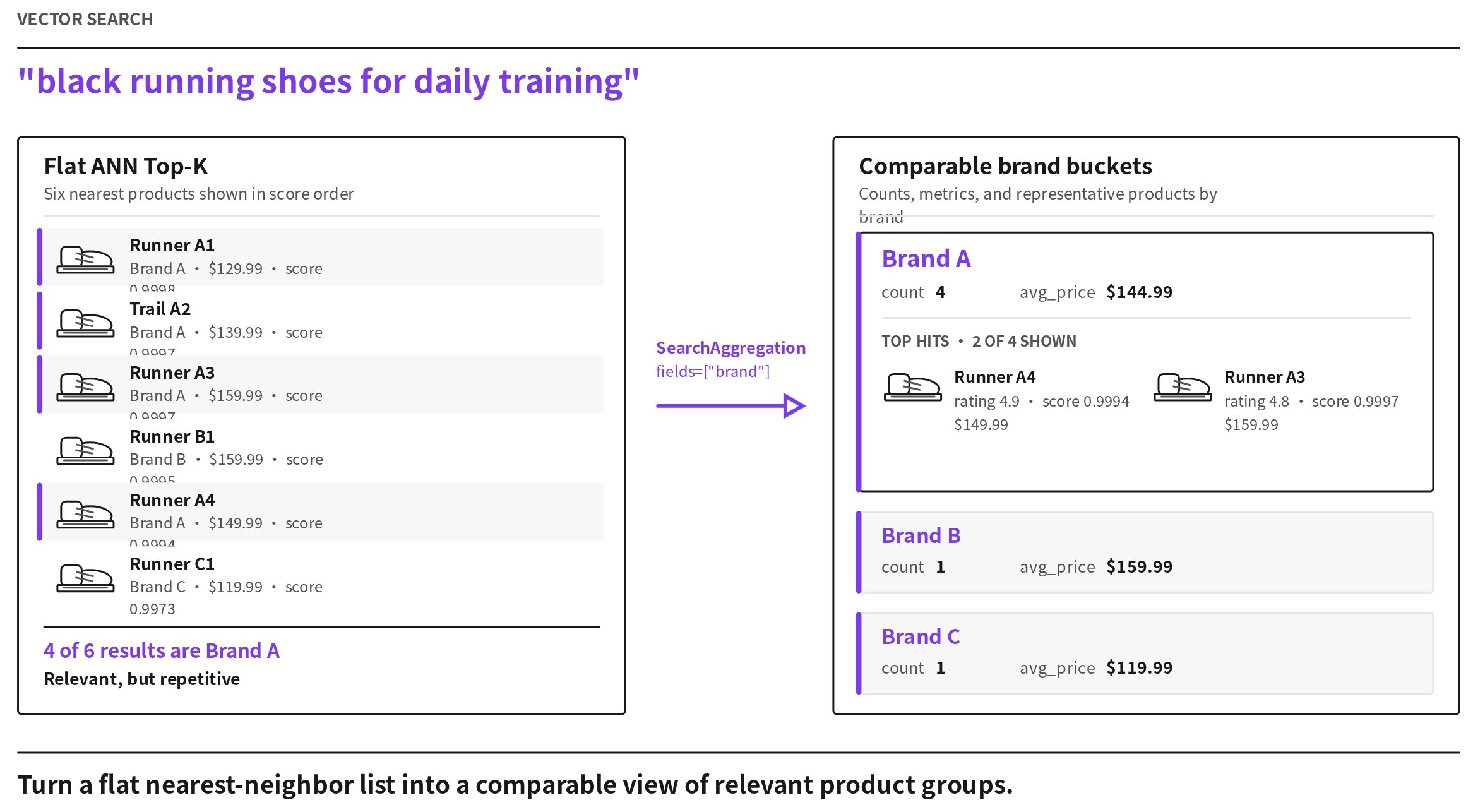
搜索聚合不会对整个 Collection 执行精确聚合。桶是否存在、计数、指标、顺序和代表性命中,都取决于 ANN 和分组阶段保留的候选项。
工作原理
-
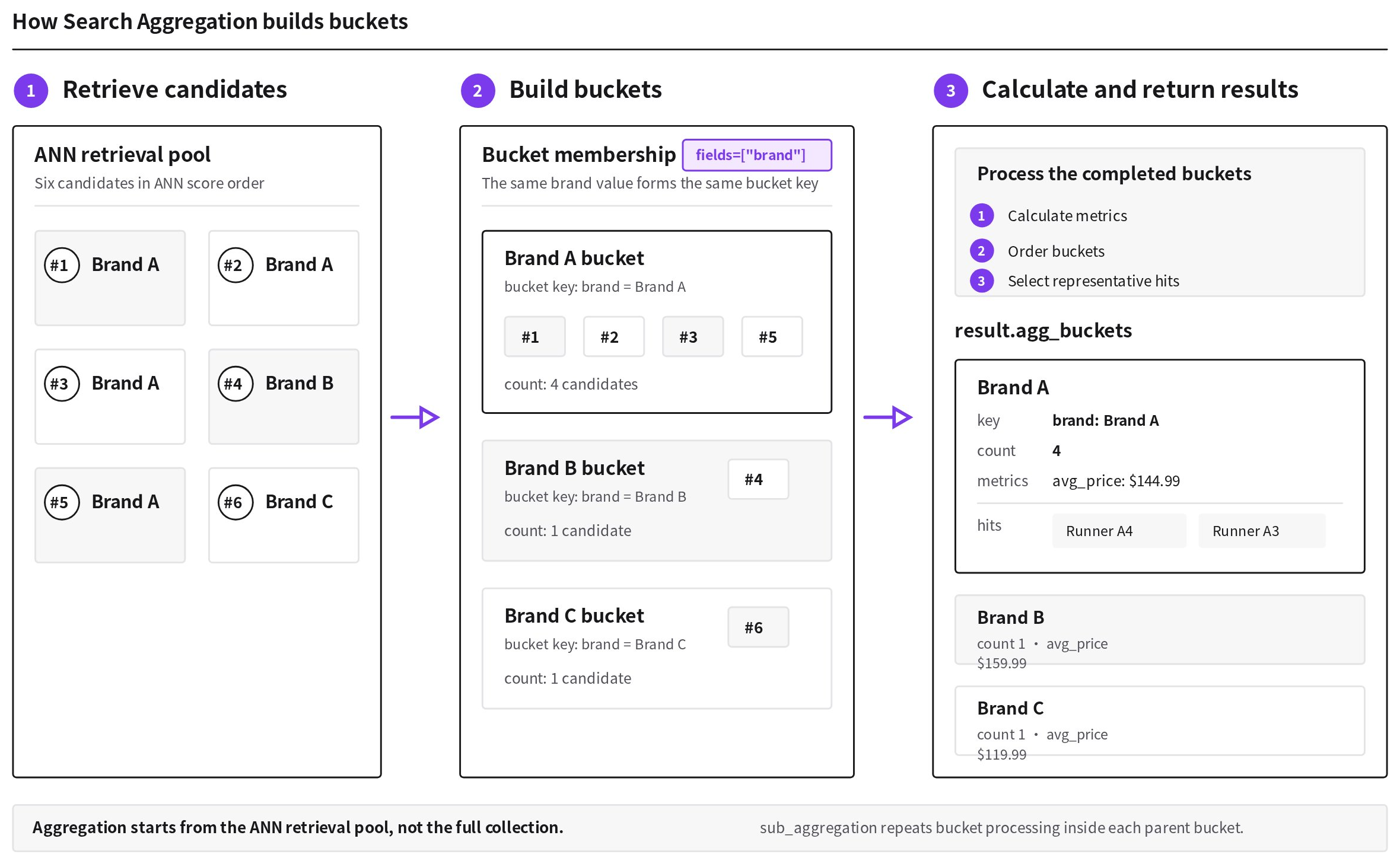
检索候选项。 Zilliz Cloud 运行 ANN 搜索,查找与查询向量最接近的实体。随后,分组阶段会为每个完整复合键保留数量受限的候选项。每个键的候选预算等于整个聚合树中最大的
TopHits.size,或者为1(当任何层级都未配置top_hits时)。 -
构建桶。
SearchAggregation.fields参数定义桶键。字段值的每一种唯一组合都会生成一个独立键。在图中,fields=["brand"]会创建(Brand A)、(Brand B)和(Brand C)桶键。具有相同键的保留候选项归入同一个桶,并计入其count。SearchAggregation.size限制 Zilliz Cloud 返回的桶数。 -
计算并返回结果。 每个返回的桶都包含其键和保留候选项计数。Zilliz Cloud 还可以计算配置的指标、对桶排序、返回代表性实体并构建子桶。每个
AggregationBucket在result.agg_buckets中都公开key、count、metrics、hits和sub_groups。启用搜索聚合后,普通搜索命中列表为空。
在图中,TopHits.size=4 为每个键提供四个候选项的预算,因此 Brand A 保留的四个候选项得到 count: 4。为保持图示简洁,完整的 Brand A 卡片仅展示返回的四个代表性命中中的两个。
使用 sub_aggregation 时,Zilliz Cloud 会在每个父桶内重复步骤 2 和 3。ANN 召回率或每个键候选预算的变化,可能改变桶计数、指标、顺序、命中结果和嵌套结果。
限制
使用搜索聚合前,请注意以下限制:
-
嵌套聚合: 一个请求可包含一个根
SearchAggregation,并最多嵌套三层sub_aggregation,总计最多四层。所有层级合计最多可使用 10 个字段创建桶键。 -
用于创建桶键的字段。
SearchAggregation.fields参数支持 Boolean、整数、VARCHAR和TIMESTAMPTZ字段;不支持FLOAT、DOUBLE、ARRAY、JSON、GEOMETRY、TEXT、向量字段或动态字段。 -
指标字段。
count操作接受"*"或任意非JSON、非动态字段;指定字段时会跳过NULL值。sum和avg支持整数及浮点字段;min和max还支持字符串和TIMESTAMPTZ字段。 -
Top Hits 排序字段。
TopHits.sort参数支持可比较的 Boolean、整数、浮点、字符串和TIMESTAMPTZ字段,以及_score;不支持ARRAY、JSON、GEOMETRY、向量字段或动态字段。 -
候选预算: 聚合树中最大的
TopHits.size也是每个完整复合键保留的候选项数量。如果任何层级都未配置top_hits,Zilliz Cloud 会为每个键保留一个候选项。桶的count和指标基于这些保留候选项计算,因此更改TopHits.size也可能改变它们。 -
可空桶字段:
NULL值会形成独立的桶键。要排除空值桶,请在搜索请求中添加类似brand is not null的过滤条件。 -
重复字段: 同一字段不能出现在多个
SearchAggregation.fields列表中。例如,如果根聚合使用fields=["category"],嵌套的sub_aggregation就不能再次使用fields=["category"]。 -
不支持的组合: 搜索聚合不能与非零
offset、搜索迭代器、混合搜索、高亮器或分组搜索组合使用。顶层offset值为0等同于省略该参数。在 REST v2 协议层,不能同时指定searchAggregation和ids。 -
返回条目数。 计算得到的最大结果条目数必须不超过 10,000。服务器按
number of query vectors × product of the effective search_size at every aggregation level × largest TopHits.size at any level计算该上限。最后一个因子使用
1(如果任何层级都未配置TopHits)。例如,一个查询向量、10 个根桶、每个根桶 5 个子桶,以及每个子桶 2 个命中结果,计算得到的最大值为1 × 10 × 5 × 2 = 100。
使用搜索聚合
请根据目标选择示例:
| 跳转到 | 说明 | 关键设置 |
|---|---|---|
| 比较桶并对桶排序 | 计算每个桶的统计信息以比较各桶,然后按指标、计数或键对返回的桶排序。 | fields、size、metrics、order |
| 显示每个桶中的代表性结果 | 从每个桶返回有限数量的实体,并按标量字段或向量分数独立排序这些实体。 | top_hits、TopHits.size、TopHits.sort |
| 对结果进行多级分组 | 将结果组织为父桶和子桶层级,以便按顺序分析多个维度。 | sub_aggregation |
以下示例使用包含 brand、category、color、price 和 rating 字段的商品 Collection。所有品牌名称、商品名称、价格、评分和搜索结果均为合成示例数据。展开下一部分以创建 Collection 并定义共用的搜索变量。
设置示例 Collection
- Python
- Java
- Go
- Rust
- C++
- NodeJS
- CSharp
- cURL
from pymilvus import DataType, MilvusClient, SearchAggregation, TopHits

client = MilvusClient(
    uri="YOUR_CLUSTER_OR_PROJECT_ENDPOINT",
    token="YOUR_AUTHORIZED_TOKEN",
)

collection_name = "product_search_aggregation"

if client.has_collection(collection_name):
    client.drop_collection(collection_name)

schema = client.create_schema(auto_id=False, enable_dynamic_field=False)
schema.add_field("id", DataType.INT64, is_primary=True)
schema.add_field("embedding", DataType.FLOAT_VECTOR, dim=5)
schema.add_field("name", DataType.VARCHAR, max_length=200)
schema.add_field("brand", DataType.VARCHAR, max_length=100)
schema.add_field("category", DataType.VARCHAR, max_length=100)
schema.add_field("color", DataType.VARCHAR, max_length=50)
schema.add_field("price", DataType.DOUBLE)
schema.add_field("rating", DataType.DOUBLE)
schema.add_field("in_stock", DataType.BOOL)

index_params = client.prepare_index_params()
index_params.add_index(
    field_name="embedding",
    index_type="AUTOINDEX",
    metric_type="COSINE",
)

client.create_collection(
    collection_name=collection_name,
    schema=schema,
    index_params=index_params,
    # Make preceding writes visible to searches from this client.
    consistency_level="Session",
)

client.insert(
    collection_name=collection_name,
    data=[
        {
            "id": 1,
            "embedding": [0.12, 0.42, 0.18, 0.66, 0.31],
            "name": "Runner A1",
            "brand": "Brand A",
            "category": "running_shoes",
            "color": "black",
            "price": 129.99,
            "rating": 4.7,
            "in_stock": True,
        },
        {
            "id": 2,
            "embedding": [0.10, 0.39, 0.20, 0.61, 0.29],
            "name": "Trail A2",
            "brand": "Brand A",
            "category": "running_shoes",
            "color": "blue",
            "price": 139.99,
            "rating": 4.6,
            "in_stock": True,
        },
        {
            "id": 3,
            "embedding": [0.14, 0.44, 0.19, 0.68, 0.33],
            "name": "Runner B1",
            "brand": "Brand B",
            "category": "running_shoes",
            "color": "white",
            "price": 159.99,
            "rating": 4.8,
            "in_stock": True,
        },
        {
            "id": 4,
            "embedding": [0.16, 0.41, 0.22, 0.62, 0.30],
            "name": "Runner C1",
            "brand": "Brand C",
            "category": "running_shoes",
            "color": "red",
            "price": 119.99,
            "rating": 4.4,
            "in_stock": False,
        },
        {
            "id": 5,
            "embedding": [0.48, 0.20, 0.59, 0.15, 0.71],
            "name": "Jacket A1",
            "brand": "Brand A",
            "category": "jackets",
            "color": "black",
            "price": 99.99,
            "rating": 4.5,
            "in_stock": True,
        },
        {
            "id": 6,
            "embedding": [0.45, 0.18, 0.55, 0.17, 0.69],
            "name": "Jacket B1",
            "brand": "Brand B",
            "category": "jackets",
            "color": "blue",
            "price": 89.99,
            "rating": 4.3,
            "in_stock": True,
        },
        {
            "id": 7,
            "embedding": [0.09, 0.38, 0.17, 0.60, 0.27],
            "name": "Runner A3",
            "brand": "Brand A",
            "category": "running_shoes",
            "color": "black",
            "price": 159.99,
            "rating": 4.8,
            "in_stock": True,
        },
        {
            "id": 8,
            "embedding": [0.13, 0.43, 0.21, 0.65, 0.32],
            "name": "Runner A4",
            "brand": "Brand A",
            "category": "running_shoes",
            "color": "black",
            "price": 149.99,
            "rating": 4.9,
            "in_stock": True,
        },
    ],
)

client.load_collection(collection_name)

query_vector = [0.11, 0.40, 0.19, 0.64, 0.30]
search_params = {
    "metric_type": "COSINE",
    "params": {},
}
import com.google.gson.Gson;
import com.google.gson.JsonObject;
import io.milvus.v2.client.ConnectConfig;
import io.milvus.v2.client.MilvusClientV2;
import io.milvus.v2.common.DataType;
import io.milvus.v2.common.IndexParam;
import io.milvus.v2.service.collection.request.AddFieldReq;
import io.milvus.v2.service.collection.request.CreateCollectionReq;
import io.milvus.v2.service.vector.request.InsertReq;
import java.util.Arrays;
import java.util.Collections;
import java.util.List;

MilvusClientV2 client = new MilvusClientV2(ConnectConfig.builder()
        .uri("YOUR_CLUSTER_ENDPOINT").token("YOUR_CLUSTER_TOKEN").build());
String collectionName = "product_search_aggregation";

CreateCollectionReq.CollectionSchema schema = CreateCollectionReq.CollectionSchema.builder().build();
schema.addField(AddFieldReq.builder().fieldName("id").dataType(DataType.Int64).isPrimaryKey(true).autoID(false).build());
schema.addField(AddFieldReq.builder().fieldName("embedding").dataType(DataType.FloatVector).dimension(5).build());
schema.addField(AddFieldReq.builder().fieldName("name").dataType(DataType.VarChar).maxLength(200).build());
schema.addField(AddFieldReq.builder().fieldName("brand").dataType(DataType.VarChar).maxLength(100).build());
schema.addField(AddFieldReq.builder().fieldName("category").dataType(DataType.VarChar).maxLength(100).build());
schema.addField(AddFieldReq.builder().fieldName("color").dataType(DataType.VarChar).maxLength(50).build());
schema.addField(AddFieldReq.builder().fieldName("price").dataType(DataType.Double).build());
schema.addField(AddFieldReq.builder().fieldName("rating").dataType(DataType.Double).build());
schema.addField(AddFieldReq.builder().fieldName("in_stock").dataType(DataType.Bool).build());

client.createCollection(CreateCollectionReq.builder().collectionName(collectionName).collectionSchema(schema)
        .indexParams(Collections.singletonList(IndexParam.builder().fieldName("embedding")
                .indexType(IndexParam.IndexType.AUTOINDEX).metricType(IndexParam.MetricType.COSINE).build()))
        .build());

List<JsonObject> data = Arrays.asList(
        product(1, new float[]{0.12f, 0.42f, 0.18f, 0.66f, 0.31f}, "Runner A1", "Brand A", "running_shoes", "black", 129.99, 4.7, true),
        product(2, new float[]{0.10f, 0.39f, 0.20f, 0.61f, 0.29f}, "Trail A2", "Brand A", "running_shoes", "blue", 139.99, 4.6, true),
        product(3, new float[]{0.14f, 0.44f, 0.19f, 0.68f, 0.33f}, "Runner B1", "Brand B", "running_shoes", "white", 159.99, 4.8, true),
        product(4, new float[]{0.16f, 0.41f, 0.22f, 0.62f, 0.30f}, "Runner C1", "Brand C", "running_shoes", "red", 119.99, 4.4, false),
        product(5, new float[]{0.48f, 0.20f, 0.59f, 0.15f, 0.71f}, "Jacket A1", "Brand A", "jackets", "black", 99.99, 4.5, true),
        product(6, new float[]{0.45f, 0.18f, 0.55f, 0.17f, 0.69f}, "Jacket B1", "Brand B", "jackets", "blue", 89.99, 4.3, true),
        product(7, new float[]{0.09f, 0.38f, 0.17f, 0.60f, 0.27f}, "Runner A3", "Brand A", "running_shoes", "black", 159.99, 4.8, true),
        product(8, new float[]{0.13f, 0.43f, 0.21f, 0.65f, 0.32f}, "Runner A4", "Brand A", "running_shoes", "black", 149.99, 4.9, true));
client.insert(InsertReq.builder().collectionName(collectionName).data(data).build());

List<Float> queryVector = Arrays.asList(0.11f, 0.40f, 0.19f, 0.64f, 0.30f);

private static JsonObject product(long id, float[] embedding, String name, String brand,
                                  String category, String color, double price, double rating,
                                  boolean inStock) {
    JsonObject row = new JsonObject();
    row.addProperty("id", id);
    row.add("embedding", new Gson().toJsonTree(embedding));
    row.addProperty("name", name);
    row.addProperty("brand", brand);
    row.addProperty("category", category);
    row.addProperty("color", color);
    row.addProperty("price", price);
    row.addProperty("rating", rating);
    row.addProperty("in_stock", inStock);
    return row;
}
import (
    "context"
    "log"

    "github.com/milvus-io/milvus/client/v3/entity"
    "github.com/milvus-io/milvus/client/v3/index"
    "github.com/milvus-io/milvus/client/v3/milvusclient"
)

client, err := milvusclient.New(context.Background(), &milvusclient.ClientConfig{
    Address: "YOUR_CLUSTER_ENDPOINT",
    APIKey:  "YOUR_CLUSTER_TOKEN",
})
if err != nil {
    log.Fatal(err)
}
defer client.Close(context.Background())

collectionName := "product_search_aggregation"
client.DropCollection(context.Background(), milvusclient.NewDropCollectionOption(collectionName))

schema := entity.NewSchema()
schema.WithField(entity.NewField().WithName("id").WithDataType(entity.FieldTypeInt64).WithIsPrimaryKey(true).
    WithIsAutoID(false),
).WithField(entity.NewField().WithName("embedding").WithDataType(entity.FieldTypeFloatVector).WithDim(5),
).WithField(entity.NewField().WithName("name").WithDataType(entity.FieldTypeVarChar).WithMaxLength(200),
).WithField(entity.NewField().WithName("brand").WithDataType(entity.FieldTypeVarChar).WithMaxLength(100),
).WithField(entity.NewField().WithName("category").WithDataType(entity.FieldTypeVarChar).WithMaxLength(100),
).WithField(entity.NewField().WithName("color").WithDataType(entity.FieldTypeVarChar).WithMaxLength(50),
).WithField(entity.NewField().WithName("price").WithDataType(entity.FieldTypeDouble),
).WithField(entity.NewField().WithName("rating").WithDataType(entity.FieldTypeDouble),
).WithField(entity.NewField().WithName("in_stock").WithDataType(entity.FieldTypeBool),
)

indexOpt := milvusclient.NewCreateIndexOption(collectionName, "embedding", index.NewAutoIndex(entity.COSINE))

err = client.CreateCollection(context.Background(), milvusclient.NewCreateCollectionOption(collectionName, schema).
    WithIndexOptions(indexOpt))
if err != nil {
    log.Fatal(err)
}

rows := []any{
    map[string]any{"id": int64(1), "embedding": []float32{0.12, 0.42, 0.18, 0.66, 0.31}, "name": "Runner A1", "brand": "Brand A", "category": "running_shoes", "color": "black", "price": 129.99, "rating": 4.7, "in_stock": true},
    map[string]any{"id": int64(2), "embedding": []float32{0.10, 0.39, 0.20, 0.61, 0.29}, "name": "Trail A2", "brand": "Brand A", "category": "running_shoes", "color": "blue", "price": 139.99, "rating": 4.6, "in_stock": true},
    map[string]any{"id": int64(3), "embedding": []float32{0.14, 0.44, 0.19, 0.68, 0.33}, "name": "Runner B1", "brand": "Brand B", "category": "running_shoes", "color": "white", "price": 159.99, "rating": 4.8, "in_stock": true},
    map[string]any{"id": int64(4), "embedding": []float32{0.16, 0.41, 0.22, 0.62, 0.30}, "name": "Runner C1", "brand": "Brand C", "category": "running_shoes", "color": "red", "price": 119.99, "rating": 4.4, "in_stock": false},
    map[string]any{"id": int64(5), "embedding": []float32{0.48, 0.20, 0.59, 0.15, 0.71}, "name": "Jacket A1", "brand": "Brand A", "category": "jackets", "color": "black", "price": 99.99, "rating": 4.5, "in_stock": true},
    map[string]any{"id": int64(6), "embedding": []float32{0.45, 0.18, 0.55, 0.17, 0.69}, "name": "Jacket B1", "brand": "Brand B", "category": "jackets", "color": "blue", "price": 89.99, "rating": 4.3, "in_stock": true},
    map[string]any{"id": int64(7), "embedding": []float32{0.09, 0.38, 0.17, 0.60, 0.27}, "name": "Runner A3", "brand": "Brand A", "category": "running_shoes", "color": "black", "price": 159.99, "rating": 4.8, "in_stock": true},
    map[string]any{"id": int64(8), "embedding": []float32{0.13, 0.43, 0.21, 0.65, 0.32}, "name": "Runner A4", "brand": "Brand A", "category": "running_shoes", "color": "black", "price": 149.99, "rating": 4.9, "in_stock": true},
}
_, err = client.Insert(context.Background(), milvusclient.NewRowBasedInsertOption(collectionName, rows...))
if err != nil {
    log.Fatal(err)
}

_, err = client.LoadCollection(context.Background(), milvusclient.NewLoadCollectionOption(collectionName))
if err != nil {
    log.Fatal(err)
}

queryVector := []float32{0.11, 0.40, 0.19, 0.64, 0.30}
use milvus::v2::error::Result;
use milvus::v2::prelude::*;

let config = ConnectConfig::new().uri("YOUR_CLUSTER_ENDPOINT").token("YOUR_CLUSTER_TOKEN");
let client = ClientV2::new(&config).await?;

let collection_name = "product_search_aggregation";
client.drop_collection(
    DropCollectionRequest::builder().collection_name(collection_name).build()?,
).await.ok();

let schema = CollectionSchema::new()
    .add_field(FieldSchema::new().name("id").data_type(DataType::Int64).primary_key(true))
    .add_field(FieldSchema::new().name("embedding").data_type(DataType::FloatVector).dimension(5))
    .add_field(FieldSchema::new().name("name").data_type(DataType::VarChar).max_length(200))
    .add_field(FieldSchema::new().name("brand").data_type(DataType::VarChar).max_length(100))
    .add_field(FieldSchema::new().name("category").data_type(DataType::VarChar).max_length(100))
    .add_field(FieldSchema::new().name("color").data_type(DataType::VarChar).max_length(50))
    .add_field(FieldSchema::new().name("price").data_type(DataType::Double))
    .add_field(FieldSchema::new().name("rating").data_type(DataType::Double))
    .add_field(FieldSchema::new().name("in_stock").data_type(DataType::Bool));

let index_param = IndexParam::new()
    .field_name("embedding")
    .index_type(IndexType::AutoIndex)
    .metric_type(MetricType::Cosine);

client.create_collection(
    CreateCollectionRequest::builder()
        .collection_name(collection_name)
        .schema(schema)
        .index_param(index_param)
        .build()?,
).await?;
#include "milvus/MilvusClientV2.h"
#include <iostream>
#include <memory>

auto client = milvus::MilvusClientV2::Create();
milvus::ConnectParam connect_param{"YOUR_CLUSTER_ENDPOINT", "YOUR_CLUSTER_TOKEN"};
auto status = client->Connect(connect_param);
if (!status.IsOk()) {
    std::cout << status.Message() << std::endl;
}

milvus::CollectionSchemaPtr schema = std::make_shared<milvus::CollectionSchema>();
schema->AddField(milvus::FieldSchema("id", milvus::DataType::INT64).WithPrimaryKey(true));
schema->AddField(milvus::FieldSchema("embedding", milvus::DataType::FLOAT_VECTOR).WithDimension(5));
schema->AddField(milvus::FieldSchema("name", milvus::DataType::VARCHAR).WithMaxLength(200));
schema->AddField(milvus::FieldSchema("brand", milvus::DataType::VARCHAR).WithMaxLength(100));
schema->AddField(milvus::FieldSchema("category", milvus::DataType::VARCHAR).WithMaxLength(100));
schema->AddField(milvus::FieldSchema("color", milvus::DataType::VARCHAR).WithMaxLength(50));
schema->AddField(milvus::FieldSchema("price", milvus::DataType::DOUBLE));
schema->AddField(milvus::FieldSchema("rating", milvus::DataType::DOUBLE));
schema->AddField(milvus::FieldSchema("in_stock", milvus::DataType::BOOL));

milvus::IndexDesc index("embedding", "", milvus::IndexType::AUTOINDEX, milvus::MetricType::COSINE);

status = client->CreateCollection(milvus::CreateCollectionRequest()
                                      .WithCollectionName("product_search_aggregation")
                                      .WithCollectionSchema(schema)
                                      .WithIndexes({std::move(index)}));
if (!status.IsOk()) {
    std::cout << status.Message() << std::endl;
}
import { DataType, MilvusClient } from '@zilliz/milvus2-sdk-node';

const client = new MilvusClient({
  address: 'YOUR_CLUSTER_ENDPOINT', username: 'root', password: 'Milvus',
});
const collectionName = 'product_search_aggregation';

if ((await client.hasCollection({ collection_name: collectionName })).value) {
  await client.dropCollection({ collection_name: collectionName });
}
await client.createCollection({
  collection_name: collectionName,
  consistency_level: 'Session',
  fields: [
    { name: 'id', data_type: DataType.Int64, is_primary_key: true, autoID: false },
    { name: 'embedding', data_type: DataType.FloatVector, dim: 5 },
    { name: 'name', data_type: DataType.VarChar, max_length: 200 },
    { name: 'brand', data_type: DataType.VarChar, max_length: 100 },
    { name: 'category', data_type: DataType.VarChar, max_length: 100 },
    { name: 'color', data_type: DataType.VarChar, max_length: 50 },
    { name: 'price', data_type: DataType.Double },
    { name: 'rating', data_type: DataType.Double },
    { name: 'in_stock', data_type: DataType.Bool },
  ],
});

const data = [
  { id: 1, embedding: [0.12, 0.42, 0.18, 0.66, 0.31], name: 'Runner A1', brand: 'Brand A', category: 'running_shoes', color: 'black', price: 129.99, rating: 4.7, in_stock: true },
  { id: 2, embedding: [0.10, 0.39, 0.20, 0.61, 0.29], name: 'Trail A2', brand: 'Brand A', category: 'running_shoes', color: 'blue', price: 139.99, rating: 4.6, in_stock: true },
  { id: 3, embedding: [0.14, 0.44, 0.19, 0.68, 0.33], name: 'Runner B1', brand: 'Brand B', category: 'running_shoes', color: 'white', price: 159.99, rating: 4.8, in_stock: true },
  { id: 4, embedding: [0.16, 0.41, 0.22, 0.62, 0.30], name: 'Runner C1', brand: 'Brand C', category: 'running_shoes', color: 'red', price: 119.99, rating: 4.4, in_stock: false },
  { id: 5, embedding: [0.48, 0.20, 0.59, 0.15, 0.71], name: 'Jacket A1', brand: 'Brand A', category: 'jackets', color: 'black', price: 99.99, rating: 4.5, in_stock: true },
  { id: 6, embedding: [0.45, 0.18, 0.55, 0.17, 0.69], name: 'Jacket B1', brand: 'Brand B', category: 'jackets', color: 'blue', price: 89.99, rating: 4.3, in_stock: true },
  { id: 7, embedding: [0.09, 0.38, 0.17, 0.60, 0.27], name: 'Runner A3', brand: 'Brand A', category: 'running_shoes', color: 'black', price: 159.99, rating: 4.8, in_stock: true },
  { id: 8, embedding: [0.13, 0.43, 0.21, 0.65, 0.32], name: 'Runner A4', brand: 'Brand A', category: 'running_shoes', color: 'black', price: 149.99, rating: 4.9, in_stock: true },
];
await client.insert({ collection_name: collectionName, data });
await client.createIndex({ collection_name: collectionName, field_name: 'embedding', index_type: 'AUTOINDEX', metric_type: 'COSINE' });
await client.loadCollectionSync({ collection_name: collectionName });

const queryVector = [0.11, 0.40, 0.19, 0.64, 0.30];
const searchParams = { metric_type: 'COSINE', params: {} };
using Milvus.Client.V2;
using Milvus.Client.V2.Requests.Collection;
using Milvus.Client.V2.Requests.Dml;
using Milvus.Client.V2.Requests.Dql;
using Milvus.Client.V2.Requests.Index;
using Milvus.Client.V2.Types;

var client = new MilvusClientV2(new ConnectConfig
{
    Uri = "YOUR_CLUSTER_OR_PROJECT_ENDPOINT",
    Username = "YOUR_AUTHORIZED_TOKEN"
});

string collectionName = "product_search_aggregation";

if ((await client.HasCollectionAsync(new HasCollectionReq { CollectionName = collectionName })).Has)
{
    await client.DropCollectionAsync(new DropCollectionReq { CollectionName = collectionName });
}

var schema = new CollectionSchema { Name = collectionName };
schema.Fields.Add(new FieldSchema("id", DataType.Int64, isPrimaryKey: true));
schema.Fields.Add(FieldSchema.CreateFloatVector("embedding", 5));
schema.Fields.Add(new FieldSchema("name", DataType.VarChar) { MaxLength = 200 });
schema.Fields.Add(new FieldSchema("brand", DataType.VarChar) { MaxLength = 100 });
schema.Fields.Add(new FieldSchema("category", DataType.VarChar) { MaxLength = 100 });
schema.Fields.Add(new FieldSchema("color", DataType.VarChar) { MaxLength = 50 });
schema.Fields.Add(new FieldSchema("price", DataType.Double));
schema.Fields.Add(new FieldSchema("rating", DataType.Double));
schema.Fields.Add(new FieldSchema("in_stock", DataType.Bool));

await client.CreateCollectionAsync(new CreateCollectionReq
{
    CollectionName = collectionName,
    Schema = schema,
    Indexes = [ new IndexParam("embedding", null, IndexType.AutoIndex, MetricType.Cosine) ],
    // Make preceding writes visible to searches from this client.
    ConsistencyLevel = ConsistencyLevel.Session
});

var rows = new List<IDictionary<string, object?>>
{
    new Dictionary<string, object?> { ["id"] = 1L, ["embedding"] = new[] { 0.12f, 0.42f, 0.18f, 0.66f, 0.31f }, ["name"] = "Runner A1", ["brand"] = "Brand A", ["category"] = "running_shoes", ["color"] = "black", ["price"] = 129.99, ["rating"] = 4.7, ["in_stock"] = true },
    new Dictionary<string, object?> { ["id"] = 2L, ["embedding"] = new[] { 0.10f, 0.39f, 0.20f, 0.61f, 0.29f }, ["name"] = "Trail A2", ["brand"] = "Brand A", ["category"] = "running_shoes", ["color"] = "blue", ["price"] = 139.99, ["rating"] = 4.6, ["in_stock"] = true },
    new Dictionary<string, object?> { ["id"] = 3L, ["embedding"] = new[] { 0.14f, 0.44f, 0.19f, 0.68f, 0.33f }, ["name"] = "Runner B1", ["brand"] = "Brand B", ["category"] = "running_shoes", ["color"] = "white", ["price"] = 159.99, ["rating"] = 4.8, ["in_stock"] = true },
    new Dictionary<string, object?> { ["id"] = 4L, ["embedding"] = new[] { 0.16f, 0.41f, 0.22f, 0.62f, 0.30f }, ["name"] = "Runner C1", ["brand"] = "Brand C", ["category"] = "running_shoes", ["color"] = "red", ["price"] = 119.99, ["rating"] = 4.4, ["in_stock"] = false },
    new Dictionary<string, object?> { ["id"] = 5L, ["embedding"] = new[] { 0.48f, 0.20f, 0.59f, 0.15f, 0.71f }, ["name"] = "Jacket A1", ["brand"] = "Brand A", ["category"] = "jackets", ["color"] = "black", ["price"] = 99.99, ["rating"] = 4.5, ["in_stock"] = true },
    new Dictionary<string, object?> { ["id"] = 6L, ["embedding"] = new[] { 0.45f, 0.18f, 0.55f, 0.17f, 0.69f }, ["name"] = "Jacket B1", ["brand"] = "Brand B", ["category"] = "jackets", ["color"] = "blue", ["price"] = 89.99, ["rating"] = 4.3, ["in_stock"] = true },
    new Dictionary<string, object?> { ["id"] = 7L, ["embedding"] = new[] { 0.09f, 0.38f, 0.17f, 0.60f, 0.27f }, ["name"] = "Runner A3", ["brand"] = "Brand A", ["category"] = "running_shoes", ["color"] = "black", ["price"] = 159.99, ["rating"] = 4.8, ["in_stock"] = true },
    new Dictionary<string, object?> { ["id"] = 8L, ["embedding"] = new[] { 0.13f, 0.43f, 0.21f, 0.65f, 0.32f }, ["name"] = "Runner A4", ["brand"] = "Brand A", ["category"] = "running_shoes", ["color"] = "black", ["price"] = 149.99, ["rating"] = 4.9, ["in_stock"] = true },
};

await client.InsertAsync(new InsertReq { CollectionName = collectionName, RowsData = rows });
await client.LoadCollectionAsync(new LoadCollectionReq { CollectionName = collectionName });

float[] queryVector = new[] { 0.11f, 0.40f, 0.19f, 0.64f, 0.30f };
export CLUSTER_ENDPOINT="YOUR_CLUSTER_ENDPOINT"
export TOKEN="YOUR_CLUSTER_TOKEN"
export COLLECTION_NAME="product_search_aggregation"
search() {
  curl --request POST \
    --url "${CLUSTER_ENDPOINT}/v2/vectordb/entities/search" \
    --header "Authorization: Bearer ${TOKEN}" \
    --header "Content-Type: application/json" \
    --data "$1"
}
schema='{"autoID":false,"enableDynamicField":false,"fields":[{"fieldName":"id","dataType":"Int64","isPrimary":true},{"fieldName":"embedding","dataType":"FloatVector","elementTypeParams":{"dim":5}},{"fieldName":"name","dataType":"VarChar","elementTypeParams":{"max_length":200}},{"fieldName":"brand","dataType":"VarChar","elementTypeParams":{"max_length":100}},{"fieldName":"category","dataType":"VarChar","elementTypeParams":{"max_length":100}},{"fieldName":"color","dataType":"VarChar","elementTypeParams":{"max_length":50}},{"fieldName":"price","dataType":"Double"},{"fieldName":"rating","dataType":"Double"},{"fieldName":"in_stock","dataType":"Bool"}]}'
indexParams='[{"fieldName":"embedding","indexType":"AUTOINDEX","metricType":"COSINE"}]'
data='[{"id":1,"embedding":[0.12,0.42,0.18,0.66,0.31],"name":"Runner A1","brand":"Brand A","category":"running_shoes","color":"black","price":129.99,"rating":4.7,"in_stock":true},{"id":2,"embedding":[0.10,0.39,0.20,0.61,0.29],"name":"Trail A2","brand":"Brand A","category":"running_shoes","color":"blue","price":139.99,"rating":4.6,"in_stock":true},{"id":3,"embedding":[0.14,0.44,0.19,0.68,0.33],"name":"Runner B1","brand":"Brand B","category":"running_shoes","color":"white","price":159.99,"rating":4.8,"in_stock":true},{"id":4,"embedding":[0.16,0.41,0.22,0.62,0.30],"name":"Runner C1","brand":"Brand C","category":"running_shoes","color":"red","price":119.99,"rating":4.4,"in_stock":false},{"id":5,"embedding":[0.48,0.20,0.59,0.15,0.71],"name":"Jacket A1","brand":"Brand A","category":"jackets","color":"black","price":99.99,"rating":4.5,"in_stock":true},{"id":6,"embedding":[0.45,0.18,0.55,0.17,0.69],"name":"Jacket B1","brand":"Brand B","category":"jackets","color":"blue","price":89.99,"rating":4.3,"in_stock":true},{"id":7,"embedding":[0.09,0.38,0.17,0.60,0.27],"name":"Runner A3","brand":"Brand A","category":"running_shoes","color":"black","price":159.99,"rating":4.8,"in_stock":true},{"id":8,"embedding":[0.13,0.43,0.21,0.65,0.32],"name":"Runner A4","brand":"Brand A","category":"running_shoes","color":"black","price":149.99,"rating":4.9,"in_stock":true}]'
curl --request POST --url "${CLUSTER_ENDPOINT}/v2/vectordb/collections/create" --header "Authorization: Bearer ${TOKEN}" --header "Content-Type: application/json" --data "{\"collectionName\":\"${COLLECTION_NAME}\",\"schema\":${schema},\"indexParams\":${indexParams}}"
curl --request POST --url "${CLUSTER_ENDPOINT}/v2/vectordb/entities/insert" --header "Authorization: Bearer ${TOKEN}" --header "Content-Type: application/json" --data "{\"collectionName\":\"${COLLECTION_NAME}\",\"data\":${data}}"
curl --request POST --url "${CLUSTER_ENDPOINT}/v2/vectordb/collections/load" --header "Authorization: Bearer ${TOKEN}" --header "Content-Type: application/json" --data "{\"collectionName\":\"${COLLECTION_NAME}\"}"
上述设置同时为向量索引和搜索参数配置 COSINE。因此,后续示例使用 {"_score": "desc"} 让余弦相似度较高的结果排在前面。对于 L2 等距离指标,请使用 {"_score": "asc"}。
比较桶并排序
当你需要利用计算得出的统计信息比较检索到的实体分组,并控制桶的返回顺序时,可使用此模式。在本例中,Zilliz Cloud 按 brand 对检索到的商品分桶,为每个品牌桶计算价格指标,再按平均价格对桶排序。
如果目标只是按字段值返回一个或多个实体以提高结果多样性,请改用分组搜索。
以下配置最多创建三个品牌桶,为每个桶计算指标,并按平均价格对桶排序:
- Python
- Java
- Go
- Rust
- C++
- NodeJS
- CSharp
- cURL
aggregation = SearchAggregation(
    # Form one bucket for each distinct brand value.
    fields=["brand"],
    # Return up to three buckets at this aggregation level.
    size=3,
    # Calculate named metrics for every selected bucket.
    metrics={
        "product_count": {"count": "*"},
        "avg_price": {"avg": "price"},
        "min_price": {"min": "price"},
    },
    # Sort buckets by average price, highest first.
    order=[
        {"avg_price": "desc"},
        # If average prices are equal, sort by bucket key in ascending order.
        {"_key": "asc"},
    ],
)
import io.milvus.v2.service.vector.request.aggregation.AggDirection;
import io.milvus.v2.service.vector.request.aggregation.MetricOps;
import io.milvus.v2.service.vector.request.aggregation.MetricSpec;
import io.milvus.v2.service.vector.request.aggregation.OrderSpec;
import io.milvus.v2.service.vector.request.aggregation.SearchAggregation;
import io.milvus.v2.service.vector.request.aggregation.SortSpec;
import io.milvus.v2.service.vector.request.aggregation.TopHitsSpec;
import java.util.Collections;

SearchAggregation aggregation = SearchAggregation.builder()
        .fields(Collections.singletonList("brand"))
        .size(3)
        .addMetric("product_count", MetricSpec.builder().op(MetricOps.COUNT).fieldName("*").build())
        .addMetric("avg_price", MetricSpec.builder().op(MetricOps.AVG).fieldName("price").build())
        .addMetric("min_price", MetricSpec.builder().op(MetricOps.MIN).fieldName("price").build())
        .addOrder(OrderSpec.builder().key("avg_price").direction(AggDirection.DESC).build())
        .addOrder(OrderSpec.builder().key("_key").direction(AggDirection.ASC).build())
        .build();
import "github.com/milvus-io/milvus/client/v3/milvusclient"

aggregation := milvusclient.NewSearchAggregation([]string{"brand"}, 3).
    WithMetric("product_count", "count", "*").
    WithMetric("avg_price", "avg", "price").
    WithMetric("min_price", "min", "price").
    WithOrder("avg_price", "desc").
    WithOrder("_key", "asc")
use milvus::v2::prelude::*;

let aggregation = SearchAggregation::new()
    .fields(["brand"])
    .size(3)
    .add_metric("product_count", MetricSpec::new().op(MetricOp::Count).field_name("*"))
    .add_metric("avg_price", MetricSpec::new().op(MetricOp::Avg).field_name("price"))
    .add_metric("min_price", MetricSpec::new().op(MetricOp::Min).field_name("price"))
    .add_order(OrderSpec::new().key("avg_price").direction(AggDirection::Desc))
    .add_order(OrderSpec::new().key("_key").direction(AggDirection::Asc));
milvus::SearchAggregationPtr aggregation = std::make_shared<milvus::SearchAggregation>();
aggregation->WithFields({"brand"}).
    WithSize(3).
    WithMetrics({
        {"product_count", milvus::AggregationMetric(milvus::AggregationMetricOp::COUNT, "*")},
        {"avg_price", milvus::AggregationMetric(milvus::AggregationMetricOp::AVG, "price")},
        {"min_price", milvus::AggregationMetric(milvus::AggregationMetricOp::MIN, "price")},
    }).
    WithOrders({
        milvus::AggregationOrder("avg_price", milvus::AggregationDirection::DESC),
        milvus::AggregationOrder("_key", milvus::AggregationDirection::ASC),
    });
const aggregation = {
  fields: ['brand'],
  size: 3,
  metrics: {
    product_count: { op: 'count', field_name: '*' },
    avg_price: { op: 'avg', field_name: 'price' },
    min_price: { op: 'min', field_name: 'price' },
  },
  order: [
    { key: 'avg_price', direction: 'desc' },
    { key: '_key', direction: 'asc' },
  ],
};
using Milvus.Client.V2;
using Milvus.Client.V2.Requests.Collection;
using Milvus.Client.V2.Requests.Dml;
using Milvus.Client.V2.Requests.Dql;
using Milvus.Client.V2.Requests.Index;
using Milvus.Client.V2.Types;

// Form one bucket for each distinct brand value.
var aggregation = new SearchAggregation
{
    Fields = { "brand" },   // Group by brand
    Size = 3,               // Return up to three buckets at this aggregation level
    Metrics =
    {
        ["product_count"] = new AggregationMetricSpec { Op = AggregationMetricOp.Count, FieldName = "*" },
        ["avg_price"] = new AggregationMetricSpec { Op = AggregationMetricOp.Avg, FieldName = "price" },
        ["min_price"] = new AggregationMetricSpec { Op = AggregationMetricOp.Min, FieldName = "price" }
    },
    Order =
    {
        // Sort buckets by average price, highest first
        new AggregationOrder { Key = "avg_price", Direction = AggregationDirection.Desc },
        // If average prices are equal, sort by bucket key in ascending order
        new AggregationOrder { Key = "_key", Direction = AggregationDirection.Asc }
    }
};
payload='{
  "collectionName": "product_search_aggregation",
  "data": [[0.11, 0.40, 0.19, 0.64, 0.30]],
  "annsField": "embedding", "limit": 10,
  "searchParams": {"metric_type": "COSINE", "params": {}},
  "searchAggregation": {
    "fields": ["brand"], "size": 3,
    "metrics": {"product_count": {"op": "count", "fieldName": "*"}, "avg_price": {"op": "avg", "fieldName": "price"}, "min_price": {"op": "min", "fieldName": "price"}},
    "order": [{"key": "avg_price", "direction": "desc"}, {"key": "_key", "direction": "asc"}]
  }
}'
search "$payload"
将该对象传给 MilvusClient.search() 的 search_aggregation 参数:
- Python
- Java
- Go
- Rust
- C++
- NodeJS
- CSharp
- cURL
result = client.search(
    collection_name=collection_name,
    data=[query_vector],
    anns_field="embedding",
    search_params=search_params,
    output_fields=[
        "name",
        "brand",
        "category",
        "color",
        "price",
        "rating",
        "in_stock",
    ],
    search_aggregation=aggregation,
)
import io.milvus.v2.service.vector.request.SearchReq;
import io.milvus.v2.service.vector.request.data.FloatVec;
import io.milvus.v2.service.vector.response.SearchResp;
import io.milvus.v2.service.vector.response.aggregation.AggregationBucket;
import java.util.Arrays;
import java.util.Collections;
import java.util.List;

SearchResp result = client.search(SearchReq.builder()
        .collectionName(collectionName)
        .data(Collections.singletonList(new FloatVec(queryVector)))
        .annsField("embedding")
        .limit(10)
        .searchParams(Collections.singletonMap("metric_type", "COSINE"))
        .outputFields(Arrays.asList("name", "brand", "category", "color", "price", "rating", "in_stock"))
        .searchAggregation(aggregation)
        .build());

List<AggregationBucket> buckets = result.getAggregationBuckets().get(0);
import (
    "context"
    "log"

    "github.com/milvus-io/milvus/client/v3/entity"
    "github.com/milvus-io/milvus/client/v3/milvusclient"
)

resultSets, err := client.Search(context.Background(), milvusclient.NewSearchOption(
    collectionName,
    10,
    []entity.Vector{entity.FloatVector(queryVector)},
).WithANNSField("embedding").
    WithSearchParam("metric_type", "COSINE").
    WithOutputFields("name", "brand", "category", "color", "price", "rating", "in_stock").
    WithSearchAggregation(aggregation))
if err != nil {
    log.Fatal(err)
}

buckets := resultSets[0].AggregationBuckets
use milvus::v2::prelude::*;

let result = client.search(
    SearchRequest::builder()
        .collection_name("product_search_aggregation")
        .vector_field("embedding")
        .vectors(SearchVectors::Float(vec![vec![0.11f32, 0.40, 0.19, 0.64, 0.30]]))
        .limit(10)
        .output_fields(["name", "brand", "category", "color", "price", "rating", "in_stock"])
        .search_aggregation(aggregation)
        .build()?,
).await?;
println!("{:?}", result.results().get_agg_buckets());
milvus::SearchResponse search_resp;
status = client->Search(milvus::SearchRequest()
                            .WithCollectionName("product_search_aggregation")
                            .WithAnnsField("embedding")
                            .WithLimit(10)
                            .WithOutputFields({"name", "brand", "category", "color", "price", "rating", "in_stock"})
                            .AddFloatVector({0.11f, 0.40f, 0.19f, 0.64f, 0.30f})
                            .WithSearchAggregation(aggregation),
                        search_resp);
if (!status.IsOk()) {
    std::cout << status.Message() << std::endl;
}
const result = await client.search({
  collection_name: collectionName,
  data: queryVector,
  anns_field: 'embedding',
  limit: 10,
  ...searchParams,
  output_fields: ['name', 'brand', 'category', 'color', 'price', 'rating', 'in_stock'],
  search_aggregation: aggregation,
});

const buckets = result.agg_buckets;
using Milvus.Client.V2;
using Milvus.Client.V2.Requests.Collection;
using Milvus.Client.V2.Requests.Dml;
using Milvus.Client.V2.Requests.Dql;
using Milvus.Client.V2.Requests.Index;
using Milvus.Client.V2.Types;

var result = await client.SearchAsync(new SearchReq
{
    CollectionName = collectionName,
    VectorFieldName = "embedding",
    Vectors = new[] { new ReadOnlyMemory<float>(queryVector) },
    Limit = 10,
    MetricType = MetricType.Cosine,
    Parameters = new SearchParameters
    {
        OutputFields = { "name", "brand", "category", "color", "price", "rating", "in_stock" }
    },
    SearchAggregation = aggregation
});

var buckets = result.AggregationBuckets?.FirstOrDefault();
curl --request POST \
  --url "${CLUSTER_ENDPOINT}/v2/vectordb/entities/search" \
  --header "Authorization: Bearer ${TOKEN}" \
  --header "Content-Type: application/json" \
  --data '{
    "collectionName": "product_search_aggregation",
    "data": [[0.11, 0.40, 0.19, 0.64, 0.30]],
    "annsField": "embedding",
    "limit": 10,
    "outputFields": ["name", "brand", "category", "color", "price", "rating", "in_stock"],
    "searchParams": {"metric_type": "COSINE", "params": {}},
    "searchAggregation": {
      "fields": ["brand"], "size": 3,
      "metrics": {"product_count": {"op": "count", "fieldName": "*"}, "avg_price": {"op": "avg", "fieldName": "price"}, "min_price": {"op": "min", "fieldName": "price"}},
      "order": [{"key": "avg_price", "direction": "desc"}, {"key": "_key", "direction": "asc"}]
    }
  }'
设置 search_aggregation 后,PyMilvus 不会在 result[0] 中返回普通实体命中。请改从 result.agg_buckets[0] 读取桶响应。output_fields 参数控制每个返回的 AggregationHit.fields 映射中包含哪些标量字段;即使指标源字段或排序字段未列在 output_fields 中,Zilliz Cloud 仍可使用它们。
查看示例桶输出
以下输出捕获自上述请求,并为便于阅读序列化为 JSON。PyMilvus 返回的是 AggregationBucket 对象,而不是 JSON。即使 fields 只包含一个字段,key 值也始终是按顺序排列的键分量列表,从而保留复合键的字段顺序。
[
  {
    "key": [
      {
        "field_id": 103,
        "field_name": "brand",
        "value": "Brand B"
      }
    ],
    "count": 1,
    "metrics": {
      "product_count": 1,
      "avg_price": 159.99,
      "min_price": 159.99
    },
    "hits": [],
    "sub_groups": []
  },
  {
    "key": [
      {
        "field_id": 103,
        "field_name": "brand",
        "value": "Brand A"
      }
    ],
    "count": 1,
    "metrics": {
      "product_count": 1,
      "avg_price": 129.99,
      "min_price": 129.99
    },
    "hits": [],
    "sub_groups": []
  },
  {
    "key": [
      {
        "field_id": 103,
        "field_name": "brand",
        "value": "Brand C"
      }
    ],
    "count": 1,
    "metrics": {
      "product_count": 1,
      "avg_price": 119.99,
      "min_price": 119.99
    },
    "hits": [],
    "sub_groups": []
  }
]
对于本指南中的单个查询向量,请从 result.agg_buckets[0] 读取返回的顶层桶。每个桶都会提供按顺序排列的键分量、保留候选项 count、计算得到的 metrics、代表性 hits,以及 sub_groups 中的嵌套桶。
配置含义如下:
| 配置项 | 控制内容 | 本例 |
|---|---|---|
fields | Zilliz Cloud 创建桶键的方式 | 为每个不同的 brand 值创建一个桶。 |
size | 返回桶的最大数量 | 最多返回三个品牌桶。 |
metrics | 为每个桶计算的统计信息 | 计算商品数量、平均价格和最低价格。 |
order | Zilliz Cloud 对返回桶的排序方式 | 按平均价格排序;平均价格相同时,使用桶键打破平局。 |
配置 search_aggregation 时,Zilliz Cloud 会忽略 limit。请使用根 SearchAggregation.size 值控制顶层桶数量。
使用这些设置时,Zilliz Cloud 按 avg_price 降序返回 Brand B、Brand A 和 Brand C 桶。只有当桶的平均价格相同时,才会应用 _key 条件。由于此配置未定义 top_hits,每个桶的 hits 列表都为空,每个键的候选预算为 1。因此,显示的计数和指标描述的是每个品牌保留的一个候选项。当聚合需要更宽的每键指标窗口时,请配置 top_hits 并增大 TopHits.size。
指标和排序规则
SearchAggregation.metrics 的每个条目都将用户定义的别名映射到一个操作及其数据源:
| 数据源 | 支持的操作 | 行为 |
|---|---|---|
任意非 JSON、非动态字段 | count | 统计源字段不为 NULL 的保留候选项数量。 |
| 整数或浮点字段 | sum、avg、min、max | 基于保留的非空值进行计算。 |
字符串或 TIMESTAMPTZ 字段 | min、max | 选择保留的非空值中的最小值或最大值。 |
"*" | count | 统计桶中的每个保留候选项。结果与 bucket.count 一致。 |
_score | sum、avg、min、max | 对保留候选项的 ANN 相似度或距离值进行聚合。 |
SearchAggregation.order 接受以下键:
| 排序键 | 含义 |
|---|---|
| 指标别名 | 按同一聚合层级的 metrics 中计算出的值排序,例如 avg_price。 |
_count | 按每个桶中的保留候选项数量排序。 |
_key | 按桶键排序,而不是按名为 _key 的 Collection 字段排序。 |
每个 order 条目都将一个键映射到 "asc" 或 "desc"。Zilliz Cloud 会从前到后依次评估多个条目。如果省略 order,Zilliz Cloud 将保留候选集中的桶发现顺序。
要按向量匹配质量对桶排序,先根据 _score 计算桶级指标,再在 order 中使用该指标别名。不能直接将 _score 用作桶排序键,因为每个桶可能包含多个实体分数。例如,使用 COSINE 或 IP 时:
- Python
- Java
- Go
- Rust
- C++
- NodeJS
- CSharp
- cURL
aggregation = SearchAggregation(
    fields=["brand"],
    size=3,
    metrics={"max_score": {"max": "_score"}},
    order=[{"max_score": "desc"}],
)
import io.milvus.v2.service.vector.request.aggregation.AggDirection;
import io.milvus.v2.service.vector.request.aggregation.MetricOps;
import io.milvus.v2.service.vector.request.aggregation.MetricSpec;
import io.milvus.v2.service.vector.request.aggregation.OrderSpec;
import io.milvus.v2.service.vector.request.aggregation.SearchAggregation;
import java.util.Collections;

SearchAggregation aggregation = SearchAggregation.builder()
        .fields(Collections.singletonList("brand"))
        .size(3)
        .addMetric("max_score", MetricSpec.builder().op(MetricOps.MAX).fieldName("_score").build())
        .addOrder(OrderSpec.builder().key("max_score").direction(AggDirection.DESC).build())
        .build();
import "github.com/milvus-io/milvus/client/v3/milvusclient"

aggregation := milvusclient.NewSearchAggregation([]string{"brand"}, 3).
    WithMetric("max_score", "max", "_score").
    WithOrder("max_score", "desc")
use milvus::v2::prelude::*;

let aggregation = SearchAggregation::new()
    .fields(["brand"])
    .size(3)
    .add_metric("max_score", MetricSpec::new().op(MetricOp::Max).field_name("_score"))
    .add_order(OrderSpec::new().key("max_score").direction(AggDirection::Desc));
milvus::SearchAggregationPtr aggregation = std::make_shared<milvus::SearchAggregation>();
aggregation->WithFields({"brand"}).
    WithSize(3).
    WithMetrics({{"max_score", milvus::AggregationMetric(milvus::AggregationMetricOp::MAX, "_score")}}).
    WithOrders({milvus::AggregationOrder("max_score", milvus::AggregationDirection::DESC)});
const aggregation = {
  fields: ['brand'],
  size: 3,
  metrics: { max_score: { op: 'max', field_name: '_score' } },
  order: [{ key: 'max_score', direction: 'desc' }],
};
using Milvus.Client.V2;
using Milvus.Client.V2.Requests.Collection;
using Milvus.Client.V2.Requests.Dml;
using Milvus.Client.V2.Requests.Dql;
using Milvus.Client.V2.Requests.Index;
using Milvus.Client.V2.Types;

var aggregation = new SearchAggregation
{
    Fields = { "brand" },
    Size = 3,
    Metrics =
    {
        ["max_score"] = new AggregationMetricSpec { Op = AggregationMetricOp.Max, FieldName = "_score" }
    },
    Order = { new AggregationOrder { Key = "max_score", Direction = AggregationDirection.Desc } }
};
payload='{
  "collectionName": "product_search_aggregation",
  "data": [[0.11, 0.40, 0.19, 0.64, 0.30]], "annsField": "embedding", "limit": 10,
  "searchParams": {"metric_type": "COSINE", "params": {}},
  "searchAggregation": {"fields": ["brand"], "size": 3, "metrics": {"max_score": {"op": "max", "fieldName": "_score"}}, "order": [{"key": "max_score", "direction": "desc"}]}
}'
search "$payload"
使用 L2 时,请计算最小 _score 值,并按指标别名升序排序,使距离最小的桶排在最前面。
创建复合桶键
要创建复合桶键,请在同一个列表中传入多个字段名:
- Python
- Java
- Go
- Rust
- C++
- NodeJS
- CSharp
- cURL
aggregation = SearchAggregation(
    # Combine brand and color to form a composite bucket key.
    fields=["brand", "color"],
    size=6,
)
import io.milvus.v2.service.vector.request.aggregation.SearchAggregation;
import java.util.Arrays;

SearchAggregation aggregation = SearchAggregation.builder()
        .fields(Arrays.asList("brand", "color"))
        .size(6)
        .build();
import "github.com/milvus-io/milvus/client/v3/milvusclient"

aggregation := milvusclient.NewSearchAggregation([]string{"brand", "color"}, 6)
use milvus::v2::prelude::*;

let aggregation = SearchAggregation::new()
    .fields(["brand", "color"])
    .size(6);
milvus::SearchAggregationPtr aggregation = std::make_shared<milvus::SearchAggregation>();
aggregation->WithFields({"brand", "color"}).WithSize(6);
const aggregation = {
  fields: ['brand', 'color'],
  size: 6,
};
using Milvus.Client.V2;
using Milvus.Client.V2.Requests.Collection;
using Milvus.Client.V2.Requests.Dml;
using Milvus.Client.V2.Requests.Dql;
using Milvus.Client.V2.Requests.Index;
using Milvus.Client.V2.Types;

// Combine brand and color to form a composite bucket key
var aggregation = new SearchAggregation
{
    Fields = { "brand", "color" },
    Size = 6
};
payload='{
  "collectionName": "product_search_aggregation",
  "data": [[0.11, 0.40, 0.19, 0.64, 0.30]], "annsField": "embedding", "limit": 10,
  "searchParams": {"metric_type": "COSINE", "params": {}},
  "searchAggregation": {"fields": ["brand", "color"], "size": 6}
}'
search "$payload"
此配置可生成 (Brand A, black)、(Brand A, blue) 和 (Brand B, white) 等键。只有两个实体的两个值都匹配时,它们才属于同一个桶。Zilliz Cloud 保留列表顺序,因此 brand 是第一个键分量,color 是第二个。order 中使用 _key 时,Zilliz Cloud 会按相同顺序比较复合键分量。请在一个扁平列表中传入多个字符串;不支持嵌套列表。
size=6 是该聚合层级可返回的复合桶最大数量。示例数据包含五种不同的品牌-颜色组合,因此五个桶都可以返回。在返回条目限制中,此请求贡献 1 query vector × 6 buckets × 1 = 6 个配置结果条目。
一个 SearchAggregation.fields 列表中的多个字段会在该聚合层级创建复合桶键。要创建父子桶层级,请使用嵌套聚合。
后续示例会重新定义 aggregation。请将更新后的对象传给同一个 search_aggregation 参数,然后重新运行搜索调用。
显示每个桶中的代表性结果
当应用需要展示每个桶中的实际商品时,请包含代表性实体。在本例中,Zilliz Cloud 从每个品牌桶最多返回两个商品,先按评分排序,再按向量分数排序。
按如下方式配置 TopHits:
- Python
- Java
- Go
- Rust
- C++
- NodeJS
- CSharp
- cURL
aggregation = SearchAggregation(
    fields=["brand"],
    size=3,
    # Return and sort representative entities for each selected bucket.
    top_hits=TopHits(
        # Return up to two entities per bucket.
        size=2,
        # Apply sort criteria in list order.
        sort=[
            {"rating": "desc"},
            {"_score": "desc"},
        ],
    ),
)
import io.milvus.v2.service.vector.request.aggregation.AggDirection;
import io.milvus.v2.service.vector.request.aggregation.SearchAggregation;
import io.milvus.v2.service.vector.request.aggregation.SortSpec;
import io.milvus.v2.service.vector.request.aggregation.TopHitsSpec;
import java.util.Collections;

SearchAggregation aggregation = SearchAggregation.builder().fields(Collections.singletonList("brand")).size(3)
        .topHits(TopHitsSpec.builder().size(2)
                .addSort(SortSpec.builder().fieldName("rating").direction(AggDirection.DESC).build())
                .addSort(SortSpec.builder().fieldName("_score").direction(AggDirection.DESC).build()).build())
        .build();
import "github.com/milvus-io/milvus/client/v3/milvusclient"

aggregation := milvusclient.NewSearchAggregation([]string{"brand"}, 3).
    WithTopHits(milvusclient.NewTopHits(2).
        WithSort("rating", "desc").
        WithSort("_score", "desc"))
use milvus::v2::prelude::*;

let aggregation = SearchAggregation::new()
    .fields(["brand"])
    .size(3)
    .top_hits(TopHitsSpec::new()
        .size(2)
        .add_sort(SortSpec::new().field_name("rating").direction(AggDirection::Desc))
        .add_sort(SortSpec::new().field_name("_score").direction(AggDirection::Desc)));
milvus::AggregationTopHitsPtr top_hits = std::make_shared<milvus::AggregationTopHits>();
top_hits->WithSize(2).
    WithSorts({
        milvus::AggregationSort("rating", milvus::AggregationDirection::DESC),
        milvus::AggregationSort("_score", milvus::AggregationDirection::DESC),
    });

milvus::SearchAggregationPtr aggregation = std::make_shared<milvus::SearchAggregation>();
aggregation->WithFields({"brand"}).WithSize(3).WithTopHits(top_hits);
const aggregation = {
  fields: ['brand'],
  size: 3,
  top_hits: {
    size: 2,
    sort: [
      { field_name: 'rating', direction: 'desc' },
      { field_name: '_score', direction: 'desc' },
    ],
  },
};
using Milvus.Client.V2;
using Milvus.Client.V2.Requests.Collection;
using Milvus.Client.V2.Requests.Dml;
using Milvus.Client.V2.Requests.Dql;
using Milvus.Client.V2.Requests.Index;
using Milvus.Client.V2.Types;

// Return and sort representative entities for each selected bucket
var aggregation = new SearchAggregation
{
    Fields = { "brand" },
    Size = 3,
    TopHits = new AggregationTopHits
    {
        // Return up to two entities per bucket
        Size = 2,
        // Apply sort criteria in list order
        Sort =
        {
            new AggregationSort { FieldName = "rating", Direction = AggregationDirection.Desc },
            new AggregationSort { FieldName = "_score", Direction = AggregationDirection.Desc }
        }
    }
};
payload='{
  "collectionName": "product_search_aggregation",
  "data": [[0.11, 0.40, 0.19, 0.64, 0.30]], "annsField": "embedding", "limit": 10,
  "searchParams": {"metric_type": "COSINE", "params": {}},
  "searchAggregation": {"fields": ["brand"], "size": 3, "topHits": {"size": 2, "sort": [{"fieldName": "rating", "direction": "desc"}, {"fieldName": "_score", "direction": "desc"}]}}
}'
search "$payload"
查看包含代表性命中的桶
以下 Brand A 桶捕获自上述请求,并为便于阅读序列化为 JSON。
{
  "key": [
    {
      "field_id": 103,
      "field_name": "brand",
      "value": "Brand A"
    }
  ],
  "count": 2,
  "metrics": {},
  "hits": [
    {
      "pk": 1,
      "score": 0.99976646900177,
      "fields": {
        "brand": "Brand A",
        "category": "running_shoes",
        "color": "black",
        "in_stock": true,
        "name": "Runner A1",
        "price": 129.99,
        "rating": 4.7
      }
    },
    {
      "pk": 2,
      "score": 0.9997048377990723,
      "fields": {
        "brand": "Brand A",
        "category": "running_shoes",
        "color": "blue",
        "in_stock": true,
        "name": "Trail A2",
        "price": 139.99,
        "rating": 4.6
      }
    }
  ],
  "sub_groups": []
}
| 参数 | 用途 |
|---|---|
top_hits | 可选。配置此聚合层级的代表性实体。如果省略,bucket.hits 为空,每个键的候选预算默认为 1。 |
TopHits.size | 从每个选定桶最多返回两个代表性实体,并将整个聚合树中每个键的候选预算设为 2。 |
TopHits.sort | 使用列出的条件对每个桶内的实体排序。 |
当应用需要代表性实体,或计数和指标需要更宽的每键候选窗口时,请配置 top_hits。较大的 TopHits.size 会同时增加候选预算和限制中的最大返回条目计算值。
SearchAggregation.order 对桶排序,而 TopHits.sort 对每个桶内保留的实体排序。排序顺序不会改变哪些候选项被保留用于计算 count 和指标。TopHits.sort 接受受支持的可比较标量字段名,以及表示 ANN 相似度或距离的内置 _score 字段。Zilliz Cloud 会从前到后依次评估 sort 条目。在本例中,它按 rating 从高到低排列商品,仅在两个评分相同时使用 _score。由于设置使用 COSINE,按 _score 降序会将相似度更高的商品排在前面。
metrics 或 TopHits.sort 使用的字段不必出现在 output_fields 中。Zilliz Cloud 会在内部获取这些字段,但每个返回命中的 fields 映射只包含 output_fields 中明确列出的字段。主键和向量分数仍可通过 AggregationHit.pk 和 AggregationHit.score 获取。
每个返回的 AggregationHit 都通过 pk 提供主键、通过 score 提供向量分数,并通过 fields 提供请求的输出字段。
对结果进行多级分组
当需要在一个桶内再创建一层桶时,请使用嵌套聚合。在本例中,Zilliz Cloud 先创建类别桶,再在每个类别中创建品牌桶。
子聚合仅接收分配给其父桶的实体。fields 控制各聚合层级的桶键,而 sub_aggregation 创建父子层级。
以下配置创建键为 (running_shoes) 的类别桶。在该父桶中,子聚合会创建独立的品牌桶,键例如 (Brand A)、(Brand B) 和 (Brand C)。
Parent bucket key:
(running_shoes)

Child bucket keys:
├── (Brand A)
├── (Brand B)
└── (Brand C)
每个层级都可以独立使用多个字段。例如,在子聚合中使用 fields=["brand", "color"],会创建类似 (Brand A, black) 的复合子键。
以下配置实现该层级结构:
- Python
- Java
- Go
- Rust
- C++
- NodeJS
- CSharp
- cURL
aggregation = SearchAggregation(
    fields=["category"],
    size=2,
    metrics={
        "product_count": {"count": "*"},
        "avg_price": {"avg": "price"},
    },
    order=[{"product_count": "desc"}],
    # For each category bucket, group only its entities by brand.
    sub_aggregation=SearchAggregation(
        fields=["brand"],
        size=3,
        metrics={
            "brand_count": {"count": "*"},
            "avg_rating": {"avg": "rating"},
        },
        order=[{"avg_rating": "desc"}],
        top_hits=TopHits(
            size=2,
            sort=[{"rating": "desc"}],
        ),
    ),
)
import io.milvus.v2.service.vector.request.aggregation.AggDirection;
import io.milvus.v2.service.vector.request.aggregation.MetricOps;
import io.milvus.v2.service.vector.request.aggregation.MetricSpec;
import io.milvus.v2.service.vector.request.aggregation.OrderSpec;
import io.milvus.v2.service.vector.request.aggregation.SearchAggregation;
import io.milvus.v2.service.vector.request.aggregation.SortSpec;
import io.milvus.v2.service.vector.request.aggregation.TopHitsSpec;
import java.util.Collections;

SearchAggregation aggregation = SearchAggregation.builder().fields(Collections.singletonList("category")).size(2)
        .addMetric("product_count", MetricSpec.builder().op(MetricOps.COUNT).fieldName("*").build())
        .addMetric("avg_price", MetricSpec.builder().op(MetricOps.AVG).fieldName("price").build())
        .addOrder(OrderSpec.builder().key("product_count").direction(AggDirection.DESC).build())
        .subAggregation(SearchAggregation.builder().fields(Collections.singletonList("brand")).size(3)
                .addMetric("brand_count", MetricSpec.builder().op(MetricOps.COUNT).fieldName("*").build())
                .addMetric("avg_rating", MetricSpec.builder().op(MetricOps.AVG).fieldName("rating").build())
                .addOrder(OrderSpec.builder().key("avg_rating").direction(AggDirection.DESC).build())
                .topHits(TopHitsSpec.builder().size(2).addSort(SortSpec.builder().fieldName("rating").direction(AggDirection.DESC).build()).build()).build())
        .build();
import "github.com/milvus-io/milvus/client/v3/milvusclient"

aggregation := milvusclient.NewSearchAggregation([]string{"category"}, 2).
    WithMetric("product_count", "count", "*").
    WithMetric("avg_price", "avg", "price").
    WithOrder("product_count", "desc").
    WithSubAggregation(milvusclient.NewSearchAggregation([]string{"brand"}, 3).
        WithMetric("brand_count", "count", "*").
        WithMetric("avg_rating", "avg", "rating").
        WithOrder("avg_rating", "desc").
        WithTopHits(milvusclient.NewTopHits(2).WithSort("rating", "desc")))
use milvus::v2::prelude::*;

let aggregation = SearchAggregation::new()
    .fields(["category"])
    .size(2)
    .add_metric("product_count", MetricSpec::new().op(MetricOp::Count).field_name("*"))
    .add_metric("avg_price", MetricSpec::new().op(MetricOp::Avg).field_name("price"))
    .add_order(OrderSpec::new().key("product_count").direction(AggDirection::Desc))
    .sub_aggregation(
        SearchAggregation::new()
            .fields(["brand"])
            .size(3)
            .add_metric("brand_count", MetricSpec::new().op(MetricOp::Count).field_name("*"))
            .add_metric("avg_rating", MetricSpec::new().op(MetricOp::Avg).field_name("rating"))
            .add_order(OrderSpec::new().key("avg_rating").direction(AggDirection::Desc))
            .top_hits(TopHitsSpec::new()
                .size(2)
                .add_sort(SortSpec::new().field_name("rating").direction(AggDirection::Desc))),
    );
milvus::SearchAggregationPtr sub = std::make_shared<milvus::SearchAggregation>();
sub->WithFields({"brand"}).
    WithSize(3).
    WithMetrics({
        {"brand_count", milvus::AggregationMetric(milvus::AggregationMetricOp::COUNT, "*")},
        {"avg_rating", milvus::AggregationMetric(milvus::AggregationMetricOp::AVG, "rating")},
    }).
    WithOrders({milvus::AggregationOrder("avg_rating", milvus::AggregationDirection::DESC)});

milvus::AggregationTopHitsPtr top_hits = std::make_shared<milvus::AggregationTopHits>();
top_hits->WithSize(2).WithSorts({milvus::AggregationSort("rating", milvus::AggregationDirection::DESC)});
sub->WithTopHits(top_hits);

milvus::SearchAggregationPtr aggregation = std::make_shared<milvus::SearchAggregation>();
aggregation->WithFields({"category"}).
    WithSize(2).
    WithMetrics({
        {"product_count", milvus::AggregationMetric(milvus::AggregationMetricOp::COUNT, "*")},
        {"avg_price", milvus::AggregationMetric(milvus::AggregationMetricOp::AVG, "price")},
    }).
    WithOrders({milvus::AggregationOrder("product_count", milvus::AggregationDirection::DESC)}).
    WithSubAggregation(sub);
const aggregation = {
  fields: ['category'],
  size: 2,
  metrics: {
    product_count: { op: 'count', field_name: '*' },
    avg_price: { op: 'avg', field_name: 'price' },
  },
  order: [{ key: 'product_count', direction: 'desc' }],
  sub_aggregation: {
    fields: ['brand'],
    size: 3,
    metrics: {
      brand_count: { op: 'count', field_name: '*' },
      avg_rating: { op: 'avg', field_name: 'rating' },
    },
    order: [{ key: 'avg_rating', direction: 'desc' }],
    top_hits: {
      size: 2,
      sort: [{ field_name: 'rating', direction: 'desc' }],
    },
  },
};
using Milvus.Client.V2;
using Milvus.Client.V2.Requests.Collection;
using Milvus.Client.V2.Requests.Dml;
using Milvus.Client.V2.Requests.Dql;
using Milvus.Client.V2.Requests.Index;
using Milvus.Client.V2.Types;

// For each category bucket, group only its entities by brand
var aggregation = new SearchAggregation
{
    Fields = { "category" },
    Size = 2,
    Metrics =
    {
        ["product_count"] = new AggregationMetricSpec { Op = AggregationMetricOp.Count, FieldName = "*" },
        ["avg_price"] = new AggregationMetricSpec { Op = AggregationMetricOp.Avg, FieldName = "price" }
    },
    Order = { new AggregationOrder { Key = "product_count", Direction = AggregationDirection.Desc } },
    SubAggregation = new SearchAggregation
    {
        Fields = { "brand" },
        Size = 3,
        Metrics =
        {
            ["brand_count"] = new AggregationMetricSpec { Op = AggregationMetricOp.Count, FieldName = "*" },
            ["avg_rating"] = new AggregationMetricSpec { Op = AggregationMetricOp.Avg, FieldName = "rating" }
        },
        Order = { new AggregationOrder { Key = "avg_rating", Direction = AggregationDirection.Desc } },
        TopHits = new AggregationTopHits { Size = 2, Sort = { new AggregationSort { FieldName = "rating", Direction = AggregationDirection.Desc } } }
    }
};
payload='{
  "collectionName": "product_search_aggregation",
  "data": [[0.11, 0.40, 0.19, 0.64, 0.30]], "annsField": "embedding", "limit": 10,
  "searchParams": {"metric_type": "COSINE", "params": {}},
  "searchAggregation": {
    "fields": ["category"], "size": 2,
    "metrics": {"product_count": {"op": "count", "fieldName": "*"}, "avg_price": {"op": "avg", "fieldName": "price"}},
    "order": [{"key": "product_count", "direction": "desc"}],
    "subAggregation": {"fields": ["brand"], "size": 3, "metrics": {"brand_count": {"op": "count", "fieldName": "*"}, "avg_rating": {"op": "avg", "fieldName": "rating"}}, "order": [{"key": "avg_rating", "direction": "desc"}], "topHits": {"size": 2, "sort": [{"fieldName": "rating", "direction": "desc"}]}}
  }
}'
search "$payload"
查看嵌套桶结果
以下序列化片段展示 running_shoes 父桶及其 Brand B 子桶。为简洁起见,省略了 Brand A 和 Brand C 子桶。
{
  "key": [
    {
      "field_id": 104,
      "field_name": "category",
      "value": "running_shoes"
    }
  ],
  "count": 4,
  "metrics": {
    "avg_price": 137.49,
    "product_count": 4
  },
  "hits": [],
  "sub_groups": [
    {
      "key": [
        {
          "field_id": 103,
          "field_name": "brand",
          "value": "Brand B"
        }
      ],
      "count": 1,
      "metrics": {
        "avg_rating": 4.8,
        "brand_count": 1
      },
      "hits": [
        {
          "pk": 3,
          "score": 0.9994542598724365,
          "fields": {
            "brand": "Brand B",
            "category": "running_shoes",
            "color": "white",
            "in_stock": true,
            "name": "Runner B1",
            "price": 159.99,
            "rating": 4.8
          }
        }
      ],
      "sub_groups": []
    }
  ]
}
显示结果表示桶路径 (running_shoes) → (Brand B),而不是单个复合桶键 (running_shoes, Brand B)。
Zilliz Cloud 首先按 product_count 排序,最多选择两个类别桶。然后,它在每个选定类别中独立运行 sub_aggregation,并按 avg_rating 排序,最多返回三个品牌桶。
在上述输出中:
-
根
running_shoes桶在其各个子复合键中共包含四个保留候选项。其metrics包含根层级的avg_price和product_count值。 -
根桶的
sub_groups列表包含品牌子桶。显示的 Brand B 桶包含一个保留候选项,以及自身的avg_rating和brand_count值。 -
根桶的
hits列表为空,因为根聚合未配置top_hits。Brand B 子桶包含一个代表性命中,因为top_hits已在sub_aggregation中配置。
常见问题
桶计数和指标的准确性如何?
搜索聚合汇总的是保留的 ANN 候选项,而不是对整个 Collection 执行聚合。
候选项保留包含两个近似阶段。ANN 搜索可能遗漏 Collection 中的相关实体,而分组阶段针对每个完整复合键最多保留数量等于最大 TopHits.size 的候选项。如果任何层级都未配置 top_hits,则每个键的上限为 1。
例如,假设一个 Collection 包含 5,000 个 Brand A 商品,其中很多都与向量查询相关。如果聚合使用 TopHits(size=4),Brand A 桶针对一个完整复合键最多只能保留四个候选项。其 count 和指标描述的是这些保留候选项,而不是所有相关的 Brand A 商品,也不是 Collection 中的全部 5,000 个实体。
当 order 使用指标别名时,近似的影响最为明显。搜索召回率变化会改变指标值,进而改变哪些桶能进入 SearchAggregation.size 的范围。嵌套聚合可能放大这种影响,因为每个子层级只处理其父桶中可用的实体。
如果需要针对每个匹配实体获得精确统计信息,请使用精确查询聚合工作流,而不是搜索聚合。
搜索聚合与分组搜索有何区别?
请根据应用主要需要的结果结构进行选择:
| 主要需求 | 推荐 | 使用的响应 |
|---|---|---|
| 返回标准排序实体列表,同时减少分组字段中的重复值 | 分组搜索 | 每个查询向量对应的扁平搜索命中 |
| 以桶的形式检查或比较分组,包括键、计数、指标、顺序、代表性命中或子桶 | 搜索聚合 | AggregationBucket 对象位于 result.agg_buckets |
即使搜索聚合配置了 top_hits,其主要响应仍是桶树。当应用已经处理普通搜索命中,且主要目标是提高结果多样性时,分组搜索仍然适用。
这些 API 互斥。在同一请求中将 search_aggregation 与 group_by_field 或 group_by_fields 组合使用时,PyMilvus 会引发 ParamError。