Semantic Highlighter
Semantic Highlighter 在句子级别识别并高亮搜索结果中语义最相关的部分,帮助您从检索到的 top-K 文档中提取关键信息。
假设您有一篇关于 AI 历史的长文档(约 75 词):
Artificial intelligence was founded as an academic discipline in 1956 at the Dartmouth Conference. The field experienced several cycles of optimism and disappointment throughout its history. AI research started after World War II with the development of electronic computers. Early researchers explored symbolic methods and problem-solving approaches. The term 'artificial intelligence' was coined by John McCarthy, one of the founders of the discipline. Modern AI has achieved remarkable success in areas such as computer vision, natural language processing, and game playing.
当您搜索 "When was artificial intelligence founded?" 时,Semantic Highlighter 会识别并仅返回语义相关的句子:
<mark>Artificial intelligence was founded as an academic discipline in 1956 at the Dartmouth Conference.</mark>
Confidence score: 0.999
您无需将整个 75 词的长文档发送给 LLM,只需发送 16 词的答案——并附带显示其与查询相关程度的置信度分数。
Semantic Highlighter 功能依赖托管在 Zilliz Cloud 的 Highlight Model。有关更多信息,请参考托管模型。
为什么需要 Semantic Highlighter?
在 RAG(检索增强生成)应用中,传统方法通常会将整个检索到的文档发送给 LLM 进行处理。这种做法存在两个主要问题:
-
Token 成本过高:即使只有文档中的一小部分与查询相关,也要将整个文档发送给 LLM,导致不必要的 token 消耗和成本。
-
噪声干扰:文档中的无关信息可能会干扰 LLM 的理解,降低回答质量。
Semantic Highlighter 帮助您:
-
降低成本:只发送相关片段给 LLM,而不是整个文档
-
提高质量:减少噪声信息,让 LLM 专注于最相关的内容
-
改善用户体验:在搜索界面中直观展示匹配的关键信息
工作原理
Semantic Highlighter 在语义搜索之后运行,仅对 top-K 结果进行处理。整个工作流程结合了用于文档检索的语义搜索和用于识别相关文本片段的托管高亮模型。
下图展示了 Semantic Highlighter 的工作流程:
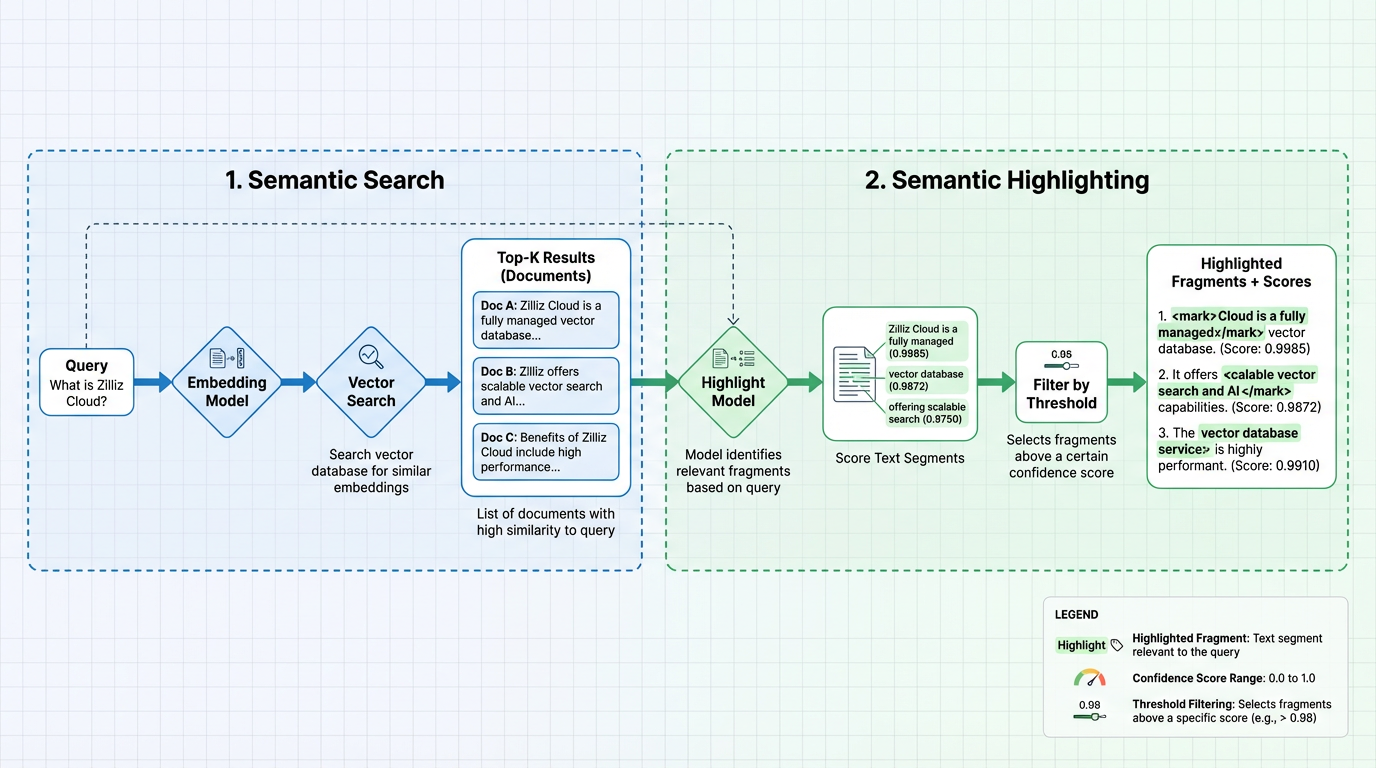
阶段 1:语义搜索
语义搜索基于向量相似度检索 top-K 最相关的文档。您有两种生成向量的选项:
选项 1:基于模型的 Embedding Function(推荐)
使用 Zilliz Cloud 的 Model-based Embedding Function 自动处理向量转换。您只需插入原始文档并提供查询文本,无需手动管理向量:
-
插入数据时:Embedding Function 将您的文档文本转换为稠密向量,并存储在向量字段中
-
执行搜索时:同一个 Embedding Function 将您的查询文本转换为向量,并在向量索引中搜索,基于向量相似度返回 top-K 文档
本文档中的所有示例都使用此方法。有关更多信息,请参阅 Model-based Embedding Function。
选项 2:外部 Embedding 模型
您也可以使用自己的外部 Embedding 服务生成向量,然后直接将向量插入到 Collection 中并执行语义搜索。这种方式让您完全控制 Embedding 模型,但需要自己管理 Embedding 流程。
阶段 2:语义高亮
高亮阶段由部署在 Zilliz Cloud 上的托管 Highlight Model 驱动。该模型处理检索到的文档,识别与查询语义相关的文本片段:
-
评分文本片段:高亮模型分析每个文档中的文本内容,为每个片段计算置信度分数(0.0-1.0)。分数越高表示与查询的语义相关性越强。
-
阈值过滤:根据配置的阈值过滤片段。只保留分数达到或超过阈值的片段。
-
返回高亮片段:输出包含用配置标签(如
<mark>和</mark>)包裹的文本片段及其置信度分数。
Highlight Model 独立于 Embedding 模型,允许您独立控制文档如何被检索以及如何被高亮。
功能概述
Semantic Highlighter 为每个搜索结果添加一个专用的 highlight 字段,其中包含语义匹配的高亮片段和置信度分数。
基础高亮
以下是启用 Semantic Highlighter 的最小配置:
- Python
- NodeJS
- Java
- Go
- cURL
highlighter = SemanticHighlighter(
    queries,                    # Your query text
    ["document"],              # Field to highlight
    pre_tags=["<mark>"],       # Tag to mark the start of highlighted text
    post_tags=["</mark>"],     # Tag to mark the end of highlighted text
    model_deployment_id="YOUR_MODEL_ID",  # Deployment ID of the highlight model
)
// js
import io.milvus.v2.service.vector.request.highlighter.SemanticHighlighter;

SemanticHighlighter highlighter = SemanticHighlighter.builder()
        .queries(queries)
        .inputFields(Collections.singletonList("document"))
        .preTags(Collections.singletonList("<mark>"))
        .postTags(Collections.singletonList("</mark>"))
        .modelDeploymentID("YOUR_MODEL_ID")
        .build();
// go
# restful
使用此基础配置,每个搜索结果都将包含一个 highlight 字段。以下是返回示例:
{
    "id": 1,
    "distance": 0.7665,
    "entity": {
        "document": "Artificial intelligence was founded as an academic discipline in 1956."
    },
    // highlight-start
    "highlight": {
        "document": {
            "fragments": [
                "<mark>Artificial intelligence was founded as an academic discipline in 1956.</mark>"
            ],
            "scores": [0.9985]
        }
    }
    // highlight-end
}
专有的 highlight 字段包含:
-
highlight.<field>.fragments:与您的查询语义相关的文本片段,使用配置的pre_tags和post_tags包裹。默认情况下,仅返回匹配的片段作为fragments。 -
highlight.<field>.scores:每个片段的置信度分数(0.0-1.0),表示文本与查询的语义相关程度。分数越高表示相关性越强。这些分数由部署的高亮模型计算得出。
阈值过滤
您可以使用 threshold 参数来控制何时将文本片段视为有效的语义高亮。
-
未设置 threshold
- 默认使用 0.5 作为阈值。Highlight Model 返回的语义匹配中,分数低于 0.5 的结果会被过滤掉。在这种情况下,字段的
fragments和scores中只会包含分数 ≥ 0.5 的匹配结果。
- 默认使用 0.5 作为阈值。Highlight Model 返回的语义匹配中,分数低于 0.5 的结果会被过滤掉。在这种情况下,字段的
-
设置了 threshold
- 仅返回语义分数大于或等于配置的
threshold的片段。低于该分数的片段会被丢弃,这可能导致某些实体的fragments/scores数组为空。
- 仅返回语义分数大于或等于配置的
- Python
- NodeJS
- Java
- Go
- cURL
highlighter = SemanticHighlighter(
    queries,
    ["document"],
    pre_tags=["<mark>"],
    post_tags=["</mark>"],
    # highlight-next-line
    threshold=0.8,              # Only return fragments with score >= 0.8
    model_deployment_id="YOUR_MODEL_ID",
)
// js
SemanticHighlighter highlighter = SemanticHighlighter.builder()
        .queries(queries)
        .inputFields(Collections.singletonList("document"))
        .preTags(Collections.singletonList("<mark>"))
        .postTags(Collections.singletonList("</mark>"))
        .modelDeploymentID("YOUR_MODEL_ID")
        .threshold(0.8)
        .build();
// go
# restful
当片段的分数低于阈值时,该字段的 fragments 和 scores 都将为空:
{
    "id": 2,
    "distance": 0.7043,
    "entity": {
        "document": "The history of artificial intelligence began in the mid-20th century."
    },
    "highlight": {
        "document": {
            "fragments": [],    // Empty because score (0.7206) < threshold (0.8)
            "scores": []
        }
    }
}
阈值使用指南:
阈值 | 行为 | 用例 |
|---|---|---|
未设置 | 默认使用 0.5 作为阈值。中等和高置信度。 | 更广泛的覆盖范围和中等精度 |
0.8 | 高置信度 | 以精度为重点的应用 |
开始前
在使用 Semantic Highlighter 之前,请确保您已配置以下内容:
-
Highlight 模型部署
部署用于语义高亮的托管 Highlight 模型:
-
通过 Zilliz Cloud 部署 Highlight 模型(例如
zilliz/semantic-highlight-bilingual-v1)。 -
获取
model_deployment_id以在SemanticHighlighter配置中使用。
有关可用的 Highlight 模型和部署说明,请参阅托管模型。
-
-
用于语义搜索的 Embedding 模型
为您 Collection 的语义搜索设置以下之一:
Semantic Highlighter 可与任何语义搜索设置配合使用。选择以下选项之一:
选项 1:基于模型的 Embedding Function(推荐)
在 Zilliz Cloud 集成自动处理向量的 Model-based Embedding Function:
-
第三方模型提供商:与硅基流动等服务提供商集成,并从 Zilliz Cloud 控制台获取其
integration_id。有关设置说明,请参阅模型供应商。 -
托管 Embedding 模型:通过 Zilliz Cloud 部署托管的 embedding 模型,并获取其
model_deployment_id。有关可用模型和部署说明,请参阅托管模型。
选项 2:外部 Embedding 模型
使用您自己的外部 Embedding 服务生成向量并将向量插入 Collection。确保您的 Collection 具有:
-
具有适当维度的向量字段
-
为搜索配置的向量索引
-
已为所有文档生成并插入的向量
📘说明为简化起见,本文档中的所有代码示例都使用基于模型的 Embedding Function 方法(选项 1)。
-
步骤
准备工作
在运行示例之前,设置一个具有语义搜索功能的 Collection。
准备您的 Collection
以下示例使用第三方模型提供商(硅基流动)作为 Embedding 模型。如果您改用 Zilliz Cloud 托管 Embedding 模型,请在 Function params 中将 integration_id 替换为 model_deployment_id。
- Python
- NodeJS
- Java
- Go
- cURL
from pymilvus import (
    MilvusClient,
    Function, DataType, FunctionType, SemanticHighlighter,
)

# Connect to Zilliz Cloud
milvus_client = MilvusClient(
    uri="https://{cluster-id}.{region}.vectordb.zilliz.com.cn:19530",
    token="YOUR_API_KEY"
)

collection_name = "semantic_highlight_demo"

# Drop existing collection if it exists
if milvus_client.has_collection(collection_name):
    milvus_client.drop_collection(collection_name)

# Define schema with text field and dense vector field
schema = milvus_client.create_schema()
schema.add_field("id", DataType.INT64, is_primary=True, auto_id=False)
schema.add_field("document", DataType.VARCHAR, max_length=9000)
schema.add_field("dense", DataType.FLOAT_VECTOR, dim=1024)

# Add text embedding function (using SiliconFlow integration)
text_embedding_function = Function(
    name="siliconflow_embedding",                        # Unique identifier for this embedding function
    function_type=FunctionType.TEXTEMBEDDING,       # Indicates a text embedding function
    input_field_names=["document"],                 # Scalar field(s) containing text data to embed
    output_field_names=["dense"],                   # Vector field(s) for storing embeddings
    params={                                      # Provider-specific embedding parameters (function-level)
        "provider": "siliconflow",                # Must be set to "siliconflow"
        "model_name": "BAAI/bge-large-en-v1.5",    # Specifies the SiliconFlow embedding model to use
        "integration_id": "YOUR_INTEGRATION_ID",    # Integration ID generated in the Zilliz Cloud console for the selected model provider
    }
)
schema.add_function(text_embedding_function)

# Create index
index_params = milvus_client.prepare_index_params()
index_params.add_index(
    field_name="dense",
    index_name="dense_index",
    index_type="AUTOINDEX",
    metric_type="IP",
)

# Create collection
milvus_client.create_collection(
    collection_name,
    schema=schema,
    index_params=index_params,
    consistency_level="Strong"
)

# Insert sample documents
docs = [
    {"id": 1, "document": "Artificial intelligence was founded as an academic discipline in 1956."},
    {"id": 2, "document": "The history of artificial intelligence began in the mid-20th century."},
    {"id": 3, "document": "AI research started after World War II with the development of electronic computers."},
    {"id": 4, "document": "Artificial intelligence is widely used in modern technology applications."},
    {"id": 5, "document": "Alan Turing proposed the idea of machine intelligence in 1950."},
    {"id": 6, "document": "Computer science has evolved significantly since its early days."},
]

milvus_client.insert(collection_name, docs)
// js
import com.google.gson.Gson;
import io.milvus.v2.client.ConnectConfig;
import io.milvus.v2.client.MilvusClientV2;
import io.milvus.v2.service.collection.request.AddFieldReq;
import io.milvus.v2.service.collection.request.CreateCollectionReq;
import io.milvus.v2.service.collection.request.CreateCollectionReq.Function;
import io.milvus.v2.service.collection.request.DropCollectionReq;
import io.milvus.v2.service.vector.request.InsertReq;

MilvusClientV2 client = new MilvusClientV2(ConnectConfig.builder()
        .uri("https://{cluster-id}.{region}.vectordb.zilliz.com.cn:19530")
        .token("YOUR_API_KEY")
        .build());

final String COLLECTION_NAME = "semantic_highlight_demo";
client.dropCollection(DropCollectionReq.builder()
        .collectionName(COLLECTION_NAME)
        .build());

CreateCollectionReq.CollectionSchema schema = CreateCollectionReq.CollectionSchema.builder()
        .build();
schema.addField(AddFieldReq.builder()
        .fieldName("id")
        .dataType(DataType.Int64)
        .isPrimaryKey(true)
        .autoID(false)
        .build());
schema.addField(AddFieldReq.builder()
        .fieldName("document")
        .dataType(DataType.VarChar)
        .maxLength(9000)
        .build());
schema.addField(AddFieldReq.builder()
        .fieldName("dense")
        .dataType(DataType.FloatVector)
        .dimension(1024)
        .build());

schema.addFunction(Function.builder()
        .functionType(FunctionType.TEXTEMBEDDING)
        .name("siliconflow_embedding")
        .inputFieldNames(Collections.singletonList("document"))
        .outputFieldNames(Collections.singletonList("dense"))
        .param("provider", "siliconflow")
        .param("model_name", "BAAI/bge-large-en-v1.5")
        .param("integration_id", "YOUR_INTEGRATION_ID")
        .build());

List<IndexParam> indexes = new ArrayList<>();
indexes.add(IndexParam.builder()
        .fieldName("dense")
        .indexName("dense_index")
        .indexType(IndexParam.IndexType.AUTOINDEX)
        .metricType(IndexParam.MetricType.IP)
        .build());

CreateCollectionReq requestCreate = CreateCollectionReq.builder()
        .collectionName(COLLECTION_NAME)
        .collectionSchema(schema)
        .indexParams(indexes)
        .consistencyLevel(ConsistencyLevel.STRONG)
        .build();
client.createCollection(requestCreate);

Gson gson = new Gson();
List<JsonObject> rows = Arrays.asList(
        gson.fromJson("{\"id\": 1, \"document\": \"Artificial intelligence was founded as an academic discipline in 1956.\"}", JsonObject.class),
        gson.fromJson("{\"id\": 2, \"document\": \"The history of artificial intelligence began in the mid-20th century.\"}", JsonObject.class),
        gson.fromJson("{\"id\": 3, \"document\": \"AI research started after World War II with the development of electronic computers.\"}", JsonObject.class),
        gson.fromJson("{\"id\": 4, \"document\": \"Artificial intelligence is widely used in modern technology applications.\"}", JsonObject.class),
        gson.fromJson("{\"id\": 5, \"document\": \"Alan Turing proposed the idea of machine intelligence in 1950.\"}", JsonObject.class),
        gson.fromJson("{\"id\": 6, \"document\": \"Computer science has evolved significantly since its early days.\"}", JsonObject.class)
);

client.insert(InsertReq.builder()
        .collectionName(COLLECTION_NAME)
        .data(rows)
        .build());
// go
# restful
示例 1:基本语义高亮
此示例展示如何向搜索查询添加 Semantic Highlighter。Semantic Highlighter 识别与查询语义相关的文本片段,并用指定的标签高亮它们。
将以下代码中的 YOUR_MODEL_ID 替换为您托管 Highlight 模型的部署 ID。
- Python
- NodeJS
- Java
- Go
- cURL
from pymilvus import SemanticHighlighter

# Define the search query
queries = ["When was artificial intelligence founded"]

# Configure semantic highlighter
# highlight-start
highlighter = SemanticHighlighter(
    queries,
    ["document"],                           # Fields to highlight
    pre_tags=["<mark>"],                    # Tag before highlighted text
    post_tags=["</mark>"],                  # Tag after highlighted text
    model_deployment_id="YOUR_MODEL_ID",    # Deployed highlight model ID
)
# highlight-end

# Perform search with highlighting
results = milvus_client.search(
    collection_name,
    data=queries,
    anns_field="dense",
    search_params={"params": {"nprobe": 10}},
    limit=2,
    output_fields=["document"],
    highlighter=highlighter
)

# Process results
for hits in results:
    for hit in hits:
        highlight = hit.get("highlight", {}).get("document", {})
        print(f"ID: {hit['id']}")
        print(f"Search Score: {hit['distance']:.4f}")      # Vector similarity score
        print(f"Fragments: {highlight.get('fragments', [])}")
        print(f"Highlight Confidence: {highlight.get('scores', [])}")  # Semantic relevance score
        print()
// js
import io.milvus.v2.service.vector.request.highlighter.SemanticHighlighter;
import io.milvus.v2.service.vector.request.SearchReq;
import io.milvus.v2.service.vector.request.data.EmbeddedText;
import io.milvus.v2.service.vector.response.SearchResp;

List<String> queries = Collections.singletonList("When was artificial intelligence founded");
SemanticHighlighter h = SemanticHighlighter.builder()
        .queries(queries)
        .inputFields(Collections.singletonList("document"))
        .preTags(Collections.singletonList("<mark>"))
        .postTags(Collections.singletonList("</mark>"))
        .modelDeploymentID("YOUR_MODEL_ID")
        .build();

SearchResp searchResp = client.search(SearchReq.builder()
        .collectionName(COLLECTION_NAME)
        .data(Collections.singletonList(new EmbeddedText(queries.get(0))))
        .annsField("dense")
        .limit(2)
        .outputFields(Collections.singletonList("document"))
        .highlighter(highlighter)
        .build());

List<List<SearchResp.SearchResult>> searchResults = searchResp.getSearchResults();
for (List<SearchResp.SearchResult> results : searchResults) {
    for (SearchResp.SearchResult result : results) {
        System.out.printf("ID: %d%n", (long)result.getId());
        System.out.printf("Search Score: %.4f%n", result.getScore());
        SearchResp.HighlightResult hresult = result.getHighlightResults().get("document");
        System.out.printf("Fragments: %s%n", hresult.getFragments());
        System.out.printf("Highlight Confidence: %s%n", hresult.getScores());
    }
}
// go
# restful
预期输出
ID: 1
Search Score: 0.8026
Fragments: ['<mark>Artificial intelligence was founded as an academic discipline in 1956.</mark>']
Highlight Confidence: [0.9985232949256897]

ID: 2
Search Score: 0.7810
Fragments: ['<mark>The history of artificial intelligence began in the mid-20th century.</mark>']
Highlight Confidence: [0.7202785611152649]
理解结果:
-
文档 1(ID: 1)获得高高亮置信度分数(0.8026),因为它直接回答了关于 AI 何时成立的查询。
-
文档 2(ID: 2)具有中等高亮置信度分数(0.7810),因为它讨论了 AI 历史,但没有具体提到"成立"。
搜索分数(distance)反映语义搜索的向量相似度,而高亮置信度(scores)反映文本回答特定查询的程度。
示例 2:阈值过滤
使用 threshold 参数按置信度分数过滤高亮。这仅返回与查询具有强语义相关性的片段。
将以下代码中的 YOUR_MODEL_ID 替换为您托管 Highlight 模型的部署 ID。
- Python
- NodeJS
- Java
- Go
- cURL
# High threshold - only highly relevant highlights
highlighter = SemanticHighlighter(
    queries,
    ["document"],
    pre_tags=["<mark>"],
    post_tags=["</mark>"],
    # highlight-next-line
    threshold=0.8,                          # Only scores >= 0.8
    model_deployment_id="YOUR_MODEL_ID",
)

results = milvus_client.search(
    collection_name,
    data=queries,
    anns_field="dense",
    search_params={"params": {"nprobe": 10}},
    limit=2,
    output_fields=["document"],
    # highlight-next-line
    highlighter=highlighter
)

for hits in results:
    for hit in hits:
        highlight = hit.get("highlight", {}).get("document", {})
        print(f"ID: {hit['id']}")
        print(f"Search Score: {hit['distance']:.4f}")      # Vector similarity score
        print(f"Fragments: {highlight.get('fragments', [])}")
        print(f"Highlight Confidence: {highlight.get('scores', [])}")  # Semantic relevance score
        print()
// js
SemanticHighlighter h = SemanticHighlighter.builder()
        .queries(queries)
        .inputFields(Collections.singletonList("document"))
        .preTags(Collections.singletonList("<mark>"))
        .postTags(Collections.singletonList("</mark>"))
        .modelDeploymentID("YOUR_MODEL_ID")
        .threshold(0.8)
        .build();

SearchResp searchResp = client.search(SearchReq.builder()
        .collectionName(COLLECTION_NAME)
        .data(Collections.singletonList(new EmbeddedText(queries.get(0))))
        .annsField("dense")
        .limit(2)
        .outputFields(Collections.singletonList("document"))
        .highlighter(highlighter)
        .build());

List<List<SearchResp.SearchResult>> searchResults = searchResp.getSearchResults();
for (List<SearchResp.SearchResult> results : searchResults) {
    for (SearchResp.SearchResult result : results) {
        System.out.printf("ID: %d%n", (long)result.getId());
        System.out.printf("Search Score: %.4f%n", result.getScore());
        SearchResp.HighlightResult hresult = result.getHighlightResults().get("document");
        System.out.printf("Fragments: %s%n", hresult.getFragments());
        System.out.printf("Highlight Confidence: %s%n", hresult.getScores());
    }
}
// go
# restful
预期输出
使用 threshold=0.8,只有语义相关度最高的文档返回高亮:
ID: 1
Search Score: 0.8027
Fragments: ['<mark>Artificial intelligence was founded as an academic discipline in 1956.</mark>']
Highlight Confidence: [0.9985232949256897]

ID: 2
Search Score: 0.7810
Fragments: []
Highlight Confidence: []
文档 2 在前一个示例中的高亮置信度分数为 0.7810,现在不再返回高亮,因为其分数低于 0.8 阈值。
示例 3:多查询高亮
使用多个查询进行搜索时,每个查询的结果根据该特定查询独立高亮。
- Python
- NodeJS
- Java
- Go
- cURL
queries = [
    "When was artificial intelligence founded",
    "Where was Alan Turing born"
]

highlighter = SemanticHighlighter(
    queries,
    ["document"],
    pre_tags=["<mark>"],
    post_tags=["</mark>"],
    model_deployment_id="YOUR_MODEL_ID",    # Deployed highlight model ID
)

results = milvus_client.search(
    collection_name,
    data=queries,
    anns_field="dense",
    search_params={"params": {"nprobe": 10}},
    limit=2,
    output_fields=["document"],
    highlighter=highlighter
)

for query, hits in zip(queries, results):
    print(f"Query: {query}")
    for hit in hits:
        highlight = hit.get("highlight", {}).get("document", {})
        print(f"  Fragments: {highlight.get('fragments', [])}")
    print()
// js
List<String> queries = Arrays.asList(
        "When was artificial intelligence founded",
        "Where was Alan Turing born"
);
SemanticHighlighter h = SemanticHighlighter.builder()
        .queries(queries)
        .inputFields(Collections.singletonList("document"))
        .preTags(Collections.singletonList("<mark>"))
        .postTags(Collections.singletonList("</mark>"))
        .modelDeploymentID("YOUR_MODEL_ID")
        .build();

SearchResp searchResp = client.search(SearchReq.builder()
        .collectionName(COLLECTION_NAME)
        .data(Collections.singletonList(new EmbeddedText(queries.get(0))))
        .annsField("dense")
        .limit(2)
        .outputFields(Collections.singletonList("document"))
        .highlighter(highlighter)
        .build());

List<List<SearchResp.SearchResult>> searchResults = searchResp.getSearchResults();
for (int i = 0; i < queries.size(); i++) {
    System.out.println("\nQuery: " + queries.get(i));
    for (SearchResp.SearchResult result : searchResults.get(i)) {
        SearchResp.HighlightResult hresult = result.getHighlightResults().get("document");
        System.out.printf("Fragments: %s%n", hresult.getFragments());
    }
}
// go
# restful
预期输出
Query: When was artificial intelligence founded
  Fragments: ['<mark>Artificial intelligence was founded as an academic discipline in 1956.</mark>']
  Fragments: ['<mark>The history of artificial intelligence began in the mid-20th century.</mark>']

Query: Where was Alan Turing born
  Fragments: []
  Fragments: []
在此示例数据集中,没有描述艾伦·图灵出生地的文本,因此该查询出现空片段是预期的。
每个查询独立确定其结果集中哪些文本片段被高亮。