稠密向量
稠密向量是一种数值化的数据表示方法,在机器学习和数据分析领域广泛使用。它是由一系列实数组成的数组,其特点是大多数或所有元素都是非零值。与稀疏向量相比,稠密向量在同等维度下包含更多的信息,因为每个维度都携带有意义的数值。这种表示方法能够有效地捕捉复杂的模式和关系,使得数据在高维空间中更容易被分析和处理。稠密向量通常具有固定的维度,可以是几十到几百,甚至几千维,具体取决于应用场景和需求。
稠密向量主要用于需要理解数据语义的场景,如语义搜索、推荐系统等。在语义搜索中,稠密向量可以帮助捕捉查询和文档之间的潜在关联,从而提高搜索结果的相关性。在推荐系统中,它们能够帮助识别用户与物品之间的相似性,提供更加个性化的推荐。
概述
稠密向量通常表示为一个固定长度的浮点数数组,例如 [0.2, 0.7, 0.1, 0.8, 0.3, ..., 0.5]。这种向量的维度通常在数百到数千之间,如 128、256、768 或 1024。每个维度都捕捉了对象的特定语义特征,使其能够通过相似度计算来应用于各种场景。
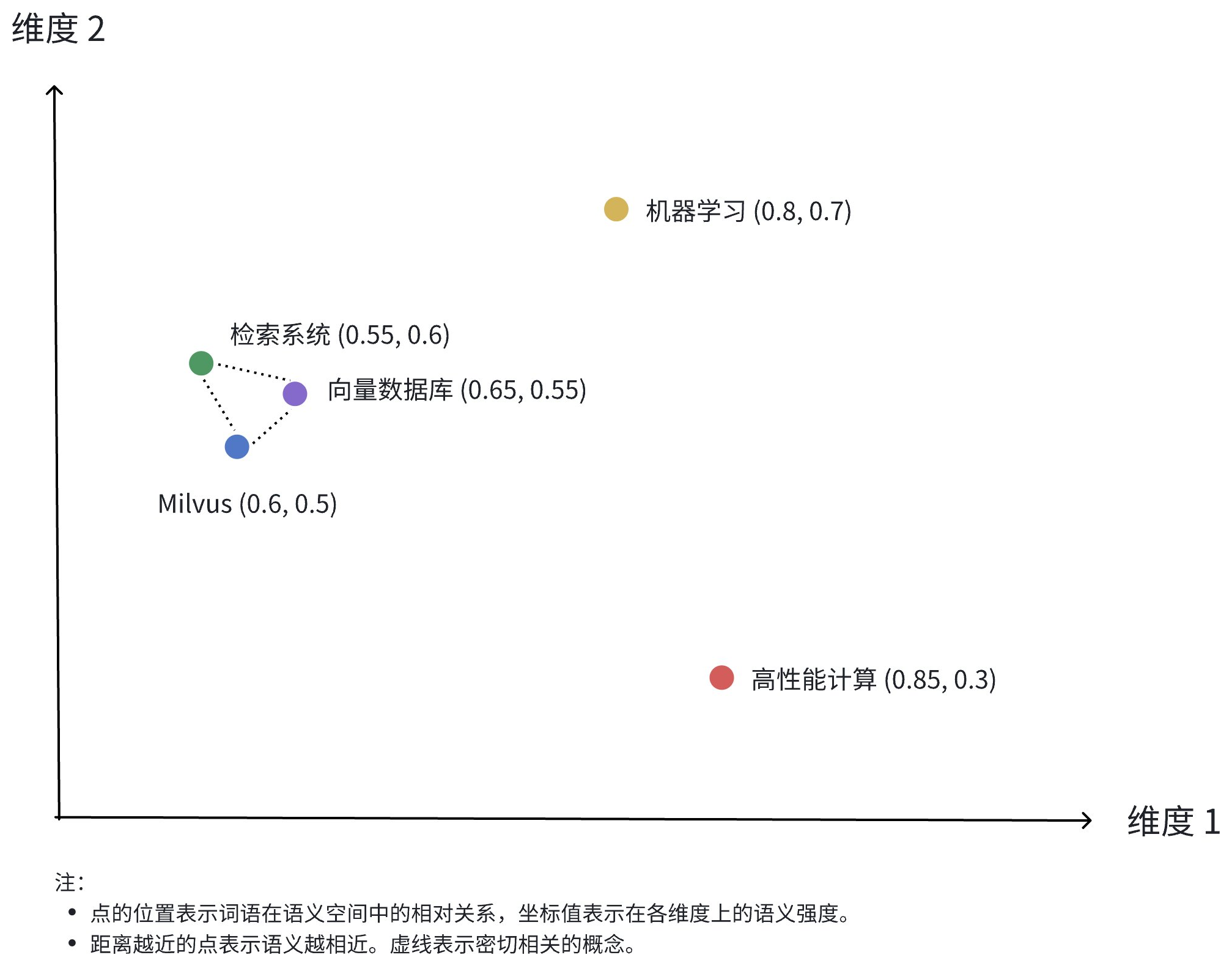
上图展示了稠密向量在二维空间中的表示。尽管实际应用中的稠密向量通常有更高的维度,但这个二维图能够直观地展示几个关键概念:
-
多维表示:每个点代表一个概念对象(如 Milvus、向量数据库、检索系统等),其位置由各个维度的值决定。
-
语义关系:点之间的距离反映了概念之间的语义相似度。距离越近,表示概念在语义上越相关。
-
聚类效应:相关概念(如 Milvus、向量数据库和检索系统)在空间中的位置较为接近,形成一个语义聚类。
以下是一个表示 "Milvus 是一个高效的向量数据库" 文本语义的真实稠密向量示例:
[
    -0.013052909,
    0.020387933,
    -0.007869,
    -0.11111383,
    -0.030188112,
    -0.0053388323,
    0.0010654867,
    0.072027855,
    // ... more dimensions
]
稠密向量可以通过各种 Embedding 模型生成,例如针对图像的 CNN 模型(如 ResNet、VGG)和针对文本的语言模型(如 BERT、Word2Vec)。这些模型将原始数据转换为高维空间中的点,捕获数据的语义特征。此外,Milvus 提供了一些便捷的方法来帮助用户生成和处理稠密向量,具体可以参考 Embeddings。
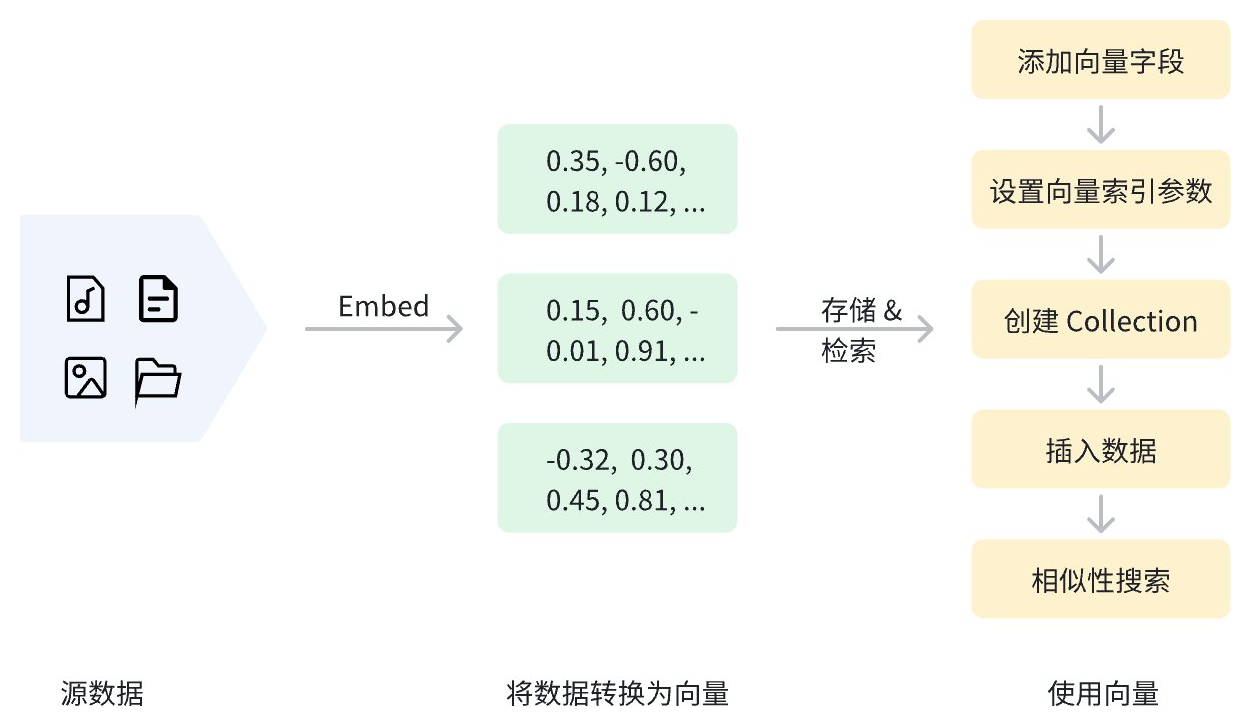
数据在向量化后,可以存储在 Zilliz Cloud 中进行管理和向量检索。下图展示了基本流程。
使用稠密向量
添加稠密向量字段
要在 Zilliz Cloud 中使用稠密向量,首先需要在创建 Collection 时定义用于存储稠密向量的向量字段。这个过程包括:
-
设置
datatype为支持的稠密向量数据类型。Zilliz Cloud 支持的稠密向量数据类型请参考数据类型。 -
通过
dim参数指定稠密向量的维度。
以下示例中,我们添加了一个名为 dense_vector 的向量字段,用于存储稠密向量。该字段的数据类型为 FLOAT_VECTOR,向量维度为 4。
- Python
- Java
- Go
- Rust
- C++
- NodeJS
- cURL
from pymilvus import MilvusClient, DataType

client = MilvusClient(uri="YOUR_CLUSTER_ENDPOINT")

schema = client.create_schema(
    auto_id=True,
    enable_dynamic_fields=True,
)

schema.add_field(field_name="pk", datatype=DataType.VARCHAR, is_primary=True, max_length=100)
schema.add_field(field_name="dense_vector", datatype=DataType.FLOAT_VECTOR, dim=4)
import io.milvus.v2.client.ConnectConfig;
import io.milvus.v2.client.MilvusClientV2;

import io.milvus.v2.common.DataType;
import io.milvus.v2.service.collection.request.AddFieldReq;
import io.milvus.v2.service.collection.request.CreateCollectionReq;

MilvusClientV2 client = new MilvusClientV2(ConnectConfig.builder()
        .uri("YOUR_CLUSTER_ENDPOINT")
        .build());

CreateCollectionReq.CollectionSchema schema = client.createSchema();
schema.setEnableDynamicField(true);
schema.addField(AddFieldReq.builder()
        .fieldName("pk")
        .dataType(DataType.VarChar)
        .isPrimaryKey(true)
        .autoID(true)
        .maxLength(100)
        .build());

schema.addField(AddFieldReq.builder()
        .fieldName("dense_vector")
        .dataType(DataType.FloatVector)
        .dimension(4)
        .build());
import (
    "fmt"

    "github.com/milvus-io/milvus/client/v3/milvusclient"
)

err = client.CreateCollection(ctx,
    milvusclient.NewCreateCollectionOption("my_collection", schema).
        WithIndexOptions(indexOption))
if err != nil {
    fmt.Println(err.Error())
    // handle error
}

// CreateCollection does not implicitly load the collection; load it before search.
loadTask, err := client.LoadCollection(ctx, milvusclient.NewLoadCollectionOption("my_collection"))
if err != nil {
    fmt.Println(err.Error())
    // handle error
}
if err := loadTask.Await(ctx); err != nil {
    fmt.Println(err.Error())
    // handle error
}
use milvus::v2::prelude::*;

let client = ClientV2::new(
    &ConnectConfig::new()
        .uri("YOUR_CLUSTER_ENDPOINT")
        .token("YOUR_CLUSTER_TOKEN"),
)
.await?;

let schema = CollectionSchema::new()
    .enable_dynamic_field(true)
    .add_field(
        FieldSchema::new()
            .name("pk")
            .data_type(DataType::VarChar)
            .primary_key(true)
            .auto_id(true)
            .max_length(100),
    )
    .add_field(
        FieldSchema::new()
            .name("dense_vector")
            .data_type(DataType::FloatVector)
            .dimension(4),
    );
#include <iostream>
#include <memory>
#include "milvus/MilvusClientV2.h"

auto client = milvus::MilvusClientV2::Create();

milvus::ConnectParam connect_param{"YOUR_CLUSTER_ENDPOINT"};
auto status = client->Connect(connect_param);
if (!status.IsOk()) {
    std::cout << status.Message() << std::endl;
}

milvus::CollectionSchemaPtr schema = std::make_shared<milvus::CollectionSchema>();
schema->SetEnableDynamicField(true);
schema->AddField(milvus::FieldSchema("pk", milvus::DataType::VARCHAR, "", true, true).WithMaxLength(100));
schema->AddField(milvus::FieldSchema("dense_vector", milvus::DataType::FLOAT_VECTOR).WithDimension(4));
import { MilvusClient, DataType } from "@zilliz/milvus2-sdk-node";

const client = new MilvusClient({
    address: "YOUR_CLUSTER_ENDPOINT"
});

const schema = [
    {
        name: "pk",
        data_type: DataType.VarChar,
        is_primary_key: true,
        autoID: true,
        max_length: 100
    },
    {
        name: "dense_vector",
        data_type: DataType.FloatVector,
        dim: 4
    }
];
export primaryField='{
    "fieldName": "pk",
    "dataType": "VarChar",
    "isPrimary": true,
    "elementTypeParams": {
        "max_length": 100
    }
}'

export vectorField='{
    "fieldName": "dense_vector",
    "dataType": "FloatVector",
    "elementTypeParams": {
        "dim": 4
    }
}'

export schema="{
    \"autoID\": true,
    \"fields\": [
        $primaryField,
        $vectorField
    ]
}"
支持的稠密向量数据类型:
| 数据类型 | 描述 |
|---|---|
FLOAT_VECTOR | 存储 32 位浮点数,常用于科学计算和机器学习中表示实数。适用于对精度要求较高的一般场景,如需要准确区分相似向量时。 |
FLOAT16_VECTOR | 存储 16 位半精度浮点数,用于深度学习和 GPU 计算。在对精度要求不高的情况下,可以节省存储空间,如推荐系统中的低精度召回阶段。 |
BFLOAT16_VECTOR | 存储 16 位 Brain 半精度浮点数 (bfloat16),具有与 Float32 相同的指数范围但精度降低。特别适合于需要快速处理大量向量的场景,如大规模图像检索。 |
为稠密向量设置索引参数
为加速语义搜索,我们需要为向量字段创建索引。索引可以显著提高大规模向量数据的检索效率。
- Python
- Java
- Go
- Rust
- C++
- NodeJS
- cURL
index_params = client.prepare_index_params()

index_params.add_index(
    field_name="dense_vector",
    index_name="dense_vector_index",
    index_type="AUTOINDEX",
    metric_type="IP"
)
import io.milvus.v2.common.IndexParam;
import java.util.*;

List<IndexParam> indexes = new ArrayList<>();

indexes.add(IndexParam.builder()
        .fieldName("dense_vector")
        .indexName("dense_vector_index")
        .indexType(IndexParam.IndexType.AUTOINDEX)
        .metricType(IndexParam.MetricType.IP)
        .build());
import (
    "github.com/milvus-io/milvus/client/v3/entity"

    "github.com/milvus-io/milvus/client/v3/index"
    "github.com/milvus-io/milvus/client/v3/milvusclient"
)

idx := index.NewAutoIndex(index.MetricType(entity.IP))
indexOption := milvusclient.NewCreateIndexOption("my_collection", "dense_vector", idx)
use milvus::v2::prelude::*;

let index_params = vec![IndexParam::new()
    .field_name("dense_vector")
    .index_name("dense_vector_index")
    .index_type(IndexType::AutoIndex)
    .metric_type(MetricType::Ip)];
#include <vector>

std::vector<milvus::IndexDesc> indexes = {
    milvus::IndexDesc("dense_vector", "dense_vector_index", milvus::IndexType::AUTOINDEX, milvus::MetricType::IP)
};
import { MetricType, IndexType } from "@zilliz/milvus2-sdk-node";

const indexParams = {
    index_name: 'dense_vector_index',
    field_name: 'dense_vector',
    metric_type: MetricType.IP,
    index_type: IndexType.AUTOINDEX
};
export indexParams='[
        {
            "fieldName": "dense_vector",
            "metricType": "IP",
            "indexName": "dense_vector_index",
            "indexType": "AUTOINDEX"
        }
    ]'
以上示例中,我们为 dense_vector 字段创建了一个名为 dense_vector_index 的索引,索引类型为 AUTOINDEX。 metric_type 设置为 IP,表示使用内积 (Inner Product) 作为距离度量。
除了 IP 距离度量,Zilliz Cloud 还支持其他度量类型。具体请参考相似度类型。
创建 Collection
稠密向量和索引定义完成后,我们便可以创建包含稠密向量的 Collection。以下示例通过 create_collection 方法创建了一个名为 my_dense_collection 的 Collection。
- Python
- Java
- Go
- Rust
- C++
- NodeJS
- cURL
client.create_collection(
    collection_name="my_collection",
    schema=schema,
    index_params=index_params
)
import io.milvus.v2.service.collection.request.CreateCollectionReq;

CreateCollectionReq requestCreate = CreateCollectionReq.builder()
        .collectionName("my_collection")
        .collectionSchema(schema)
        .indexParams(indexes)
        .build();
client.createCollection(requestCreate);
import (
    "fmt"

    "github.com/milvus-io/milvus/client/v3/milvusclient"
)

err = client.CreateCollection(ctx,
    milvusclient.NewCreateCollectionOption("my_collection", schema).
        WithIndexOptions(indexOption))
if err != nil {
    fmt.Println(err.Error())
    // handle error
}

loadTask, err := client.LoadCollection(ctx, milvusclient.NewLoadCollectionOption("my_collection"))
if err != nil {
    fmt.Println(err.Error())
    // handle error
}
if err := loadTask.Await(ctx); err != nil {
    fmt.Println(err.Error())
    // handle error
}
use milvus::v2::prelude::*;

client
    .create_collection(
        CreateCollectionRequest::builder()
            .collection_name("my_collection")
            .schema(schema)
            .index_params(index_params)
            .build()?,
    )
    .await?;
// CreateCollection creates the configured indexes and loads the collection automatically.
auto status = client->CreateCollection(milvus::CreateCollectionRequest()
                                            .WithCollectionName("my_collection")
                                            .WithIndexes(std::move(indexes))
                                            .WithCollectionSchema(schema));
if (!status.IsOk()) {
    std::cout << status.Message() << std::endl;
}
const createRes = await client.createCollection({
    collection_name: "my_collection",
    schema: schema,
    index_params: indexParams
});

console.log(createRes);
export CLUSTER_ENDPOINT="YOUR_CLUSTER_ENDPOINT"
export TOKEN="YOUR_CLUSTER_TOKEN"

curl --request POST \
--url "${CLUSTER_ENDPOINT}/v2/vectordb/collections/create" \
--header "Authorization: Bearer ${TOKEN}" \
--header "Content-Type: application/json" \
--header "Request-Timeout: 10" \
-d "{
    \"collectionName\": \"my_collection\",
    \"schema\": $schema,
    \"indexParams\": $indexParams
}"
插入稠密向量
创建 Collection 后,我们可以通过 insert 方法插入包含稠密向量的数据。注意,插入的稠密向量的维度必须与添加稠密向量字段时定义的 dim 值相同。
- Python
- Java
- Go
- Rust
- C++
- NodeJS
- cURL
data = [
    {"dense_vector": [0.1, 0.2, 0.3, 0.7]},
    {"dense_vector": [0.2, 0.3, 0.4, 0.8]},
]

client.insert(
    collection_name="my_collection",
    data=data
)
import com.google.gson.Gson;
import com.google.gson.JsonObject;
import io.milvus.v2.service.vector.request.InsertReq;
import io.milvus.v2.service.vector.response.InsertResp;

List<JsonObject> rows = new ArrayList<>();
Gson gson = new Gson();
rows.add(gson.fromJson("{\"dense_vector\": [0.1, 0.2, 0.3, 0.7]}", JsonObject.class));
rows.add(gson.fromJson("{\"dense_vector\": [0.2, 0.3, 0.4, 0.8]}", JsonObject.class));

InsertResp insertR = client.insert(InsertReq.builder()
        .collectionName("my_collection")
        .data(rows)
        .build());
import (
    "fmt"

    "github.com/milvus-io/milvus/client/v3/milvusclient"
)

_, err = client.Insert(ctx, milvusclient.NewColumnBasedInsertOption("my_collection").
    WithFloatVectorColumn("dense_vector", 4, [][]float32{
        {0.1, 0.2, 0.3, 0.7},
        {0.2, 0.3, 0.4, 0.8},
    }),
)
if err != nil {
    fmt.Println(err.Error())
    // handle err
}

flushTask, err := client.Flush(ctx, milvusclient.NewFlushOption("my_collection"))
if err != nil {
    fmt.Println(err.Error())
    // handle err
}
if err := flushTask.Await(ctx); err != nil {
    fmt.Println(err.Error())
    // handle err
}
use milvus::v2::prelude::*;

let rows = vec![
    serde_json::json!({"dense_vector": [0.1, 0.2, 0.3, 0.7]}),
    serde_json::json!({"dense_vector": [0.2, 0.3, 0.4, 0.8]}),
];

let insert = client
    .insert(
        InsertRequest::builder()
            .collection_name("my_collection")
            .rows(rows)
            .build()?,
    )
    .await?;
println!("{} rows inserted", insert.insert_count());
milvus::EntityRows data = {{{"dense_vector", std::vector<float>{0.1, 0.2, 0.3, 0.7}}},
                           {{"dense_vector", std::vector<float>{0.2, 0.3, 0.4, 0.8}}}};

milvus::InsertResponse response;
auto status = client->Insert(milvus::InsertRequest()
                                .WithCollectionName("my_collection")
                                .WithRowsData(std::move(data)),
                             response);
if (!status.IsOk()) {
    std::cout << status.Message() << std::endl;
}

status = client->Flush(milvus::FlushRequest().AddCollectionName("my_collection"));
if (!status.IsOk()) {
    std::cout << status.Message() << std::endl;
}
const data = [
    { dense_vector: [0.1, 0.2, 0.3, 0.7] },
    { dense_vector: [0.2, 0.3, 0.4, 0.8] }
];

const insertRes = await client.insert({
    collection_name: "my_collection",
    data: data
});

console.log(insertRes);
export CLUSTER_ENDPOINT="YOUR_CLUSTER_ENDPOINT"
export TOKEN="YOUR_CLUSTER_TOKEN"

curl --request POST \
--url "${CLUSTER_ENDPOINT}/v2/vectordb/entities/insert" \
--header "Authorization: Bearer ${TOKEN}" \
--header "Content-Type: application/json" \
--header "Request-Timeout: 10" \
-d '{
    "data": [
        {"dense_vector": [0.1, 0.2, 0.3, 0.7]},
        {"dense_vector": [0.2, 0.3, 0.4, 0.8]}
    ],
    "collectionName": "my_collection"
}'

## {"code":0,"cost":0,"data":{"insertCount":2,"insertIds":["453577185629572531","453577185629572532"]}}
基于稠密向量执行相似性搜索
基于稠密向量的语义搜索是 Milvus 的核心功能之一,可以根据向量之间的距离快速找到与查询向量最相似的数据。要执行相似性搜索,您需要准备查询向量和搜索参数,然后调用 search 方法。
- Python
- Java
- Go
- Rust
- C++
- NodeJS
- cURL
search_params = {
    "params": {"nprobe": 10}
}

query_vector = [0.1, 0.2, 0.3, 0.7]

res = client.search(
    collection_name="my_collection",
    data=[query_vector],
    anns_field="dense_vector",
    search_params=search_params,
    limit=5,
    output_fields=["pk"]
)

print(res)

# Output
# data: ["[{'id': '453718927992172271', 'distance': 0.7599999904632568, 'entity': {'pk': '453718927992172271'}}, {'id': '453718927992172270', 'distance': 0.6299999952316284, 'entity': {'pk': '453718927992172270'}}]"]
import io.milvus.v2.service.vector.request.SearchReq;
import io.milvus.v2.service.vector.request.data.FloatVec;
import io.milvus.v2.service.vector.response.SearchResp;

Map<String,Object> searchParams = new HashMap<>();
searchParams.put("nprobe", 10);

FloatVec queryVector = new FloatVec(new float[]{0.1f, 0.2f, 0.3f, 0.7f});

SearchResp searchR = client.search(SearchReq.builder()
        .collectionName("my_collection")
        .data(Collections.singletonList(queryVector))
        .annsField("dense_vector")
        .searchParams(searchParams)
        .topK(5)
        .outputFields(Collections.singletonList("pk"))
        .build());

System.out.println(searchR.getSearchResults());
import (
    "fmt"

    "github.com/milvus-io/milvus/client/v3/entity"
    "github.com/milvus-io/milvus/client/v3/index"
    "github.com/milvus-io/milvus/client/v3/milvusclient"
)

queryVector := []float32{0.1, 0.2, 0.3, 0.7}

annParam := index.NewCustomAnnParam()
annParam.WithExtraParam("nprobe", 10)
resultSets, err := client.Search(ctx, milvusclient.NewSearchOption(
    "my_collection", // collectionName
    5,                     // limit
    []entity.Vector{entity.FloatVector(queryVector)},
).WithANNSField("dense_vector").
    WithOutputFields("pk").
    WithAnnParam(annParam))
if err != nil {
    fmt.Println(err.Error())
    // handle error
}

for _, resultSet := range resultSets {
    fmt.Println("IDs: ", resultSet.IDs.FieldData().GetScalars())
    fmt.Println("Scores: ", resultSet.Scores)
    fmt.Println("Pks: ", resultSet.GetColumn("pk").FieldData().GetScalars())
}
use milvus::v2::prelude::*;
use std::collections::HashMap;

let query_vector = vec![0.1, 0.2, 0.3, 0.7];

let search = client
    .search(
        SearchRequest::builder()
            .collection_name("my_collection")
            .vector_field("dense_vector")
            .vectors(SearchVectors::Float(vec![query_vector]))
            .extra_params(HashMap::from([("nprobe".to_string(), "10".to_string())]))
            .limit(5)
            .output_fields(["pk"])
            .build()?,
    )
    .await?;

println!("{:?}", search.results());
std::vector<float> query_vector = {0.1, 0.2, 0.3, 0.7};
auto request = milvus::SearchRequest()
                   .WithCollectionName("my_collection")
                   .WithAnnsField("dense_vector")
                   .WithLimit(5)
                   .AddExtraParam("nprobe", "10")
                   .AddOutputField("pk")
                   .AddFloatVector(query_vector);

milvus::SearchResponse response;
auto status = client->Search(request, response);
if (!status.IsOk()) {
    std::cout << status.Message() << std::endl;
}
auto search_results = response.Results();
for (auto& result : search_results.Results()) {
    milvus::EntityRows output_rows;
    status = result.OutputRows(output_rows);
    for (const auto& row : output_rows) {
        std::cout << "\t" << row << std::endl;
    }
}
const query_vector = [0.1, 0.2, 0.3, 0.7];

const searchRes = await client.search({
    collection_name: "my_collection",
    data: query_vector,
    anns_field: "dense_vector",
    limit: 5,
    output_fields: ["pk"],
    params: {
        nprobe: 10
    }
});

console.log(searchRes);
export CLUSTER_ENDPOINT="YOUR_CLUSTER_ENDPOINT"
export TOKEN="YOUR_CLUSTER_TOKEN"

curl --request POST \
--url "${CLUSTER_ENDPOINT}/v2/vectordb/entities/search" \
--header "Authorization: Bearer ${TOKEN}" \
--header "Content-Type: application/json" \
--header "Request-Timeout: 10" \
-d '{
    "collectionName": "my_collection",
    "data": [
        [0.1, 0.2, 0.3, 0.7]
    ],
    "annsField": "dense_vector",
    "limit": 5,
    "searchParams":{
        "params":{"nprobe":10}
    },
    "outputFields": ["pk"]
}'

## {"code":0,"cost":0,"data":[{"distance":0.55,"id":"453577185629572532","pk":"453577185629572532"},{"distance":0.42,"id":"453577185629572531","pk":"453577185629572531"}]}
有关更多相似性搜索参数信息,请参考基本 ANN Search。